

We’ve all encountered this scenario: you’re reading a threat report from CISA or Microsoft and come across hashes related to a malware infection. You start copying these hashes and head to one of your favorite virus repositories to check if there’s a source available for download so you can analyze the malware yourself. Unfortunately, you don’t find a match. So, you move on to another site and repeat the process. This can be time-consuming and prone to errors.
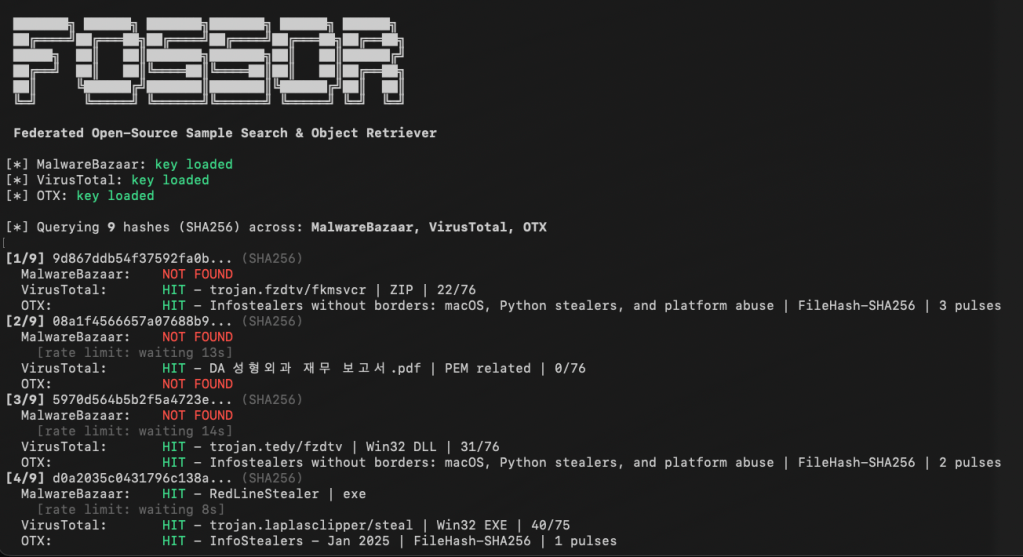
FOSSOR (Federated Open-Source Sample Search & Object Retriever) is a script designed to help you search for malware hashes across multiple threat intelligence sources. Simply run FOSSOR and provide it with a single hash or a text file of hashes (.txt or .csv). It will instantly display which sources have information about the hash, and you can even download samples if needed.
Setup
FOSSOR loads API keys from text files in the same directory as the script. Create one file per source containing only the key:
| Source | Key file | Where to get a key |
|---|---|---|
| MalwareBazaar | mb-api.txt | abuse.ch Auth Portal |
| VirusTotal | vt-api.txt | VirusTotal API |
| AlienVault OTX | otx-api.txt | OTX Account Settings |
Sources with missing key files are automatically skipped. You only need the sources you have access to.
fossor/ fossor.py mb-api.txt # your MalwareBazaar key vt-api.txt # your VirusTotal key otx-api.txt # your OTX key samples/ # created automatically by --download
Usage
Look up hashes from a file
python3 fossor.py hashes.txt
The input file should have one hash per line. Lines starting with # are treated as comments and ignored. Works with .txt, .csv, or any text file — BOM and stray whitespace are handled automatically.
Look up a single hash
python3 fossor.py d0a2035c0431796c138a26d1c9a75142b613c5417dc96a9200723870d0b3a687
Export results to CSV
python3 fossor.py hashes.txt --csv results.csv
Download available samples
python3 fossor.py hashes.txt --download
Downloads are saved to ./samples/ as password-protected zips. The password is always infected.
Warning: Downloaded samples are live malware. Handle with appropriate caution — use a VM or isolated analysis environment. Consider excluding the
samples/directory from antivirus real-time scanning and Spotlight indexing.
Disable specific sources
python3 fossor.py hashes.txt --no-vt # skip VirusTotalpython3 fossor.py hashes.txt --no-mb --no-otx # only query VirusTotal
Combine options
python3 fossor.py hashes.txt --csv results.csv --download --no-vt
Example Output
[*] MalwareBazaar: key loaded[*] VirusTotal: key loaded[*] OTX: key loaded[*] Querying 9 hashes (SHA256) across: MalwareBazaar, VirusTotal, OTX[1/9] 9d867ddb54f37592fa0b... (SHA256) MalwareBazaar: NOT FOUND VirusTotal: HIT - trojan.fzdtv/fkmsvcr | ZIP | 22/76 OTX: HIT - Infostealers without borders... | FileHash-SHA256 | 3 pulses[2/9] d0a2035c0431796c138a... (SHA256) MalwareBazaar: HIT - RedLineStealer | exe VirusTotal: HIT - trojan.laplasclipper/steal | Win32 EXE | 40/75 OTX: HIT - InfoStealers - Jan 2025 | FileHash-SHA256 | 1 pulses============================================================Summary: 9 hashes queried across 3 sources MalwareBazaar: 1/9 found VirusTotal: 6/9 found OTX: 5/9 found Unique hashes with at least one hit: 7/9Results Matrix: Hash Malwar VT OTX ------------------ ------ ------ ------ 9d867ddb54f37592fa - HIT HIT 08a1f4566657a07688 - HIT - 5970d564b5b2f5a472 - HIT HIT d0a2035c0431796c13 HIT HIT HIT 59855f0ec42546ce2b - - - a5b19195f61925ede7 - HIT HIT e7237b233fc6fda614 - HIT - 59347a8b1841d33afd - - HIT e965eb96df16eac926 - - -============================================================
Rate Limits
| Source | Limit | FOSSOR default |
|---|---|---|
| MalwareBazaar | None documented | No delay |
| VirusTotal (free) | 4 requests/min | 15s between requests |
| AlienVault OTX | 10,000 requests/hr | No delay |
Download
You can download FOSSOR for free on GitHub: https://github.com/dwmetz/FOSSOR/
 Baker Street Forensics
One thought on “Streamline Malware Hash Search with FOSSOR”