I had a wonderful time participating in the Magnet User Summit, both in person and virtually. After 2 years of participating virtually, it was my first time attending the Summit in person. It was great to meet for the first time in person, not just many of my coworkers, but many of the regulars in my Twitter stream as well. What a gathering of brilliant, yet equally humble, investigators.
During the Summit I participated on a panel about Bringing your Forensics Lab to the Cloud. I also had fun co-presenting on two talks, Walkthrough of a BEC (Business Email Compromise) and. Walkthrough of a Ransomware Investigation, where we looked at the examinations from a Law Enforcement and from a corporate perspective.
There was the surreal moment of realizing that the boss doesn’t just rock, he ROCKS!
This year there was an in person and a virtual CTF with separate evidence and challenges. For the in-person CTF we examined a Linux laptop and an iPhone. Also, the long anticipated Dark Mode is a treat for the retinas.
For the virtual CTF the evidence sources were a Windows image and an Android mobile device, and a Google TakeOut. I surprised myself with how well I did on the Android and that hasn’t been my area of expertise.
During the virtual summit I enjoyed sharing my presentation, Free Tools for DFIR Triage Collections. Special thanks to everyone who engaged with me during and after the presentations, and from all different time zones. Your support was very much appreciated. If you missed it during the Summit or want to watch it again, you can head over to the Presentations page.
You can also check out all the other recorded presentations from the 2022 Magnet User Summit via the link below.
What is the PID of the application where you might learn “how hackers hack, and how to stop them”?
Format: #### Warning: Only 1 attempt allowed!
The first thing I did was open the memdump file in HxD Hex Editor. A quick search found several hits.
I considered mapping the Offset back to the process memory but before going down that road (anticipating it to be math heavy) I decided to drop the individual process memory instead. Looking at the text surrounding “How Hackers Hack…” it appears to be html code. Looking even closer I’d say that it was in response to a search request for “how to stop getting hacked over and over.” Based on that I knew I’d be looking for a browser process.
Running pslist in Volatility we see that there’s multiple browser processes running for both Chrome and Internet Explorer.
I decided to focus on the iexplore.exe processes for Internet Explorer first – for 2 reasons. 1 – there were less running than Chrome so it was a smaller set to work through first. 2 – I did happen to find a Parsed Search Query in Axiom for “how to stop getting hacked over and over.”
The URL indicates a search from Bing.com. Only a sociopath would use Bing to search within Chrome so Internet Explorer it is.
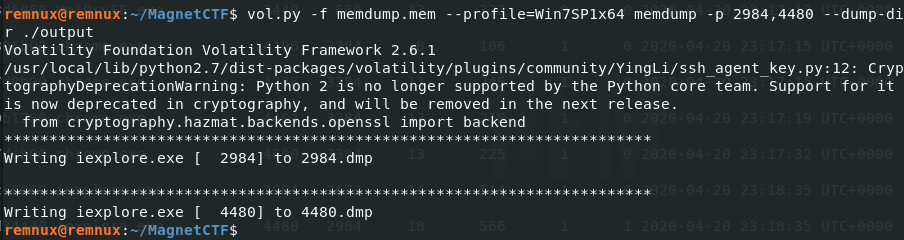
I used the memdump Volatility plugin to dump the process memory for both IE processes.
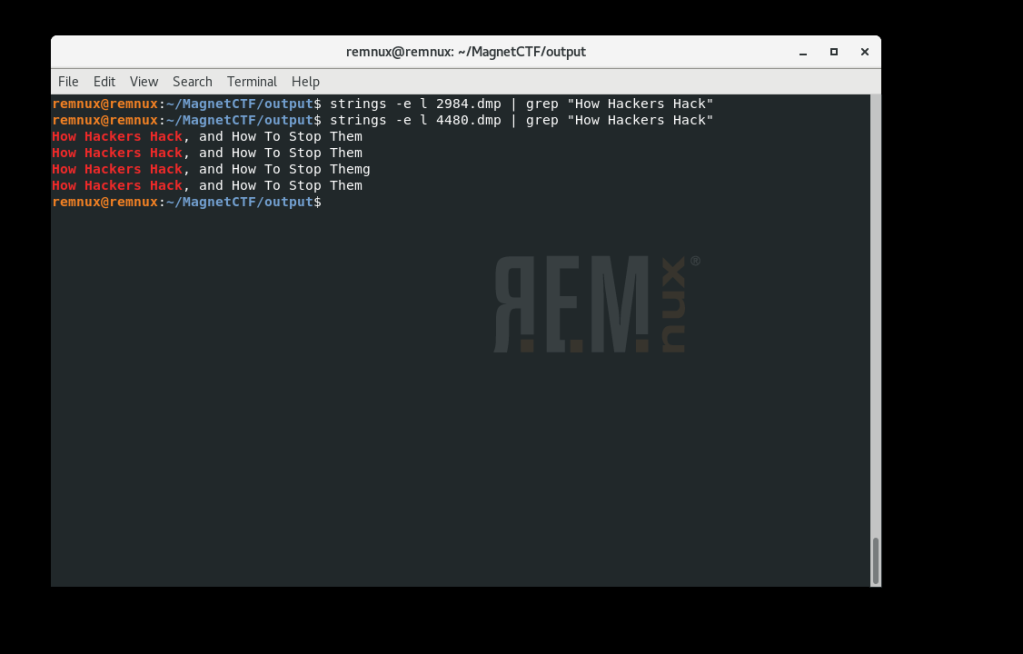
Next I ran strings against each dump file to see if there was a hit.
We see that in the second file 4480.dmp (associated with PID 4480) contains the content we’re looking for. What is the PID of the application where you might learn “how hackers hack, and how to stop them”?4480 [Flag 1]
The final challenge (#12) – Part 2:
What is the product version of the application from Part 1?
Format: XX.XX.XXXX.XXXXX
OK, so we need to know what version of Internet Explorer was used for the Bing search. Off to the Google to find that the IE version information is stored in the registry in HKEY_LOCAL_MACHINE\Software\Microsoft\Internet Explorer in the svcVersion value.
From here I mount the full memory image using MemprocFS.
Using the file structure to navigate to the registry key I open svcVersion.txt and verify that the IE version running is 11.0.9600.18860. Back to the scoreboard to submit the bittersweet ending to a very fun challenge and ….. WRONG.
Hmm, so everything I knew (which was limited to be honest) told me that I had the version right, but that wasn’t the right answer. Over on the Discord channel I saw I wasn’t the only one to have the same quandry.
I waited and lurked, waited and lurked – but wasn’t seeing any update to the question. The following day while meditating on the matter in the shower I was thinking about what other means existed to identify details like this.
I used the procdump Volatility plugin to dump the process executable for PID 4480.
Once I had executable.4480.exe I uploaded the file to Virus Total.
Scrolling down on the details tab we see that the exe is correctly identified as Internet Explorer and shows a File Version of 11.00.9600.18858. This is very similar to what we identified earlier (…58 vs …60).
Answer: 11.00.9600.18858 [Flag 2] CORRECT!
I’ll be very interested to learn how others who got the flag identified the correct version information. I suspect there’s additional artifacts that I didn’t explore that hold those clues but for the time being – it’s a mystery to me.
Who am I kidding? It’s gonna be killing me til I know the answer.
This weeks challenge was another round of memory forensics. As with the previous weeks challenge most* of my solves were done using a REMnux VM. REMnux includes both Volatility 2.61 (SSL support deprecated) and the beta of Volatility 3.
Challenge 10, Part 1: At the time of the RAM collection (20-Apr-20 23:23:26- Imageinfo) there was an established connection to a Google Server. What was the Remote IP address and port number? format: “xxx.xxx.xx.xxx:xxx”
Using the netscan plugin for Volatility and then filtering for “established” we see 4 open connections. A whois lookup on the addresses indicates that 172.253.188 is affiliated with Google. The communications were traversing port 443.
Flag 1: 172.253.63.188:443
Challenge 10, Part 2: What was the Local IP address and port number? same format as part 1
Looking at our earlier output from netscan we see the source address was 192.168.10.146:54282
Flag 2: 192.168.10.146:54282
Challenge 10, Part 3: What was the URL?
So we know we’ve got an open connection to a remote host going on at the time the memory was captured. Looking at Passive DNS for the Google IP address I could see that it’s principally been associated with Google Chat related assets.
I ran the memory sample through Bulk Extractor to carve out a PCAP of any of the networking artifacts that were present in the image.
bulk_extractor to pcap
Once the pcap was carved I opened it with Wireshark.
Looking through the pcap we see that the client computer had received a DNS response for mtalk.google.com at 172.253.63.188
The question was looking for a URL so… https://mtalk.google.com – yes! [Flag 3]. Originally this answer wasn’t accepted. I later received an email that it was accepted as an alternate solution and to resubmit.
Challenge 10, Part 4: What user was responsible for this activity based on the profile?
The getsids Volatility plugin quickly yields the active user account.
Flag 4: Warren
Challenge 10, Part 5: How long was this user looking at this browser with this version of Chrome? *format: X:XX:XX.XXXXX * Hint: down to the last second
This one had me stumped for a while. I first tried calculating the delta between when the chrome process was started to the time the image was acquired. (Nope)
Eventually I succumbed and took the hint which had to do with “FOCUS”. Another clue that I’d heard on Discord was that this was ‘VERY easy to solve in Axiom.’
Sure enough, stacking filters for Chrome and Focus and restricting the search to the Memory evidence yields a Registy artifact indicating that the focus time for Chrome was 3:36:47.301000. Oh but don’t just copy paste here without checking the question for the flag format. There’s only 5 places after the last decimal. So for Flag 5 the answer is 3:36:47.30100.
I was victorious in getting all 5 flags, but this has been just as much about learning as it has been about the friendly competition. So now that I knew the answer and where relatively it could be found in the evidence, I wanted to see if I could solve it just with REMnux as I had the other challenge elements.
I ran the timeliner Volatility plugin and exported the output file to .xlsx. format.
This took a few minutes to process. Once complete, I opened timeliner.xlsx.
Flag 5 (alternate) 3:36:47.30100
If we filter the Item column for Chrome and the Details column for Focus – there again the same result – 3:36:47.30100. Don’t forget to drop the last zero for the Flag.




 Baker Street Forensics