
In digital forensics and incident response, reliable storage isn’t a luxury — it’s a requirement. Whether you’re capturing evidence from a live system, processing large data sets with specialized tools, or running a virtual machine in the middle of a case, storage throughput can make or break your workflow.
The challenge? Reported specifications from manufacturers often don’t tell the full story. A drive rated for up to 400 MB/s might only deliver a fraction of that in real-world use. And performance isn’t determined by the drive alone: the quality of your USB cable, the number of hops between your system and the media (direct vs. through a hub), and the system’s own caching behaviors all play a part.
To eliminate the guesswork, I built Crabwise, a simple USB benchmarking utility designed with forensic workflows in mind.
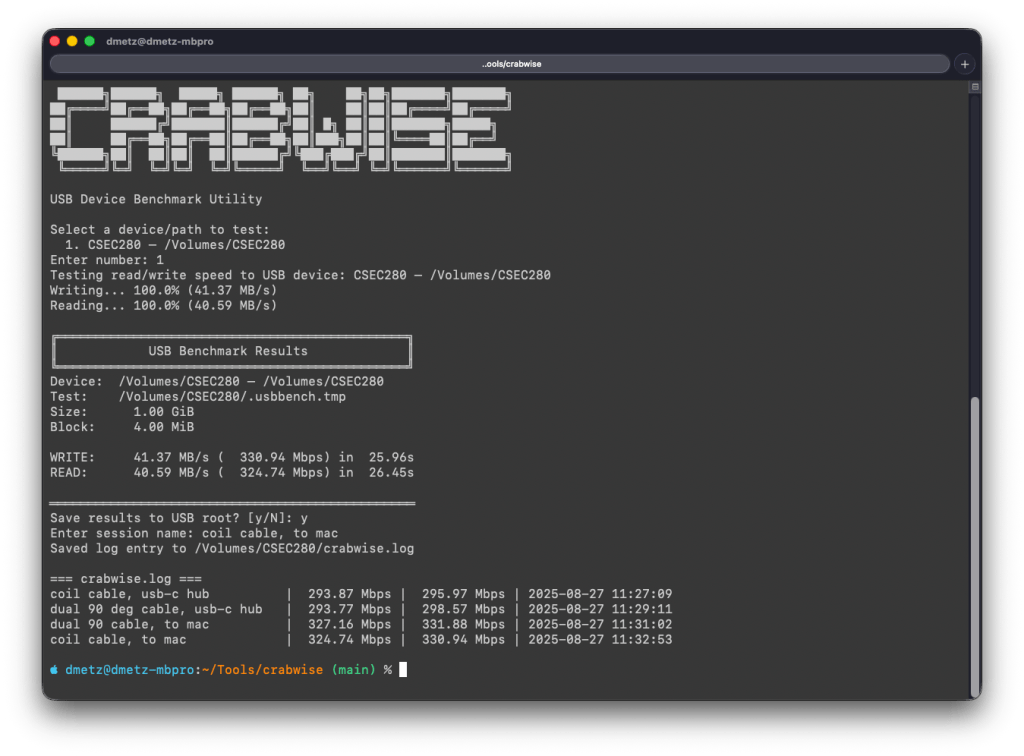
How Crabwise Works
Crabwise calculates read and write speeds by creating a temporary file on the target device and measuring throughput under direct (uncached) conditions.
- Write Test: The tool writes a pseudo-random 1 GiB file (size adjustable) to the USB drive in blocks, ensuring that system caching doesn’t skew results.
- Read Test: It then reads the file back from the device, again bypassing caches, so the reported numbers reflect device-level throughput rather than RAM speeds.
- Progress Feedback: While testing, Crabwise shows real-time percentages and MB/s estimates, so you can spot performance bottlenecks as they happen.
The result is a clean, standardized benchmark of the USB device’s true performance.
Building a Reference Table
One of the most useful features in Crabwise comes after the test: you’re prompted to save the results to the root of the device. If you choose to do so, Crabwise appends the results to a simple log file called crabwise.log.
Each entry includes:
- Session name (you provide this — e.g., “coil cable via hub” or “direct to Mac”),
- Read speed,
- Write speed,
- Timestamp of the test.
When you cat the file, you get an instant side-by-side comparison of your runs:
=== crabwise.log ===
coil cable, usb-c hub          |  293.87 Mbps |  295.97 Mbps | 2025-08-27 11:27:09
dual 90 deg cable, usb-c hub   |  293.77 Mbps |  298.57 Mbps | 2025-08-27 11:29:11
dual 90 cable, to mac          |  327.16 Mbps |  331.88 Mbps | 2025-08-27 11:31:02
coil cable, to mac             |  324.74 Mbps |  330.94 Mbps | 2025-08-27 11:32:53
Over time, this builds into a practical reference table that lets you quickly compare how different cables, hubs, and ports affect performance. What looks like a subtle cabling change can sometimes mean the difference between a VM booting smoothly or crawling.
Closing Thoughts
In forensic and investigative work, you don’t always get to choose the hardware you’re handed — but you can make informed decisions about how you connect and use it. Tools like Crabwise give you a way to validate your environment, document your results, and avoid unpleasant surprises when timing matters most.
Whether you’re testing cables, validating a new hub, or verifying a forensic workstation setup, Crabwise turns USB benchmarking into a repeatable, documented process.
Download crabwise from GitHub: https://github.com/dwmetz/crabwise/
 Baker Street Forensics