A short while back, I released a pair of tools for building MD5 hash sets — one targeting known-good gold builds, the other designed for scanning malware corpora. The goal was simple: generate hash sets that could be used in forensics tools like Axiom Cyber to flag IOC matches during case processing.
Recently, I hit a familiar problem: I had a hash and wanted to know if that file existed in my malware library. Step one was updating my tooling to support SHA256 — the modern standard for hash sharing — and regenerating the hash sets. That part worked. I could search for a hash and confirm whether it appeared in my set.
But what if I got a match?
At that point, I realized: I had no way to correlate the match back to the original file. With ~30,000 samples in the library, “just eyeballing it” wasn’t an option.
As I’ve been coding up new tools — or revisiting earlier ones — I’ve discovered that rabbit holes have rabbit holes.
So I updated the SHA256 tool to not only generate a hash set, but also produce a .tsv lookup table mapping each hash to its full file path. This made the sets usable both in forensics platforms and for custom lookups in more ad hoc workflows. As they say: necessity is the mother of intention.
Of course, that led to another realization. I now had four hashing tools — two for MD5 (MZ and non-MZ), and two for SHA256. The “Hashing Tools” section in MalChela was getting a bit crowded.
Back to the drawing board.
The Result: Three Unified Tools
I consolidated and upgraded everything into three tools — all of which support both CLI and GUI usage.
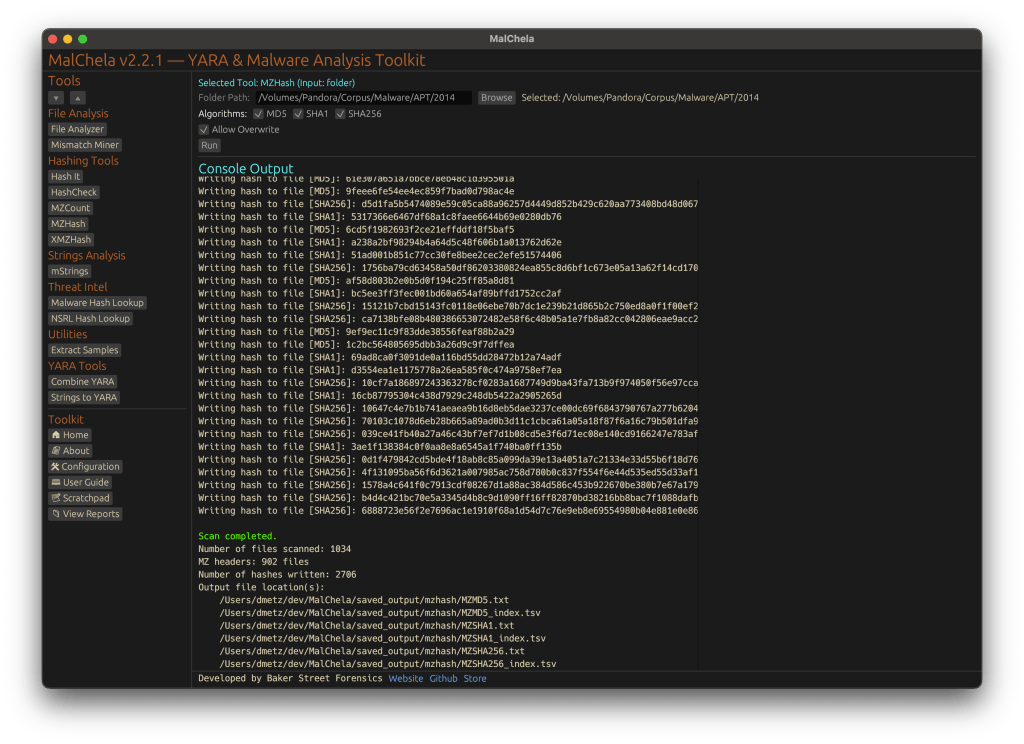
#️⃣ MZHash (replaces mzmd5)
• Uses YARA to recursively scan for files with an MZ header (i.e., Windows executables and DLLs)
• Generates one hash file per selected algorithm: MD5, SHA1, SHA256
• Also creates a .tsv lookup file for each, mapping hashes to paths
cargo run -p mzhash /directory/to/scan -- -a MD5 -a SHA1 -a SHA256
Via GUI, you can browse to the folder and check boxes for each algorithm.
🌐 XMZHash (replaces xmzmd5)
• Uses YARA to skip over files with MZ, ZIP, or PDF headers
• Hashes everything else — ideal for surfacing Linux, Mac, or unusual samples from a mixed malware corpus
• Also supports .tsv lookup file generation
cargo run -p xmzhash /directory/to/scan -- -a MD5 -a SHA1 -a SHA256
The idea: hash what’s not obviously Windows, document-related, or un-extracted samples.
XMZHash
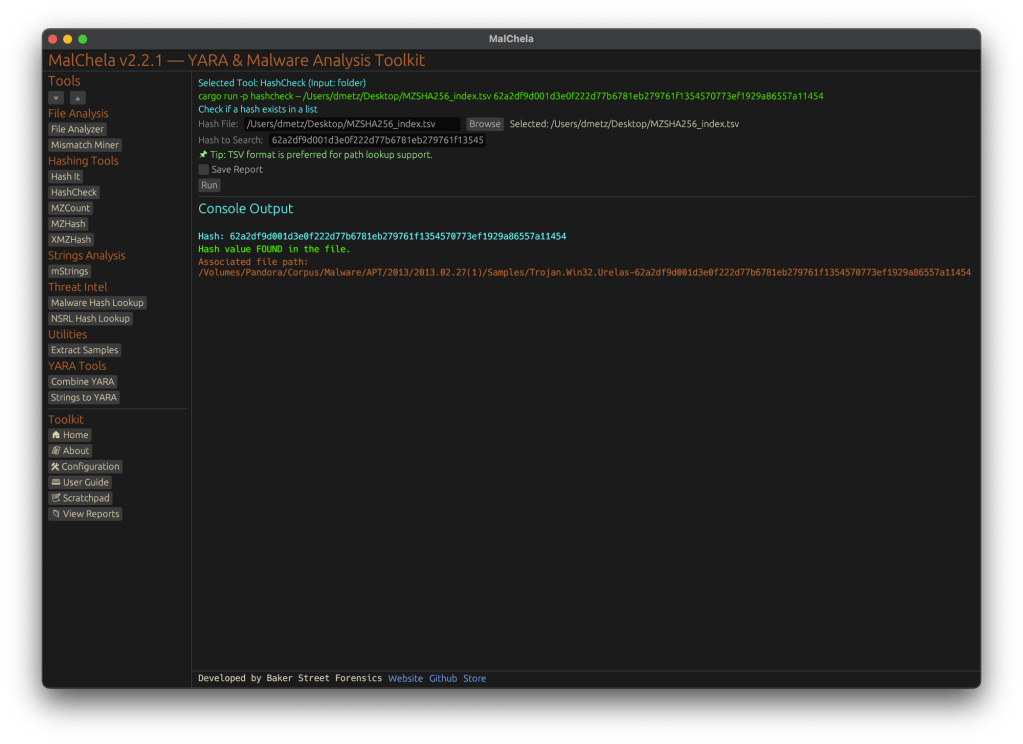
🔍 HashCheck
Okay, so naming might not be my strong suit. But this tool’s direct.
• Provide a hash value and a .txt or .tsv hash set
• It checks for matches, and if you’re using a .tsv, it shows the file path of the match
• Great for live triage, corpus hunting, or checking known-bads
cargo run -p hashcheck ./hashes.tsv 44d88612fea8a8f36de82e1278abb02f
Hash Check
In Summary
MalChela 2.2.1 expands its hashing toolkit with the introduction of HashCheck, MZHash, and XMZHash — giving analysts faster ways to flag known-good, isolate unknowns, and build actionable sets. In this release, we’ve also said goodbye to legacy tools, standardized output saving, and doubled down on clarity across both CLI and GUI workflows.
MalChela, a Rust based toolkit for YARA and malware analysis, was released as a set of command-line apps just a few months ago. Now, it steps into a new realm with the introduction of a graphical user interface (GUI), bringing its powerful features to a broader audience.
The transition from command-line to GUI isn’t just a cosmetic upgrade; it’s a strategic move to make malware analysis more accessible. The GUI version retains all the robust functionalities of its predecessor while offering an intuitive interface that caters to both seasoned analysts and newcomers.
Key Features at a Glance
File Analyzer Module
The updated fileanalyzer module provides a comprehensive overview of suspect files. By simply providing the path to a file, users receive:
SHA-256 Hash,
Entropy analysis,
Regular expression detection for packing,
PE header information (for PE files),
File metadata,
Suspicious API calls,
YARA rule matches (against your local library)
and VirusTotal hash matches.
This module serves as an excellent first step in static analysis, offering a detailed snapshot of the file’s characteristics.
mStrings Integration
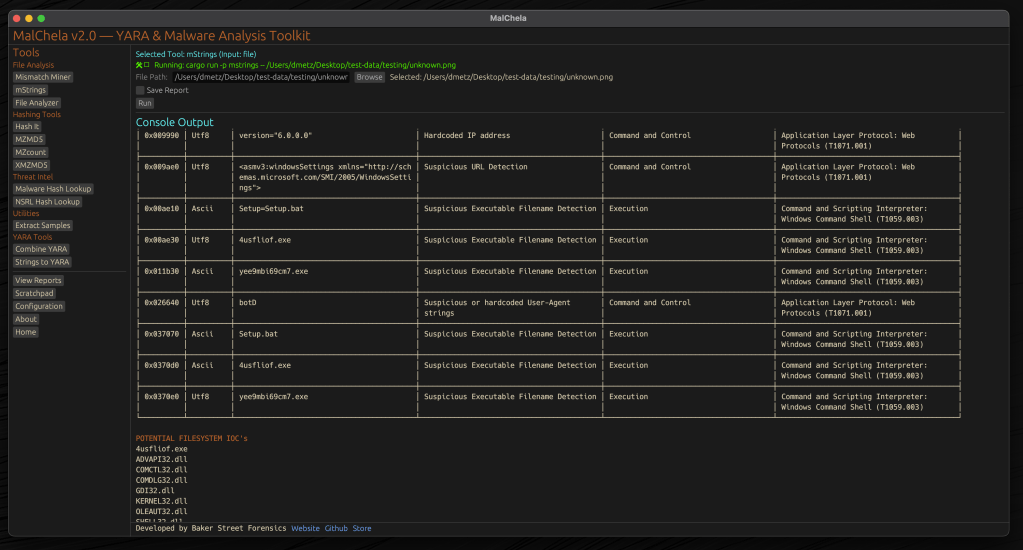
One of MalChela’s standout features, mstrings, is seamlessly integrated into the GUI. This function extracts strings from files and applies Sigma rules defined in YAML to evaluate threats, aligning results with the MITRE ATT&CK framework. It’s a powerful tool for identifying indicators of compromise (IOCs) and understanding malware behavior. Users of MalChela can easily customize their own detection rules in YAML. About 15 new detection rules were added in this release.
Other Tools in the MalChela Suite
Beyond mstrings and fileanalyzer, the MalChela suite includes a range of focused utilities designed to support malware triage and forensic workflows.
malhash lets you quickly query both Virus Total and Malware Bazaar via API calls. The GUI includes an API configuration utility. The CLI will walk you through it.
mismatchminer walks a directory or volume looking for executables disguised as other file types.
mzmd5 and xmzmd5 generate MD5 hash sets—useful for building known-good or known-bad reference hash sets for matching against large corpora.
mzcount provides a quick census of file types in a directory.
strings_to_yara lets you transform suspicious strings into functional YARA rules.
extract_samples recursively unpacks directories of password protected archives often used in malware distribution.
nsrlquery lets you quickly check a hash against the CIRCL hash database.
MalChela’s modular approach with support for custom rule generation, gives analysts what they need without unnecessary overhead. Each tool is designed to run independently but plays well within the broader GUI ecosystem.
Output for any included tool can be saved or skipped at runtime with a simple toggle in the GUI. Structured tools support exporting results in plain text and JSON formats, while YARA rule creation and notes can also be saved in YAML or Markdown.
The Scratchpad:
Notes, YARA Strings, and Analyst Flow
Analysis often involves scattered notes, pasted IOCs, potential YARA strings, and fleeting insights. The MalChela GUI brings structure to that chaos with a built-in scratchpad — a minimalist text editor embedded directly in the interface.
The scratchpad supports live note-taking during tool runs, temporary storage of strings for strings_to_yara, manual IOC tracking and observation logging, and a copy/paste buffer for hashes, commands, or decoded payloads.
Auto-Save & Formats
By default, the scratchpad auto-saves your content every 10 seconds to prevent loss during intense analysis sessions. A simple dropdown lets you export your notes in .txt, .yaml, or .md formats—ideal for integrating with reports or detection development pipelines.
VS Code Integration
For those who prefer a full-featured editor, the “Open in VS Code” button sends your current note directly to a VS Code window, assuming it’s installed and on your system path. This bridges the gap between in-tool triage and deeper rule crafting or documentation workflows.
Bonus Tip: strings_to_yara Compatibility
Lines in the scratchpad that begin with hash: are ignored by the strings_to_yara tool. This allows analysts to keep reference hashes or tagging metadata in the same document without interfering with rule generation. You can import your scratchpad into strings_to_yara in one click.
This feature isn’t just a notepad—it’s a tactical workspace. Whether you’re building detections, jotting notes mid-investigation, or scripting quick ideas, the scratchpad keeps yourn workflow grounded and your thoughts collected.
Last but not least, a crab with karma
Update Checker
The GUI includes a function to automatically check the GitHub repository for updates, encouraging users to pull the latest changes and ensure they have the most current tools at their disposal. 🦀
Enhancing the Analysis Workflow
The GUI version of MalChela doesn’t just replicate CLI functionalities; it enhances the overall workflow. The visual interface allows for easier navigation between modules, quick access to results, and a more streamlined analysis process.
For instance, after walking a directory with mismatchminer you find a suspect file. You run fileanalyzer and can directly proceed to mstrings if the initial findings warrant deeper investigation. From there VirusTotal and Malware Bazaar information can be queried with malhash. Drop your notes in the scratchpad as you go and then use strings_to_yara to draft a YARA rule without worrying about a single tab or indent.
But wait, there’s more
Integrating Third-Party Tools with YAML
The MalChela GUI supports third-party tool integration using a simple tools.yaml configuration file. This makes MalChela not just a toolkit, but a flexible launchpad for your broader forensic workflow.
Each entry in tools.yaml defines the command, input type, and category for a tool. MalChela parses this file at startup, populating the GUI dynamically. Analysts can add their own utilities—whether it’s a custom script, a Python tool, or an external binary—without needing to recompile the application.
- name: Extract Samples
  command: ["extract_samples"]
  input_type: folder
  category: "Utilities"
- name: File Analyzer
  command: ["fileanalyzer"]
  input_type: file
  category: "File Analysis"
# Example 3rd party integration:
# Below is a disabled example for capa
# Uncomment to enable if capa is in your PATH
#
# - name: capa
#   command: "capa"
#   input_type: "file"
#   category: "External"
#   optional_args: []
Once added, the tool appears in the GUI under its specified category, ready to be launched with a single click. Tools must be available in the system PATH, and input types must be one of: file, folder, or hash.
This keeps the interface clean, configurable, and analyst-driven—allowing teams to tailor MalChela to fit their exact needs without touching a single line of Rust.
MalChela is built with the belief that collaboration fuels innovation. I welcome contributions from the broader security and forensics community—whether it’s crafting new detection logic, enhancing YARA rule coverage, refining the GUI, or integrating additional tools via YAML. If you have an idea, patch, or workflow improvement, I’d love to see it. Together, we can make MalChela a more powerful and adaptable tool for every analyst.
To explore the GUI version of MalChela, visit the official GitHub repository:
Installation instructions and a user guide are available to help you get started. Whether you’re a seasoned analyst or just beginning your journey in malware analysis, the GUI version of MalChela offers a user-friendly yet powerful tool to aid your investigations.
MalChela GUI runs on Mac and Linux (with extra love for Mac users). For use on Windows the entire MalChela CLI toolset is supported under WSL 2.
Malware authors often use file masquerading—disguising malicious executables as seemingly harmless files—to bypass both user scrutiny and automated defenses. A classic example is an executable file with an image extension, such as `.png`, that actually contains a Windows PE binary. To help address this challenge, the Mismatch Miner utility, written in Rust and part of the MalChela malware analysis toolkit, introduces a practical approach for uncovering these deceptive files using YARA rules.
Why File Masquerading Matters
File extension spoofing remains a simple yet effective evasion tactic. Users and some security tools may trust files based on their extensions, ignoring the underlying content. Attackers exploit this by renaming executables with extensions like `.jpg` or `.png`, hoping to slip past defenses. While this technique is not new, it continues to be relevant due to its effectiveness and the limitations of extension-based filtering.
That said, this method should be seen as one component of a broader detection strategy. While it is effective for catching executables disguised as images or documents, it does not address more sophisticated evasion tactics, such as fileless malware or executables embedded within other file formats. Additionally, some legitimate software may use unconventional file extensions, so results should be reviewed with context in mind.
Mismatch Miner: Approach and Implementation
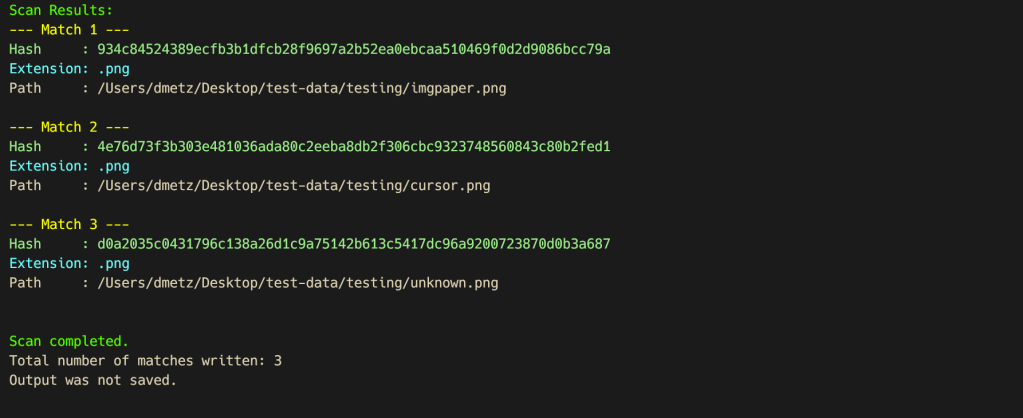
Mismatch Miner is designed to scan a directory for files with extensions that are commonly abused for masquerading, including popular image formats. For each candidate file, it leverages YARA—a widely used pattern-matching tool in malware analysis—to check for the presence of the “MZ” header, which marks the start of Windows executable files. If a file’s extension suggests it is an image, but its header indicates it is an executable, the tool flags the file and reports its name, full path, and SHA256 hash, to support further investigation.
Mismatch Miner screenshot
Mismatch Miner offers a practical solution for identifying a common malware evasion technique: executables disguised as benign files. By combining Rust’s performance with YARA’s pattern-matching, it provides security analysts with a reliable tool for uncovering hidden threats. While not a panacea, header-based mismatch detection is a useful addition to any malware analysis workflow, helping to close a gap that attackers continue to exploit.
Mismatch Miner is bundled with MalChela, the YARA & Malware Analysis toolkit. If you’ve already installed it, a ‘git pull’ from your workspace directory should get you the new feature.
It’s been just over a week since MalChela was initially released and already here have been a number of updates.
mStrings
In the previous post, I walked through the new mStrings function. I think this is one of my favorites so far. It extracts strings from a file and uses Sigma rules defined in YAML against the strings to evaluate threats and align results to the MITRE ATT&CK framework.
For fun I pointed it at an old WannaCry sample . I had a proud papa moment at the positive network IOC detection.
Check for Updates
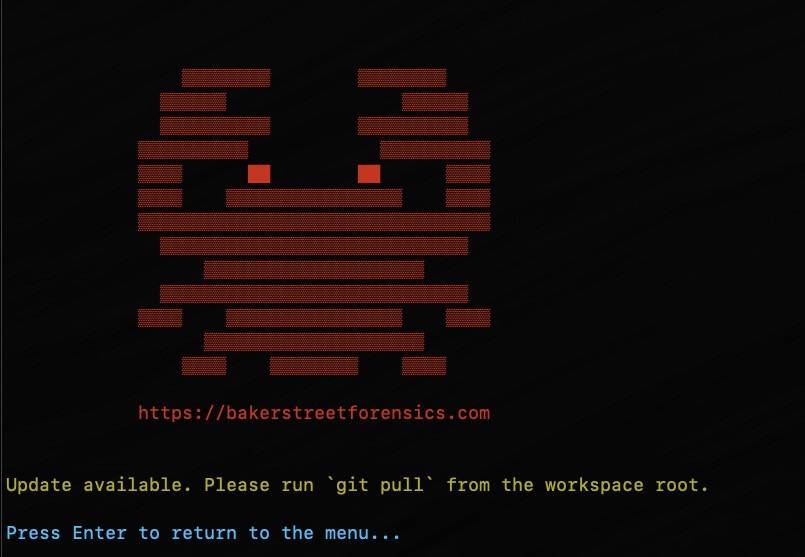
Next came a function to automatically check the GitHub repo for updates and encourage a git pull to grab the latest… because apparently I can’t stop myself and this project will just keep growing, as my sleep keeps dwindling. Personally I found it ironic that you have to update in order to get the update telling you that updates are available… but it will work for all future updates as they come. So go ahead and update why don’t you.
Screenshot of MalChela indicating an update is available via git.
New File Analyzer module
Most recently a File Analyzer module has been added. Give it the path to your suspect file and it will return back:
SHA-256 Hash
Entropy (<7.5=high)
A RegEx detection for packing (mileage may vary)
PE Header info if it’s a PE
File Metadata
Yara Matches (any rules in yara_rules folder in workspace)
If there’s a positive match for the hash on VirusTotal (leverages the same key as previously in MalChela with the Virus Total / Malware Bazaar lookup)
Lastly, you’re given the option of whether or not you want to run strings on the file, or return to the main menu.
I really like the idea of using this as a possible first step in static analysis. Run this first and opt for strings. Things look interesting there, throw it into mStrings. Positive match on VirusTotal – use the malware hash lookup and get a more detailed analysis. Use the results from mStrings to craft a YARA rule and add it to your repo for future detections.









 Baker Street Forensics