I’m excited to share that I’ll be speaking at MITRE ATT&CKcon 7.0, October 27–28, 2026, at MITRE in McLean, VA and online.
My talk, From Strings to Techniques: AI-Augmented Malware Analysis with MalChela and Claude Desktop, looks at what happens when you give an AI co-analyst real tools instead of just a chat window. Using MalChela’s MCP server integration with Claude Desktop, I’ll walk through a workflow that goes from raw string extraction to ATT&CK-mapped findings, synthesizes results across multiple tools, and ends with something defenders can actually use: detection content.
Expect a practical look at:
ATT&CK-mapped string analysis with mStrings, turning noise into techniques
Cross-tool synthesis, letting the co-analyst correlate output from tiquery, fileanalyzer, and more
Closing the loop, from static analysis to YARA and Sigma rules ready for detection engineering
If you’re going to be in McLean, come say hello. I’m always up for talking DFIR, malware, open-source tooling, or where AI fits (and doesn’t) in our workflows. If you can’t make the trip, ATT&CKcon offers virtual attendance, so you can still catch the talk and the rest of a great lineup.
Hot on the heels of v4.2… yep, v4.3. What can I say? The melatonin isn’t cutting it anymore to keep me asleep. Rather than count sheep – working on my favorite project helps. Granted I’ve still got bags under my eyes, but I’ve got something to show for it.
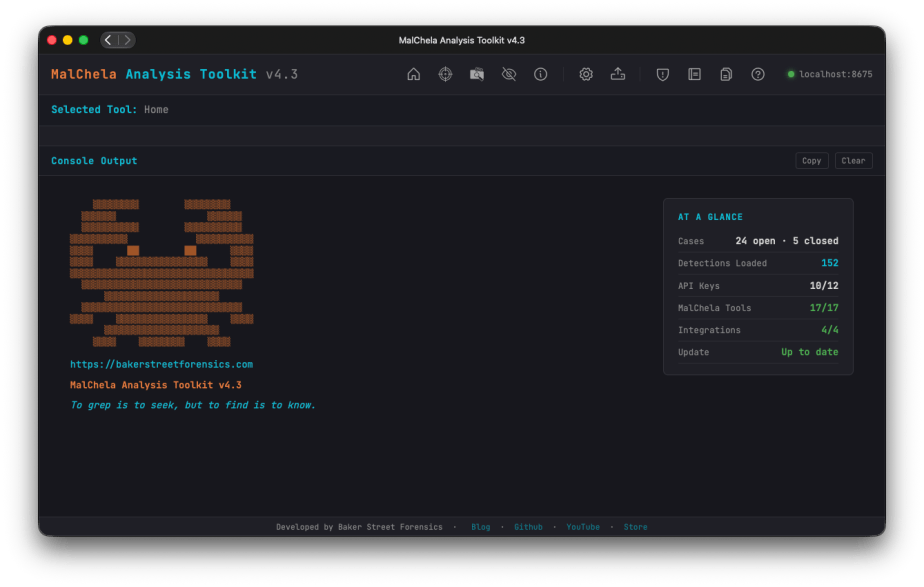
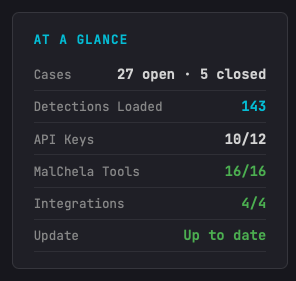
At A Glance
The first thing you’ll notice on this release, after all it’s impossible to miss, the At A Glance panel added to the Home Screen. In addition to the “Crabby Koans“, you see:
Number of open/closed cases
API key status
Number of MalChela tools loaded
Number of Integrations (3rd party tools) loaded; great for REMnux mode
GitHub status for available updates (it’s back!)
Other UI enhancements include new Analyze and Cases toolbar buttons, a collapsible Tools sidebar; and live progress updates during a run.
Airplane Mode / Offline Mode
While there’s a lot of great threat-intel information you can garner using TIQuery and the other utilities, sometimes internet isn’t an option – or maybe it’s a sample you want to handle so carefully you want to ensure there’s no external lookup activity. MalChela won’t mess with your Op-Sec. Rather than just have things fail gracefully (hopefully) when there’s no internet, there’s now a new Offline Mode toggle (Configuration screen), that cleanly skips every network call across the toolkit (NSRLQuery, TIQuery’s full multi-source lookup, FileAnalyzer’s VirusTotal + NSRL checks) instead of failing quietly or hanging, so labs and scenarios can run fully air-gapped.
Analyze Rollup
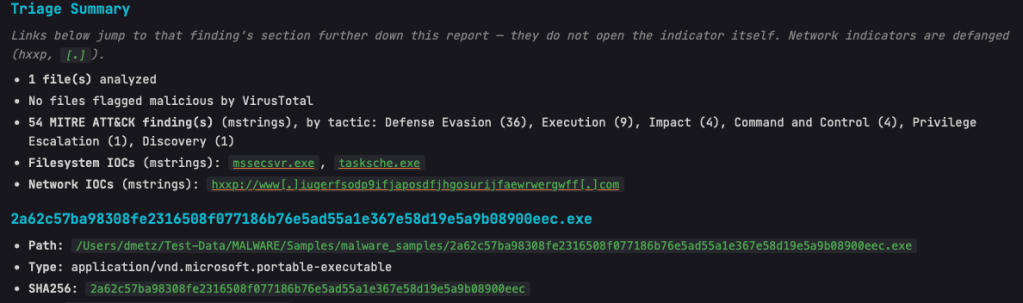
Triage Summary now links directly to the relevant section for flagged malicious files and their flags/indicators, plus the Filesystem and Network IOC lists — click a finding, jump straight to the detail.
Network IOCs in the rollup are shown defanged by default, with a note clarifying that links jump to the report section rather than the live URL.
Case ZIP/archive samples and containers found mid-scan (not just top-level) are now auto-extracted and analyzed automatically.
Includes the new dpp Extract tool: unwraps DMG/PKG containers to reach the real payload files inside.
mStrings
As the tools and the suite continue to grow, mStrings remains the star of the show. Updates in this release include:
Network IOCs in mStrings’ own report output are now defanged, matching the rollup.
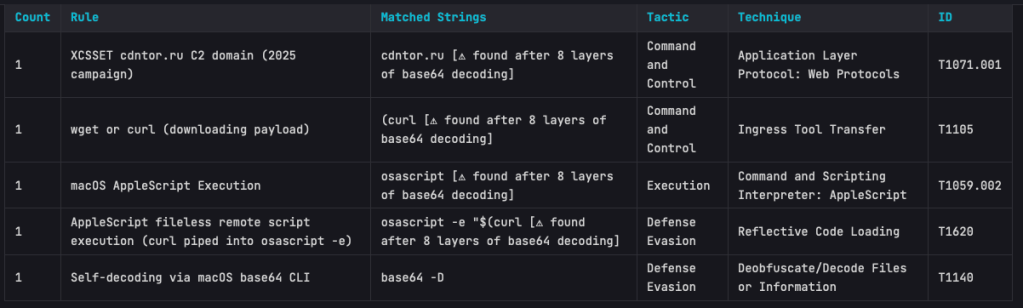
Base64 strings are now auto-decoded and recursively rescanned for further IOCs/detections.
Regex engine switched to fancy-regex, enabling lookaround-based detection patterns.
Better surfacing of bare-domain C2 IOCs and multi-layer obfuscation depth.
The Base64 scanning is impressive. On one of my test samples MalChela was able to extract strings in a file buried under 8 layers of Base64 encapsulation.
StringsToYARA
New refang capability: defanged URLs (hxxp://, [.]) in source strings are automatically restored to real URLs in the generated YARA rule.
Safely store your URLs in a defanged state – when it’s time to create the rule – then and only then does the live url get exposed.
Detections
25 new detection rules added (bringing the ruleset to 144), including full coverage for the Proton macOS RAT family, XCSSET, iWorm, EmPyre, Bella RAT, BirdMiner, and Python self-decompressing execution patterns.
Documentation
Full documentation pass covering all of the above, plus a new Offline Mode reference page and a Top Toolbar quick-reference table.
Bonus for me, the PDF User Guide is now generated via an automated, versioned build pipeline.
I’m excited to announce that v4.2 of MalChela is now available. While it may not be “the Answer to the Ultimate Question of Life, the Universe, and Everything,” or even The Malware Analysts Guide to the Galaxy, it does have some great new functionality.
This release has two big themes. First, the Mac side of the house — four tools now speak fluent .app bundle instead of making you dig out the binary inside Contents/MacOS/ yourself.
Second, and bigger: there’s a new way to run MalChela that doesn’t start with “which tool do I need for this file again?” It’s called Analyze, and it’s the closest thing this project has had to a an easy button.
Mac app bundle support (“Mac Stack”)
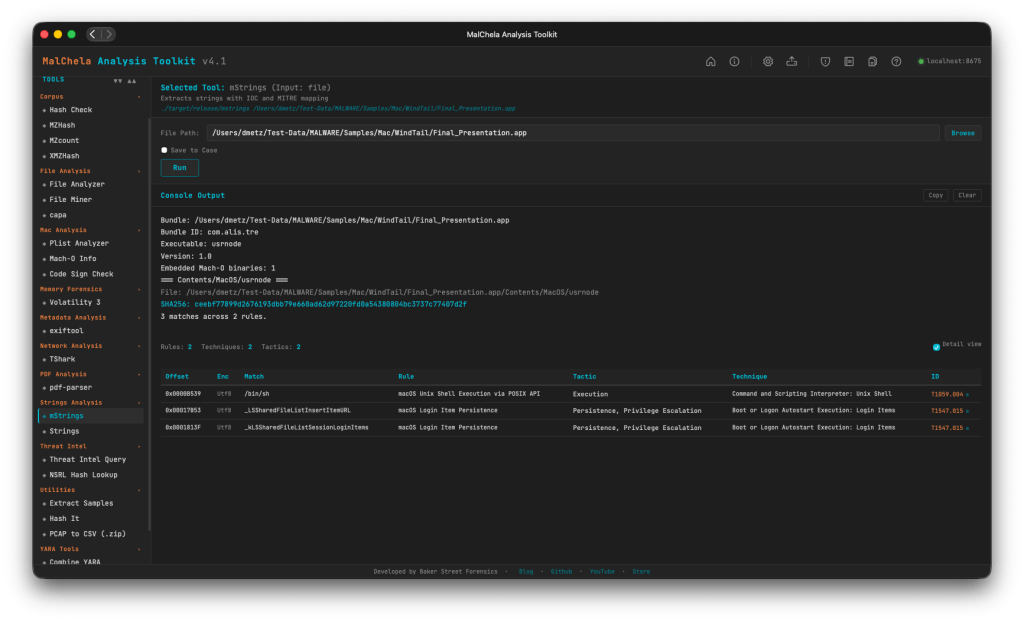
If you’ve ever pulled a .app bundle into MalChela before, you know the drill: find the actual binary buried in Contents/MacOS/, feed that to whatever tool you’re running, and hope you resolved the right one. That workaround is gone. Four tools now understand .app bundles directly — point macho_info, codesign_check, mstrings, or plist_analyzer at the bundle itself and they auto-resolve the main executable (via CFBundleExecutable, falling back to the sole binary in Contents/MacOS/ when needed).
What each one is actually looking for:
macho_info — architecture, PIE/ASLR, __PAGEZERO, linked libraries, per-section entropy. It flags deprecated/EOL crypto libraries, RPATH entries (a classic dylib-hijacking setup), and the CoreFoundation+SystemConfiguration+Security dylib triad that shows up disproportionately often in C2 implants.
codesign_check — signature status (Developer-signed / Ad-hoc / Unsigned), Bundle ID, Team ID, entitlements, and the get-task-allow flag (a tell for debug builds). It also catches Team ID mismatches between a bundle’s signer and its main executable’s signer — a supply-chain / hijack indicator that’s easy to miss by eye.
plist_analyzer — flags LSUIElement/NSUIElement (an app hiding itself from the Dock), NSAllowsArbitraryLoads (App Transport Security turned off), custom CFBunda missing CFBundleSignature, and missing orextra binaries inside Contents/MacOS/.
mstrings — now scans Mach-O binaries and bundles directly, with the same bundle-to-executable auto-resolution as the rest of the stack.
More Mac-specific detections are already in the pipeline for upcoming releases, so consider this the foundation, not the ceiling.
Analyze — one-click auto-triage
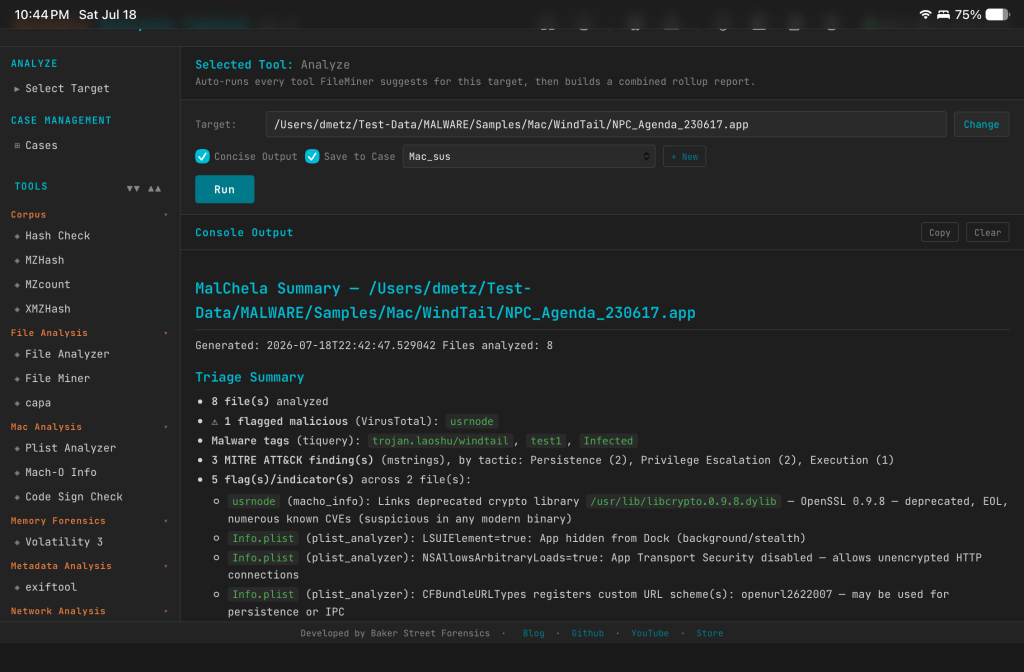
Point Analyze at a file, a folder, or a .app bundle, and it classifies everything with FileMiner, then automatically dispatches every tool FileMiner suggests for each file it finds. No more running FileMiner, reading the suggested-tools column, and manually kicking off each one yourself — Analyze closes that loop for you. It’s available in both the PWA and as a new analyze tool in the MCP server, so if you’re driving MalChela through Claude, the same triage workflow is one call away.
A couple of details worth knowing:
Save to Case works exactly like every other tool panel — checkbox plus case dropdown, opt-in. On the MCP side, it follows the same rule as every other MCP tool: you need an active case (set_case) before Analyze will run, which keeps the behavior consistent across the whole server rather than special-casing this one workflow.
Concise Output is on by default and renders the rollup report inline instead of the full expanded per-tool output — good default for a first pass, and easy to turn off if you want to see everything each tool produced.
The MalChela Summary rollup report
Every Analyze run produces one malchela_summary_<timestamp>.md, saved alongside the individual tool reports it’s summarizing. The goal here wasn’t just “concatenate the output” — it’s a real triage document, and it leads with a summary banner built to answer the questions you’d actually ask first:
How many files, really? File counts, with automatic grouping of duplicate content — if the same bytes show up under five different filenames (extremely common with carved or exported artifacts), you get one write-up instead of five identical ones.
Is anything flagged? Malicious verdicts pulled from VirusTotal, cross-referenced across both FileAnalyzer and tiquery — which matters more than it sounds like, since FileAnalyzer isn’t run against Mach-O files, so tiquery is what keeps Mac samples from falling through the cracks.
What is it? Malware family and tag names pulled straight from tiquery’s multi-source lookups.
What does it do? MITRE ATT&CK findings from mstrings, totaled and broken down by tactic, so you can see at a glance whether you’re looking at something built for persistence, defense evasion, discovery, or all of the above.
What did it touch or talk to? Filesystem and network IOCs surfaced by mstrings.
What’s structurally off? Flags and indicators from macho_info, plist_analyzer, and codesign_check — the RPATH entries, hidden-Dock plists, and Team ID mismatches mentioned above, all rolled up in one place.
Below the summary, each file gets its own section with every tool’s actual formatted report embedded — real tables, real headers, not a wall of raw console output. It reads cleanly whether you’re looking at it in the PWA or opening the file on its own.
Douglas Adams never actually tells us what the Question is — just the Answer. v4.2 doesn’t have that problem. The question was always “what’s actually in this sample,” and now Analyze, the Mac Stack, and the MalChela Summary answer it in one pass instead of five.
There’s a moment every analyst knows — the one where an unknown file lands on your desk and the clock starts ticking. You need answers, and you need them fast. MalChela was built for exactly that moment.
Today I’m excited to announce the MalChela Video Series on YouTube — a growing collection of tutorial episodes walking through real malware analysis workflows using MalChela, the open-source Rust-based toolkit I’ve been building for the DFIR community. Whether you’re new to the tool or already running it in your lab, there’s something here for you.
Four episodes are available right now in the playlist.
What’s in the Playlist
Ep0 | Installation & First Run
Every case starts somewhere. Episode 0 is your onboarding — installing MalChela, walking through its dependencies, and getting oriented with both the CLI and GUI modes. If you’ve been curious about the tool but weren’t sure where to start, this is the episode to bookmark.
Ep1 | First Contact: Hash, Inspect, Identify
You’ve just been handed a suspicious file. What do you do first?
This episode covers the first three tools in a malware triage workflow — the exact sequence I reach for every time I encounter an unknown file:
hashit — generate MD5, SHA1, and SHA256 hashes to protect chain of custody and enable deduplication
fileanalyzer — static inspection: entropy analysis, PE header fields, compile timestamps, and import tables
malhash — simultaneous lookup against VirusTotal and MalwareBazaar to identify known malware families
By the end of this episode, you’ll take an unknown file from zero to confirmed malware family identification in under five minutes — no sandboxing required.
Ep2 | From Strings to Signatures
Continuing from Episode 1, we go deeper into the confirmed RedLine info-stealer sample using mStrings — MalChela’s string extraction engine. Unlike the traditional strings utility, mStrings runs every extracted string through a detection ruleset and MITRE ATT&CK mapping layer simultaneously, turning raw output into actionable intelligence.
We walk through 62 detections, including PDB path artifacts, hard-coded dropper filenames, WMI queries, credential harvesting patterns, anti-debug checks, and a code injection setup. We then feed the extracted IOCs into Strings2YARA to auto-generate a structured YARA rule — and confirm it fires against the sample using File Analyzer.
By the end, you’ll be reading a malware file not as a pile of strings, but as a window into the attacker’s tradecraft.
Ep3 | REMnux Mode & Custom Tools
MalChela doesn’t work in isolation. Episode 3 covers how to extend the toolkit through the tools.yaml config file and how enabling REMnux mode surfaces an entire distro’s worth of malware analysis utilities directly within MalChela’s interface.
We also explore three built-in integrations: Volatility 3 with a dynamic plugin builder, T-Shark with a searchable reference, and YARA-X — a faster, Rust-native rewrite of YARA.
What’s Coming
The series is ongoing. Future episodes will push further into advanced workflows — think directory-scale triage, corpus management, and the AI-assisted analysis capabilities introduced in MalChela’s MCP integration. Stay subscribed and you won’t miss them.
Get Involved
If MalChela is useful in your work, the best thing you can do is help spread the word:
📺 Subscribe to the YouTube channel — Subscribe to the channel and save the playlist so you don’t miss new episodes as they land.
📖 Follow Baker Street Forensics — Writeups, major releases, and workflow deep dives live here.
💬 Share and comment — If an episode clicks for you, pass it along to a colleague or drop a comment on the video. That feedback genuinely shapes what comes next.
The game is afoot. Let’s get to work.
MalChela is open-source and freely available. Find the project on GitHub.