Streamline Malware Hash Search with FOSSOR

We’ve all encountered this scenario: you’re reading a threat report from CISA or Microsoft and come across hashes related to a malware infection. You start copying these hashes and head to one of your favorite virus repositories to check if there’s a source available for download so you can analyze the malware yourself. Unfortunately, you don’t find a match. So, you move on to another site and repeat the process. This can be time-consuming and prone to errors.

FOSSOR (Federated Open-Source Sample Search & Object Retriever) is a script designed to help you search for malware hashes across multiple threat intelligence sources. Simply run FOSSOR and provide it with a single hash or a text file of hashes (.txt or .csv). It will instantly display which sources have information about the hash, and you can even download samples if needed.
Setup

FOSSOR loads API keys from text files in the same directory as the script. Create one file per source containing only the key:

SourceKey fileWhere to get a key
MalwareBazaarmb-api.txtabuse.ch Auth Portal
VirusTotalvt-api.txtVirusTotal API
AlienVault OTXotx-api.txtOTX Account Settings

Sources with missing key files are automatically skipped. You only need the sources you have access to.

fossor/
fossor.py
mb-api.txt # your MalwareBazaar key
vt-api.txt # your VirusTotal key
otx-api.txt # your OTX key
samples/ # created automatically by --download

Usage

Look up hashes from a file

python3 fossor.py hashes.txt

The input file should have one hash per line. Lines starting with # are treated as comments and ignored. Works with .txt.csv, or any text file — BOM and stray whitespace are handled automatically.

Look up a single hash

python3 fossor.py d0a2035c0431796c138a26d1c9a75142b613c5417dc96a9200723870d0b3a687

Export results to CSV

python3 fossor.py hashes.txt --csv results.csv

Download available samples

python3 fossor.py hashes.txt --download

Downloads are saved to ./samples/ as password-protected zips. The password is always infected.

Warning: Downloaded samples are live malware. Handle with appropriate caution — use a VM or isolated analysis environment. Consider excluding the samples/ directory from antivirus real-time scanning and Spotlight indexing.

Disable specific sources

python3 fossor.py hashes.txt --no-vt # skip VirusTotal
python3 fossor.py hashes.txt --no-mb --no-otx # only query VirusTotal

Combine options

python3 fossor.py hashes.txt --csv results.csv --download --no-vt

Example Output

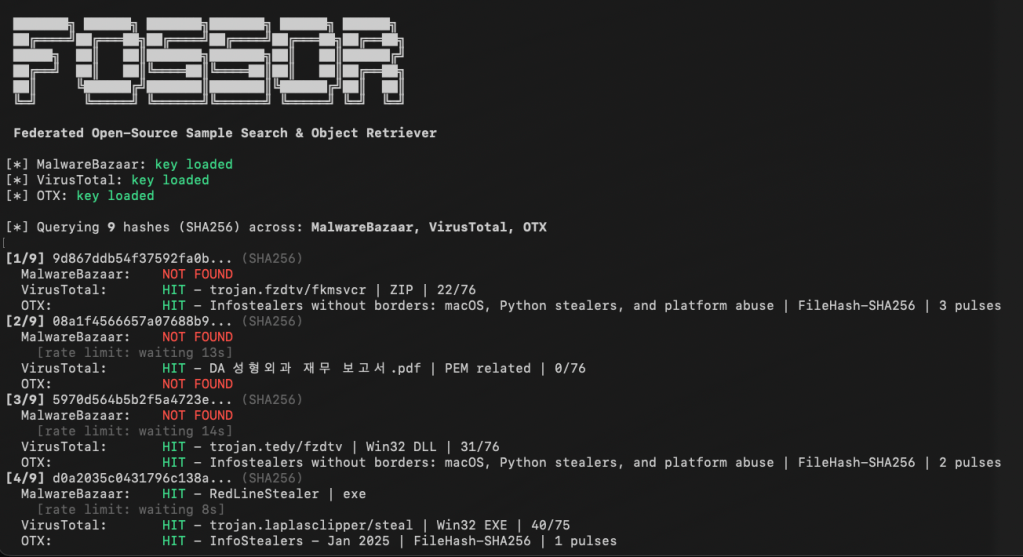
[*] MalwareBazaar: key loaded
[*] VirusTotal: key loaded
[*] OTX: key loaded
[*] Querying 9 hashes (SHA256) across: MalwareBazaar, VirusTotal, OTX
[1/9] 9d867ddb54f37592fa0b... (SHA256)
MalwareBazaar: NOT FOUND
VirusTotal: HIT - trojan.fzdtv/fkmsvcr | ZIP | 22/76
OTX: HIT - Infostealers without borders... | FileHash-SHA256 | 3 pulses
[2/9] d0a2035c0431796c138a... (SHA256)
MalwareBazaar: HIT - RedLineStealer | exe
VirusTotal: HIT - trojan.laplasclipper/steal | Win32 EXE | 40/75
OTX: HIT - InfoStealers - Jan 2025 | FileHash-SHA256 | 1 pulses
============================================================
Summary: 9 hashes queried across 3 sources
MalwareBazaar: 1/9 found
VirusTotal: 6/9 found
OTX: 5/9 found
Unique hashes with at least one hit: 7/9
Results Matrix:
Hash Malwar VT OTX
------------------ ------ ------ ------
9d867ddb54f37592fa - HIT HIT
08a1f4566657a07688 - HIT -
5970d564b5b2f5a472 - HIT HIT
d0a2035c0431796c13 HIT HIT HIT
59855f0ec42546ce2b - - -
a5b19195f61925ede7 - HIT HIT
e7237b233fc6fda614 - HIT -
59347a8b1841d33afd - - HIT
e965eb96df16eac926 - - -
============================================================

Rate Limits

SourceLimitFOSSOR default
MalwareBazaarNone documentedNo delay
VirusTotal (free)4 requests/min15s between requests
AlienVault OTX10,000 requests/hrNo delay

Download

You can download FOSSOR for free on GitHub: https://github.com/dwmetz/FOSSOR/

MalChela GUI: Visualizing Malware Analysis with Ease

A New Face for MalChela

MalChela, a Rust based toolkit for YARA and malware analysis, was released as a set of command-line apps just a few months ago. Now, it steps into a new realm with the introduction of a graphical user interface (GUI), bringing its powerful features to a broader audience.

The transition from command-line to GUI isn’t just a cosmetic upgrade; it’s a strategic move to make malware analysis more accessible. The GUI version retains all the robust functionalities of its predecessor while offering an intuitive interface that caters to both seasoned analysts and newcomers.

Key Features at a Glance

File Analyzer Module

The updated fileanalyzer module provides a comprehensive overview of suspect files. By simply providing the path to a file, users receive:

  • SHA-256 Hash,
  • Entropy analysis,
  • Regular expression detection for packing,
  • PE header information (for PE files),
  • File metadata,
  • Suspicious API calls,
  • YARA rule matches (against your local library)
  • and VirusTotal hash matches.

This module serves as an excellent first step in static analysis, offering a detailed snapshot of the file’s characteristics.

mStrings Integration

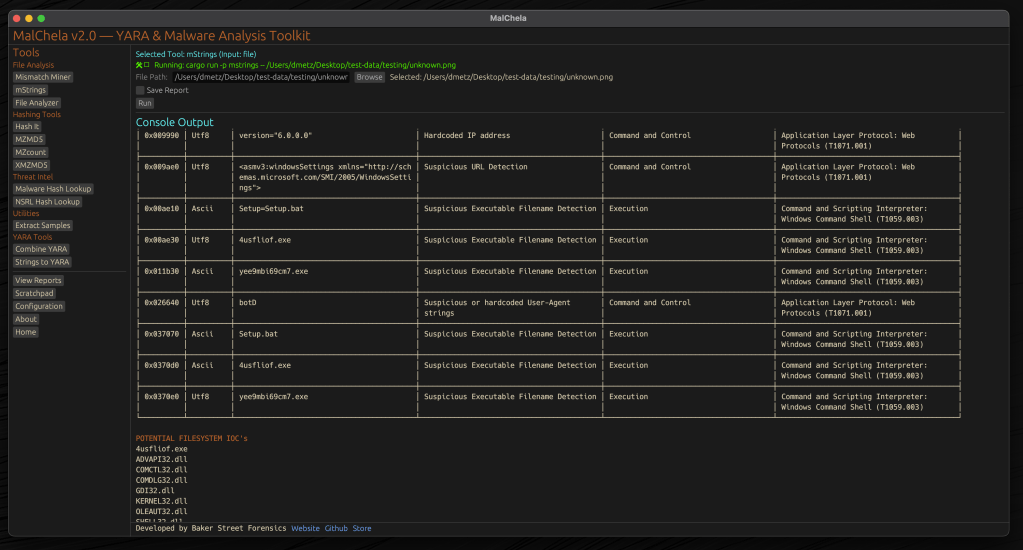
One of MalChela’s standout features, mstrings, is seamlessly integrated into the GUI. This function extracts strings from files and applies Sigma rules defined in YAML to evaluate threats, aligning results with the MITRE ATT&CK framework. It’s a powerful tool for identifying indicators of compromise (IOCs) and understanding malware behavior. Users of MalChela can easily customize their own detection rules in YAML. About 15 new detection rules were added in this release.

Other Tools in the MalChela Suite

Beyond mstrings and fileanalyzer, the MalChela suite includes a range of focused utilities designed to support malware triage and forensic workflows.

malhash lets you quickly query both Virus Total and Malware Bazaar via API calls. The GUI includes an API configuration utility. The CLI will walk you through it.

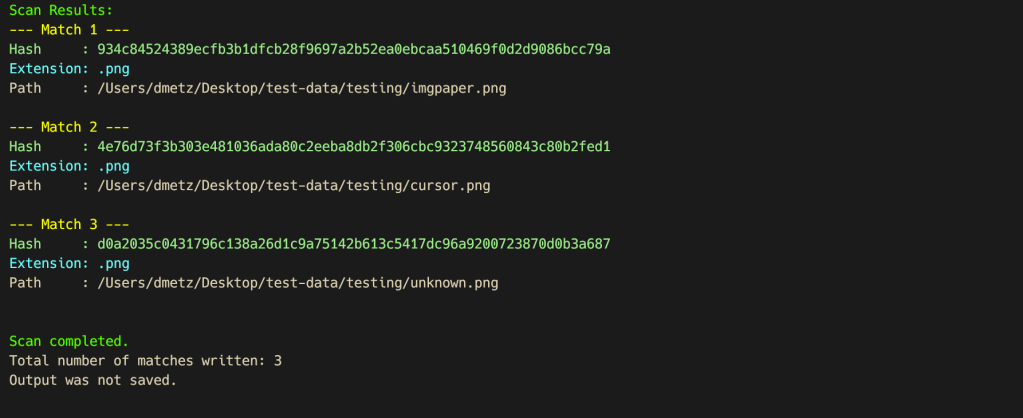
mismatchminer walks a directory or volume looking for executables disguised as other file types.

mzmd5 and xmzmd5 generate MD5 hash sets—useful for building known-good or known-bad reference hash sets for matching against large corpora.

mzcount provides a quick census of file types in a directory.

strings_to_yara lets you transform suspicious strings into functional YARA rules.

extract_samples recursively unpacks directories of password protected archives often used in malware distribution.

nsrlquery lets you quickly check a hash against the CIRCL hash database.

MalChela’s modular approach with support for custom rule generation, gives analysts what they need without unnecessary overhead. Each tool is designed to run independently but plays well within the broader GUI ecosystem.

Output for any included tool can be saved or skipped at runtime with a simple toggle in the GUI. Structured tools support exporting results in plain text and JSON formats, while YARA rule creation and notes can also be saved in YAML or Markdown.

The Scratchpad:

Notes, YARA Strings, and Analyst Flow

Analysis often involves scattered notes, pasted IOCs, potential YARA strings, and fleeting insights. The MalChela GUI brings structure to that chaos with a built-in scratchpad — a minimalist text editor embedded directly in the interface.

The scratchpad supports live note-taking during tool runs, temporary storage of strings for strings_to_yara, manual IOC tracking and observation logging, and a copy/paste buffer for hashes, commands, or decoded payloads.

Auto-Save & Formats

By default, the scratchpad auto-saves your content every 10 seconds to prevent loss during intense analysis sessions. A simple dropdown lets you export your notes in .txt, .yaml, or .md formats—ideal for integrating with reports or detection development pipelines.

VS Code Integration

For those who prefer a full-featured editor, the “Open in VS Code” button sends your current note directly to a VS Code window, assuming it’s installed and on your system path. This bridges the gap between in-tool triage and deeper rule crafting or documentation workflows.

Bonus Tip: strings_to_yara Compatibility

Lines in the scratchpad that begin with hash: are ignored by the strings_to_yara tool. This allows analysts to keep reference hashes or tagging metadata in the same document without interfering with rule generation. You can import your scratchpad into strings_to_yara in one click.

This feature isn’t just a notepad—it’s a tactical workspace. Whether you’re building detections, jotting notes mid-investigation, or scripting quick ideas, the scratchpad keeps yourn workflow grounded and your thoughts collected.

Last but not least, a crab with karma

Update Checker

The GUI includes a function to automatically check the GitHub repository for updates, encouraging users to pull the latest changes and ensure they have the most current tools at their disposal. 🦀

Enhancing the Analysis Workflow

The GUI version of MalChela doesn’t just replicate CLI functionalities; it enhances the overall workflow. The visual interface allows for easier navigation between modules, quick access to results, and a more streamlined analysis process.

For instance, after walking a directory with mismatchminer you find a suspect file. You run fileanalyzer and can directly proceed to mstrings if the initial findings warrant deeper investigation. From there VirusTotal and Malware Bazaar information can be queried with malhash. Drop your notes in the scratchpad as you go and then use strings_to_yara to draft a YARA rule without worrying about a single tab or indent.

But wait, there’s more

Integrating Third-Party Tools with YAML

The MalChela GUI supports third-party tool integration using a simple tools.yaml configuration file. This makes MalChela not just a toolkit, but a flexible launchpad for your broader forensic workflow.

Each entry in tools.yaml defines the command, input type, and category for a tool. MalChela parses this file at startup, populating the GUI dynamically. Analysts can add their own utilities—whether it’s a custom script, a Python tool, or an external binary—without needing to recompile the application.

- name: Extract Samples
  command: ["extract_samples"]
  input_type: folder
  category: "Utilities"
- name: File Analyzer
  command: ["fileanalyzer"]
  input_type: file
  category: "File Analysis"
# Example 3rd party integration:
# Below is a disabled example for capa
# Uncomment to enable if capa is in your PATH
#
# - name: capa
#   command: "capa"
#   input_type: "file"
#   category: "External"
#   optional_args: []

Once added, the tool appears in the GUI under its specified category, ready to be launched with a single click. Tools must be available in the system PATH, and input types must be one of: file, folder, or hash.

This keeps the interface clean, configurable, and analyst-driven—allowing teams to tailor MalChela to fit their exact needs without touching a single line of Rust.

MalChela is built with the belief that collaboration fuels innovation. I welcome contributions from the broader security and forensics community—whether it’s crafting new detection logic, enhancing YARA rule coverage, refining the GUI, or integrating additional tools via YAML. If you have an idea, patch, or workflow improvement, I’d love to see it. Together, we can make MalChela a more powerful and adaptable tool for every analyst.

Getting Started

👉 MalChela on GitHub

To explore the GUI version of MalChela, visit the official GitHub repository:

Installation instructions and a user guide are available to help you get started. Whether you’re a seasoned analyst or just beginning your journey in malware analysis, the GUI version of MalChela offers a user-friendly yet powerful tool to aid your investigations.

MalChela GUI runs on Mac and Linux (with extra love for Mac users). For use on Windows the entire MalChela CLI toolset is supported under WSL 2.

Mal-Hash Updates

Mal-Hash.ps1

  • The script takes the input of a file, calculates the hashes (MD5, SHA1, SHA256), and then submits the SHA256 hash to Virus Total* for analysis.
  • The script will also run Strings against the sample.
  • The script will check Malware Bazaar to see if a sample matching the hash is available.
  • The hashes, strings, Virus Total and Malware Bazaar results are both displayed on screen and saved to a text report.
  • Timestamp of the analysis is recorded in UTC.

VTHashSub.ps1

  • The script takes a hash value as input and submits the hash to Virus Total* for analysis.
  • The script will check Malware Bazaar to see if a sample matching the hash is available.
  • The hashes, Virus Total and Malware Bazaar results are both displayed on screen and saved to a text report.
  • Timestamp of the analysis is recorded in UTC.

Mal-Hash.ps1 and VTHashSub.ps1 will operate (via PowerShell) on Windows, Mac & Linux.

* Virus Total API key expected in vt-api.txt.

Latest updates:

  • n of x vendors detected
  • VT permalink
  • Malware Bazaar results

Both scripts available on my GitHub page:

https://github.com/dwmetz/Mal-Hash