

MalChela’s 2.2 update is packed with practical and platform-friendly improvements. It includes native support for REMnux, better tool settings, and deeper integrations with analysis tools like YARA-X, Tshark, Volatility3, and the newly improved fileanalyzer module.
🦀 REMnux Edition: Built-In Support, Zero Tweaks
When the GUI loads a REMnux-specific tools.yaml profile, it enters REMnux mode.

Native binaries and Python scripts like capa, oledump.py, olevba, and FLOSS are loaded into the MalChela tools menu, allowing you to mix and match operations with the embedded MalChela utilities and the full REMnux tool stack. No manual configuration needed—just launch and go. MalChela currently supports the following REMnux programs right out of the box:
| Tool Name | Description |
|---|---|
| binwalk | Firmware analysis and extraction tool |
| capa | Identifies capabilities in executable files |
| radare2 | Advanced reverse engineering framework |
| Volatility 3 | Memory forensics framework for RAM analysis |
| exiftool | Extracts metadata from images, documents, and more |
| TShark | Terminal-based network packet analyzer (Wireshark CLI) |
| mraptor | Detects malicious macros in Office documents |
| oledump | Parses OLE files and embedded streams |
| oleid | Identifies features in OLE files that may indicate threats |
| olevba | Extracts and analyzes VBA macros from Office files |
| rtfobj | Extracts embedded objects from RTF documents |
| zipdump | Inspects contents of ZIP files, including suspicious payloads |
| pdf-parser | Analyzes structure and contents of suspicious PDFs |
| FLOSS | Reveals obfuscated and decoded strings in binaries |
| clamscan | On-demand virus scanner using ClamAV engine |
| strings | Extracts printable strings from binary files |
| YARA-X | Next-generation high-performance YARA rule scanner |
If you only need a subset of tools you can easily save and restore that a custom profile.
TShark Panel with Built-In Reference
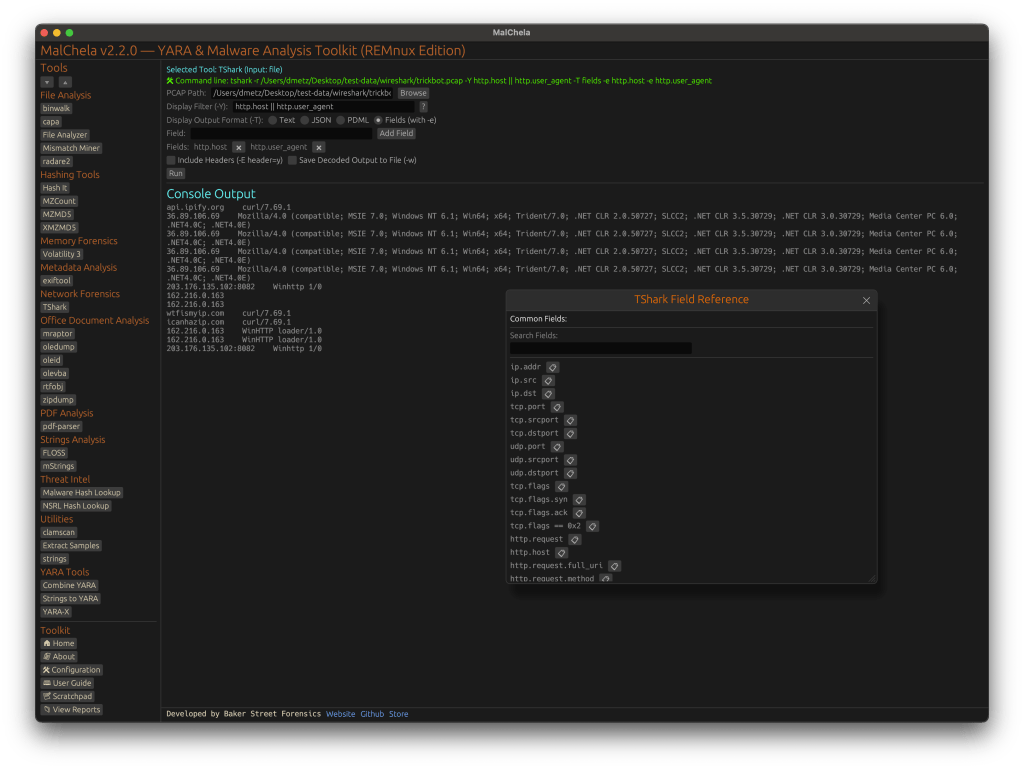
A new TShark integration exposes features including:
- A filter builder panel
- Commonly used fields reference
- Tooltip hints for each example (e.g., `ip.addr == 192.168.1.1` shows “Any traffic to or from 192.168.1.1”)
- One-click copy support
This helps analysts build and understand filters quickly—even if TShark isn’t something they use every day. Using the syntax builder in MalChela you can use the exact commands directly in Tshark or Wireshark.

YARA-X Support (Install Guide Included)
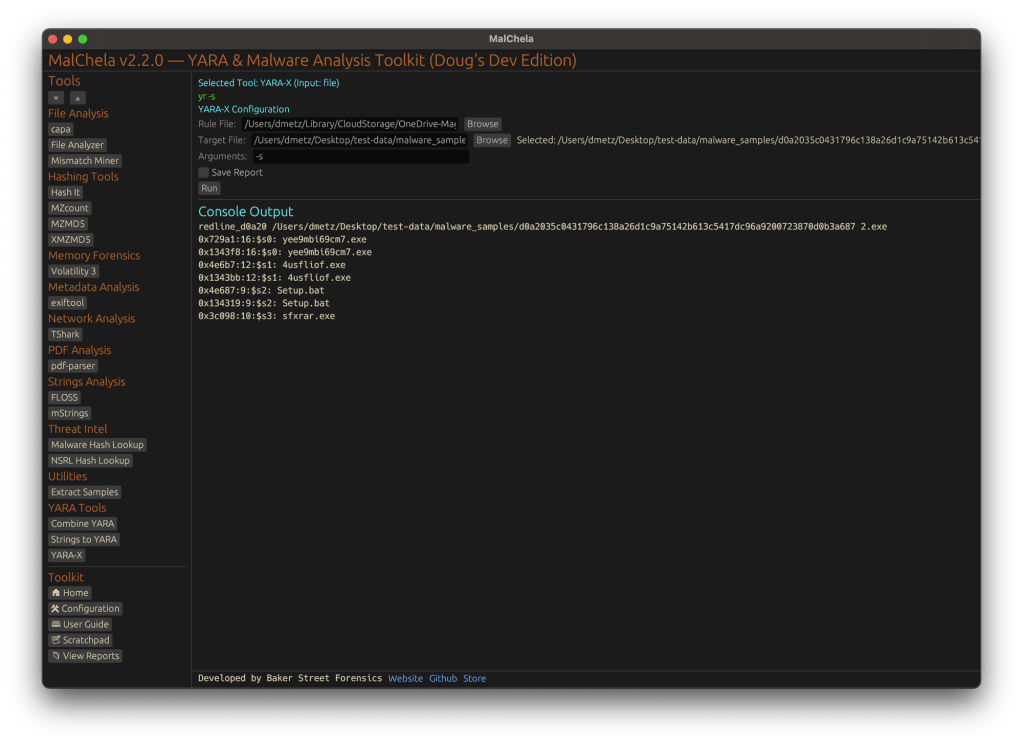
Support for YARA-X (via the `yr` binary) is now built in. YARA-X is not bundled with REMnux by default, but install instructions are included in the User Guide for both macOS and Linux users.
Once installed, MalChela allows for rule-based scanning from the GUI,and with YARA-X, it’s faster than ever.
fileanalyzer: Fuzzy Hashing, PE Metadata, and More
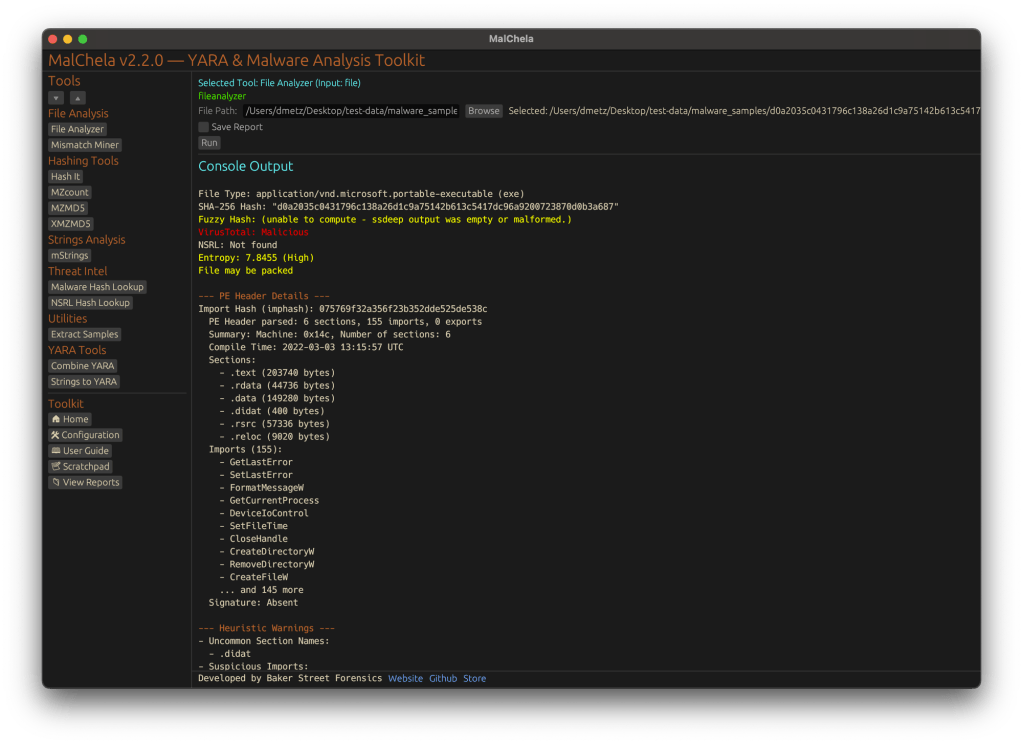
MalChela’s fileanalyzer tool has also been updated to include:
- Fuzzy hashing support via `ssdeep`
- BLAKE3 hashing for fast, secure fingerprints
- Expanded PE analysis, including:
- Import and Export Table parsing (list of imported and exported functions)
- Compilation Timestamp (for detection of suspicious or forged build times)
- Section Characteristics (flags like IMAGE_SCN_MEM_EXECUTE, IMAGE_SCN_CNT_CODE, etc., for detecting anomalous sections)
These improvements provide deeper insight into executable structure, helping analysts detect anomalies such as packers, suspicious timestamps, or unexpected imports/exports. Useful for everything from sample triage to correlation, fileanalyzer now digs deeper—without slowing down.
Memory Forensics Gets a Boost: Volatility 3 Now Supported
With the 2.2 release, MalChela introduces support for Volatility 3, the modern Python-based memory forensics framework. Whether you’re running MalChela in REMnux or on a customized macOS or Linux setup, you can now access the full power of Volatility directly from the MalChela GUI.

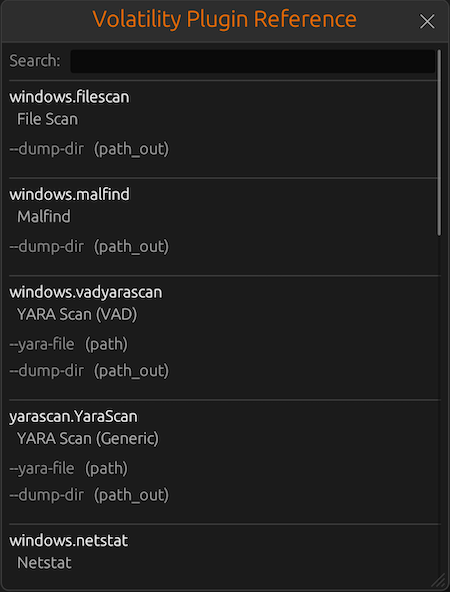
There’s an intuitive plugin selector that dynamically adjusts available arguments based on your chosen plugin,. You can search, sort, and browse available plugins, and even toggle output options like –dump-dir with ease.
Like Tshark, there is an added plugin reference panel with searchable descriptions and argument overviews — a real time-saver when navigating Volatility’s deep and often complex toolset.
Smarter Tool Configuration via YAML
The tool configuration system continues to evolve:
- Tools now declare their input type (file, folder, or hash)
- The GUI dynamically adjusts the interface to match
- Alternate profiles (like REMnux setups) can be managed simply by swapping `tools.yaml` files via the GUI
- Easily backup or restore your custom setups
- Restore the default toolset to get back to basics
This structure helps keep things clean—whether you’re testing, teaching, or deploying in a lab environment.
Embedded Documentation Access
The GUI now includes a link to the full MalChela User Guide in PDF. You can also access the documentation online.
From tool usage and CLI flags to configuration tips and install steps, it’s all just a click away—especially useful in offline environments or when onboarding new analysts. I’ll be honest, this is likely the most comprehensive user guide I’ve ever written.
Whether you’re reviewing binaries, building hash sets, or exploring network captures—MalChela 2.2 is designed bring together the tools you need, and make it easier to interoperate between them.
The new REMnux mode makes it even easier to get up and running with dozens of third party integrations.
Have an idea for a feature or application you’d like to see supported — reach out to me.
GitHub: REMnux Release




 Baker Street Forensics