

One of the things I value most about the open-source community is that the best improvements to a tool often don’t come from inside it — they come from outside conversations. A short while back, the author of mlget, xorhex, reached out and suggested I add more malware retrieval sources to FOSSOR, one of my earlier tools for pulling down samples from threat intel repositories. It was a generous nudge, and it landed at exactly the right moment.
FOSSOR started as a simple script. It did one job — grab malware samples from a handful of sources — and it did it well enough. When I wrote it, I already knew it was a candidate for eventual MalChela integration, but “eventually” had stayed firmly in the future tense. The message from xorhex gave me the push to actually sit down and do it properly.
The result is tiquery — and it’s become a new centerpiece to MalChela 3.2.
The Pattern I Keep Repeating (Deliberately)
If you’ve followed this blog or the MalChela project for a while, you might notice a recurring arc in how my tools tend to develop. It goes something like this:
- Step one: write a focused script that solves a specific problem.
- Step two: that script evolves into a standalone tool as the scope grows.
- Step three: the tool finds its permanent home inside MalChela, where it benefits from the broader ecosystem — case management, the GUI, the MCP server integration, the portable workspace.
- Step four: When there’s overlap between tools, follow the KISS principle.
FOSSOR was in step one. The conversation with xorhex accelerated the jump to step three. What emerged was something more ambitious than just a source expansion — it’s a unified threat intelligence query engine, built from the ground up.
If you’re new to MalChela, it’s a Rust-based malware analysis toolkit built for DFIR practitioners — static analysis, string extraction, YARA rule generation, threat intel lookups, network analysis, and now a unified case management layer tying it all together. Free, open-source, and built to run anywhere.
Introducing tiquery
tiquery is now the single threat intel tool in MalChela, replacing the retired malhash. The core idea is straightforward: submit a hash, query multiple sources in parallel, get a clean color-coded summary back. No waiting for one source to finish before the next one starts. No manually juggling browser tabs or API wrappers.
Out of the box, tiquery works with eight confirmed sources:
- VirusTotal
- MalwareBazaar
- AlienVault OTX
- MetaDefender Cloud
- Hybrid Analysis
- FileScan.IO
- Malshare
- ObjectiveSee (no API key required — queries a locally-cached macOS malware catalogue)
Sources are tiered — free sources and registration-required sources are distinguished in the interface. If you haven’t configured an API key for a given source, tiquery skips it gracefully rather than throwing an error. This means you can run it easily with whatever keys you have available.
The ObjectiveSee integration deserves a special mention. It queries the objective-see.org/malware.html catalogue for macOS-specific threats using a locally-cached copy that refreshes every 24 hours, with a stale-cache fallback for offline use. For anyone doing Mac forensics, this is a meaningful addition — a free, no-key-required check specifically against known macOS malware families.
Tiquery, like FOSSOR, supports batch lookups as well — point it to a .csv or .txt file of hashes and they’ll all be checked in parallel. You can also download samples directly, with MalwareBazaar supported in this release and additional sources on the way – (your vote matters).
What It Looks Like in Practice
The screenshots below show tiquery running in both the CLI and GUI. In both cases, for any of the matching sources you get a basic classification (malware family, tags, detections,) and direct links to threat intelligence documents about the samples. It’s the perfect jumping off point when you want to leverage community research.
The CLI output is clean and tabular — source abbreviation, status (color-coded FOUND/NOT FOUND), family and tag information, detection count, and a direct reference URL. Everything you need to make a quick triage decision, no scrolling through API response JSON required. You can run tiquery CLI as a stand-alone, or from within the MalChela CLI menu.

In the GUI, the experience is layered a bit more richly. You can toggle individual sources on or off, switch between single-hash and bulk lookup modes, download the sample directly from MalwareBazaar, and export results to CSV — all from one interface. The macOS ObjectiveSee source displays its cache age inline so you always know how fresh the data is.
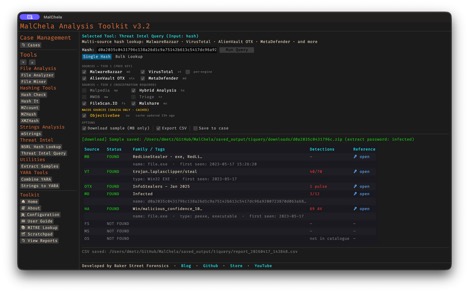
Both outputs feed into MalChela’s case management system. Check “Save to Case” in the GUI, and tiquery creates a valid case.json automatically — no separate case creation step needed.
Extended Case Management Across the Toolkit
Speaking of case management — 3.2 extends “Save to Case” support across the full GUI. File Analyzer, File Miner, and mStrings, all now include the checkbox. This closes out the last gaps in the case workflow. Whatever tool you’re using for a given task, if you want to preserve the output in a named case, it’s one click. You no longer have to start with the New Case workflow, however it is recommended if that’s the direction you’re going from the start.
The Strings to YARA tool also gains a companion “Save to YARA Library” checkbox. Check it, and the generated rule gets copied directly into the project’s yara_rules/ directory alongside being saved to the case. This will automatically make the rule available when you run fileanalyzer on subsequent files. It’s a small workflow improvement, but one that eliminates a manual copy step I was taking every time anyway. I also added a quick formatter so the special character most often in need of escaping “\” gets handled automatically when the rule is generated.
A Note on malhash
malhash is retired in 3.2. If you’ve been using it in scripts or workflows, tiquery is its direct replacement — it does everything malhash did and then some. This is a breaking change in the sense that the binary is gone, but functionally tiquery is a superset, not a lateral move.
malhash served its purpose well. RIP. tiquery is where that purpose lives now.
Get It
MalChela 3.2 is available now on GitHub. The full release notes are in the repo.
Thanks to xorhex for the nudge. Sometimes the best features start with someone saying “have you thought about…”

