I first wrote CyberPipe when I was on the front lines of incident response, driven by the need for more robust and efficient triage collections, whether online or off. Over the years, CyberPipe continues to adapt and improve, addressing the ever-changing challenges faced by incident response practitioners.
CyberPipe (formerly CSIRT-Collect) is a PowerShell script that is designed to streamline the collection of digital evidence using Magnet Response in enterprise environments, ensuring that responders can gather critical data efficiently and effectively. Other features include detection of encrypted drives, BitLocker key recovery, and memory image collection.
The most recent update includes enhancements in three areas: Collection, Capabilities, and Reliability.
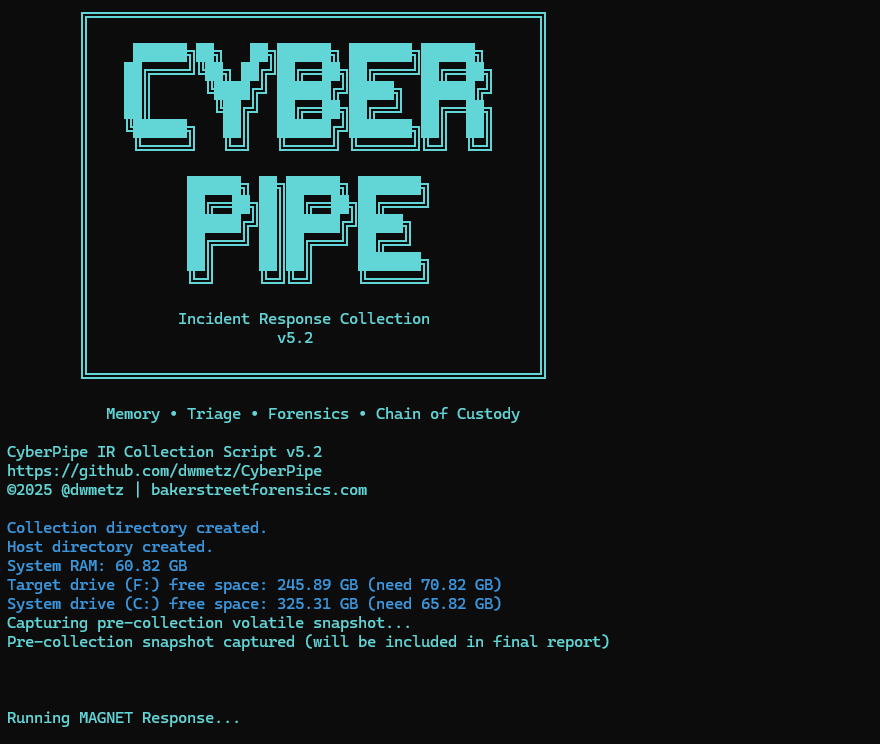
Screenshot of CyberPipe
🔍 What’s New in 5.2
Intelligent Collection
The script now includes dual disk space validation, checking both the target drive and the system drive with profile-aware thresholds to prevent sudden failures due to insufficient space.
A pre-collection volatile snapshot captures uptime, users, connections, and processes to preserve transient state before heavy operations begin.
Reports virtual environment detection (VMware, Hyper-V, VirtualBox, etc.) to help analysts understand collection limitations.
Real-time progress indicators provide accurate size tracking during the collection, offering responders visibility into the remaining data capture.
Enhanced Capabilities
The new QuickTriage profile allows for rapid collection of volatile and system artifacts when time is ticking.
BitLocker recovery now includes all volumes, not just the C: drive.
A single-file report (CyberPipe-Report.txt) consolidates metadata and a summary of collected artifacts in a human-readable format.
All collected artifacts and logs are hashed using SHA-256 to enhance integrity and chain of custody.
Output compression is available via the -Compress flag, aiding in storage and transfer.
Network collection is simplified with the -Net parameter, eliminating the need for manual network path or configuration edits.
Improved Reliability
Profile-aware space checks alert when free space is insufficient for a chosen profile, preventing silent failures.
The script now validates exit codes from MAGNET Response to detect failures more effectively.
Artifact verification after collection ensures that all expected items were gathered.
Error handling and messaging have been refined to provide clearer feedback to the operator.
What I’m hoping this delivers
CyberPipe 5.2 aims to address some challenges observed in real-world triage and live-response operations:
Resilience in constrained environments — dual drive checks and profile awareness help prevent mid-collection failures.
Better transparency and oversight — real-time progress display and post-collection verification enhance confidence.
Faster response options — the QuickTriage profile is suitable when speed is paramount.
Stronger forensic hygiene — SHA-256 hashing, improved error detection, and full-volume BitLocker key recovery contribute to defensibility.
In digital forensics and incident response, reliable storage isn’t a luxury — it’s a requirement. Whether you’re capturing evidence from a live system, processing large data sets with specialized tools, or running a virtual machine in the middle of a case, storage throughput can make or break your workflow.
The challenge? Reported specifications from manufacturers often don’t tell the full story. A drive rated for up to 400 MB/s might only deliver a fraction of that in real-world use. And performance isn’t determined by the drive alone: the quality of your USB cable, the number of hops between your system and the media (direct vs. through a hub), and the system’s own caching behaviors all play a part.
To eliminate the guesswork, I built Crabwise, a simple USB benchmarking utility designed with forensic workflows in mind.
How Crabwise Works
Crabwise calculates read and write speeds by creating a temporary file on the target device and measuring throughput under direct (uncached) conditions.
Write Test: The tool writes a pseudo-random 1 GiB file (size adjustable) to the USB drive in blocks, ensuring that system caching doesn’t skew results.
Read Test: It then reads the file back from the device, again bypassing caches, so the reported numbers reflect device-level throughput rather than RAM speeds.
Progress Feedback: While testing, Crabwise shows real-time percentages and MB/s estimates, so you can spot performance bottlenecks as they happen.
The result is a clean, standardized benchmark of the USB device’s true performance.
Building a Reference Table
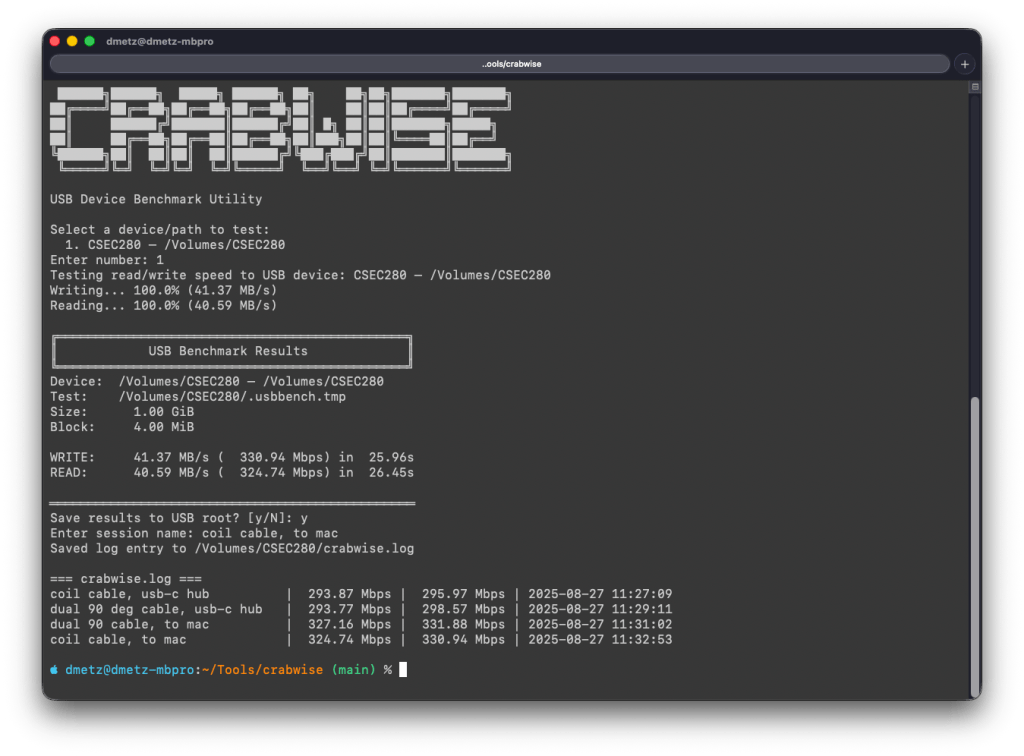
One of the most useful features in Crabwise comes after the test: you’re prompted to save the results to the root of the device. If you choose to do so, Crabwise appends the results to a simple log file called crabwise.log.
Each entry includes:
Session name (you provide this — e.g., “coil cable via hub” or “direct to Mac”),
Read speed,
Write speed,
Timestamp of the test.
When you cat the file, you get an instant side-by-side comparison of your runs:
Over time, this builds into a practical reference table that lets you quickly compare how different cables, hubs, and ports affect performance. What looks like a subtle cabling change can sometimes mean the difference between a VM booting smoothly or crawling.
Closing Thoughts
In forensic and investigative work, you don’t always get to choose the hardware you’re handed — but you can make informed decisions about how you connect and use it. Tools like Crabwise give you a way to validate your environment, document your results, and avoid unpleasant surprises when timing matters most.
Whether you’re testing cables, validating a new hub, or verifying a forensic workstation setup, Crabwise turns USB benchmarking into a repeatable, documented process.
Whether teaching, investigating, or tinkering on the road, there’s an undeniable appeal to a device that’s self-contained, headless, and versatile enough to support forensic analysis, malware triage, and field acquisition. That idea became the seed for Toby — a Raspberry Pi Zero 2 W–based micro-rig that can be managed from an iPad or mobile device.
It started off with a “what could I do with at Raspberry Pi” and the final result: a fully functional, go-anywhere forensics toolkit that fits in the palm of your hand, carefully packed into a Grid-It travel kit and loaded with purpose.
Why Build Toby?
Toby wasn’t born from necessity. It came from a blend of curiosity, constraint, and the spirit of joyful overengineering. The goal wasn’t just to get Kali Linux running on a Pi — that’s been done. The challenge was in how much capability could be packed into a minimalist footprint without compromising on control, security, or style.
Some driving goals from the outset:
Headless-first: Must be operable via SSH, or VNC — no screen needed.
Kali-based: Full access to familiar forensic and pentest tooling.
Discreet and functional: Everything should be secure, practical, and stowable.
Modular connectivity: USB OTG, video capture, remote keyboard/mouse, and VPN support all needed to be viable.
Portable power: Run from a battery pack for field ops or demo use without dependency on AC power.
Hardware Selection
Raspberry Pi Zero 2 W
The Pi Zero 2 W hits a sweet spot. It has enough power to run full Kali and perform triage analysis, especially with swap and careful headless tuning. It supports USB OTG and can be powered over micro-USB, making it ideal for lightweight builds.
Grid-It Travel Kit: The Physical Layout
Instead of housing the components in a fixed enclosure, I opted for flexibility: a Grid-It organizer sleeve. It allows each cable and tool to remain accessible and secured via elastic straps — perfect for quick swaps or field reconfiguration.
The current loadout includes:
Raspberry Pi Zero 2 W
HDMI mini to full adapter (for display recovery if needed)
USB micro to USB-C adapter combo (for powering Pi from laptop, iPad, or battery pack)
Anker battery pack (portable, long runtime)
Wireless keyboard (compact; paired via Bluetooth or USB receiver)
USB capture device (used for teaching, demoing webcam/VNC sessions)
Short USB OTG cable
The setup is light, self-contained, and TSA-friendly — a true digital go-bag for the forensically inclined.
Portable Power
Toby can be powered from the USB port of an iPad or from a battery pack or AC adapter, making it extremely flexible for field use.
Toby powered from iPad Pro
Toby powered from portable battery
Software
The OS is a clean, headless Kali Linux image configured specifically for ARM on the Pi Zero 2 W. Rather than trying to turn it into a desktop experience (even though it can), it boots fast, runs lean, and drops me directly into a terminal where I can get to work — whether over SSH or local keyboard.
Core Components:
• Base image: Raspbian (Debian-based) with Kali tools manually installed
Metapackages:
kali-linux-forensic
kali-linux-desktop
core/default Kali utilities and command-line tools, incrementally layered until the system was functionally equivalent to a full Kali install (minus unnecessary services)
One of Toby’s handiest features isn’t a tool you run—it’s a tool to remember tools. toby-find is a simple but powerful command-line helper built into the system. It gives you fast access to a curated list of CLI forensics tools available on Toby, along with short descriptions and usage tips.
It’s like having a searchable cheat sheet, always available—perfect for field use when memory is fuzzy or connectivity is limited.
toby-find utility
What It Does
When you run:
toby-find [keyword]
it will search the help file for any tool(s) mentioning the keyword in name or description, and provide back a simple command syntax for each tool.
Example:
dwmetz@toby:~$ toby-find strings

Tool:        mstrings
Description: Extracts printable strings from files and maps them to MITRE ATT&CK techniques.
Example:     mstrings suspicious.exe
Category:    Malware
--------------------------------------------------
Tool:        strings_to_yara
Description: Generates a basic YARA rule from strings gathered manually or via mstrings.
Example:     strings_to_yara
Category:    Malware
--------------------------------------------------
Tool:        floss
Description: Extracts obfuscated strings from malware binaries.
Example:     floss suspicious.exe
Category:    Forensics
--------------------------------------------------
Tool:        rephrase
Description: Analyzes and reformats strings from documents or binaries.
Example:     rephrase input.txt
Category:    Forensics
--------------------------------------------------
Installed Tools:
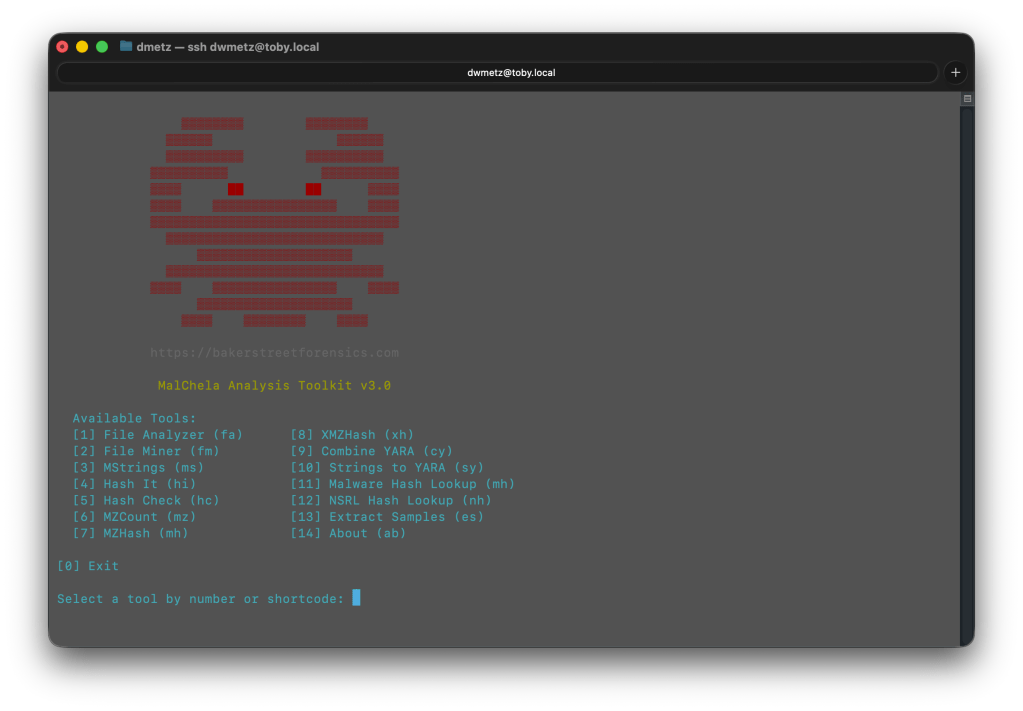
Many of the tools are native to Kali, but some, including MalChela, were compiled manually or added through custom scripts. (Bold == MalChela tools or custom scripts.)
Tool Name
Description
bat
Cat replacement with syntax highlighting and Git integration.
binwalk
Scans binaries for embedded files and executable code.
bulk_extractor
Extracts artifacts like emails and credit card numbers from disk images.
combine_yara
Combines multiple YARA rule files into a single merged rule set.
dff
Digital Forensics Framework with CLI and GUI modes.
dig
Performs DNS lookups to retrieve domain IPs and records.
exiftool
Displays metadata from images, PDFs, and other file types.
extract_samples
Extracts files from password-protected ZIP and RAR archives.
fileanalyzer
Analyzes file metadata, headers, and hashes to assist triage and detection.
fileminer
Recursively scans a directory for files of interest based on extensions and type.
floss
Extracts obfuscated strings from malware binaries.
foremost
Recovers deleted files from disk images using file carving.
hashcheck
Computes multiple cryptographic hashes and prints them side-by-side.
hashdeep
Generates and verifies file hashes for entire directories.
hashit
Quickly generate MD5, SHA1, SHA256, and SHA512 hashes of a file.
htop
Interactive system monitor showing real-time process usage.
ipcalc
Performs subnet calculations for IP ranges.
ipstatus
Shows interface configuration and public IP address.
malchela
Main CLI launcher for the MalChela forensic toolkit, with a menu-driven interface.
malhash
Looks up file hashes using VirusTotal and MalwareBazaar.
mosh
SSH replacement that maintains session state during roaming.
mstrings
Extracts printable strings from files and maps them to MITRE ATT&CK techniques.
mzcount
Tallies file extensions and MIME types in a directory.
mzhash
Recursively hash all files in a directory using MD5.
ncdu
Disk usage analyzer with an interactive interface.
nmap
Performs host discovery and port scanning on a network.
nsrlquery
Checks file hashes against the National Software Reference Library.
p0f
Performs passive OS fingerprinting from live network traffic.
reglookup
Queries Windows Registry hives from the command line.
regripper
Extracts and parses registry artifacts using Perl-based plugins.
rephrase
Analyzes and reformats strings from documents or binaries.
rifiuti2
Parses Windows Recycle Bin INFO2 files for forensic analysis.
rkhunter
Scans the system for known rootkits and suspicious behavior.
rsakeyfind
Searches RAM dumps for RSA private key patterns.
safecopy
Recovers data from damaged or unstable storage media.
samdump2
Extracts password hashes from Windows SAM files.
scalpel
Performs file carving on disk images using headers/footers.
screen
Terminal window manager similar to tmux.
scrounge-ntfs
Recovers deleted files from NTFS file systems.
speed
Performs a network speed test from the command line.
ssh
Standard secure shell for remote command-line access.
Generates a basic YARA rule from strings gathered manually or via mstrings.
tcpdump
Captures and displays raw network packets in real time.
tmux
Terminal multiplexer for managing multiple sessions.
toby-find
Lists available tools and examples installed on the Toby system.
truecrack
Attempts to brute-force passwords for TrueCrypt volumes.
tshark
Terminal version of Wireshark for packet capture and filtering.
undbx
Extracts messages from Outlook Express DBX mailboxes.
unar
Extracts files from .rar and other archives.
unhide
Detects hidden processes and tasks in Linux systems.
upx
Compresses or decompresses executable files.
uptime
Displays system uptime and load averages.
vinetto
Parses thumbnail caches from Internet Explorer and Firefox.
vnc-off
Stops the running VNC session.
vnc-on
Starts a VNC server session for remote desktop access.
volatility3
Memory forensics framework for analyzing RAM dumps.
vpn-off
Stops the active OpenVPN session.
vpn-on
Starts the OpenVPN client using the configured lab connection.
winregfs
Mounts Windows Registry hives as a read-only virtual filesystem.
xmount
Converts between forensic image formats (e.g. EWF to RAW).
xmzhash
Recursively hash all files in a directory using MD5, SHA1, and SHA256.
This setup enables lightweight static analysis, file triage, memory inspection, and network capture — all from a Pi that fits in a Altoids case.
Build Process (Step by Step)
1. Flashing and First Boot
Using the Raspberry Pi Imager, I selected the ARM64 Raspbian image, added SSH and Wi-Fi credentials, and flashed the SD card.
Tip: The “advanced” options in Raspberry Pi Imager let you configure headless behavior up front, saving time on first boot.
2. Swap, Networking, and System Setup
The Pi Zero 2 W is modest on RAM — just 512MB — so swap is essential. I configured a persistent 2GB file-based swap at /swapfile, which gave the system enough breathing room to compile, run heavier tools, and avoid out-of-memory crashes during extended sessions.
Networking is Wi-Fi-only, so multiple SSIDs were configured using wpa_supplicant.conf for home and hotspot SSIDs. VPN has also been configured for remote access to my home malware lab.
3. Building and Installing MalChela
I cloned the full MalChela repository directly and compiled tool-by-tool:
cd MalChela
for tool in fileanalyzer mstrings hashcheck extract_samples ...; do
  cargo build --release -p $tool
done
4. Screen Choices
In addition to headless-mode, you can use a typical keyboard/monitor/mouse setup, for either cli mode or full gui.
The Pi Zero 2 W supports HDMI output via its mini-HDMI port, so you can plug it directly into any monitor or TV using a mini-HDMI to HDMI cable or adapter. For true portability, I needed something more flexible that didn’t require me packing a separate screen.
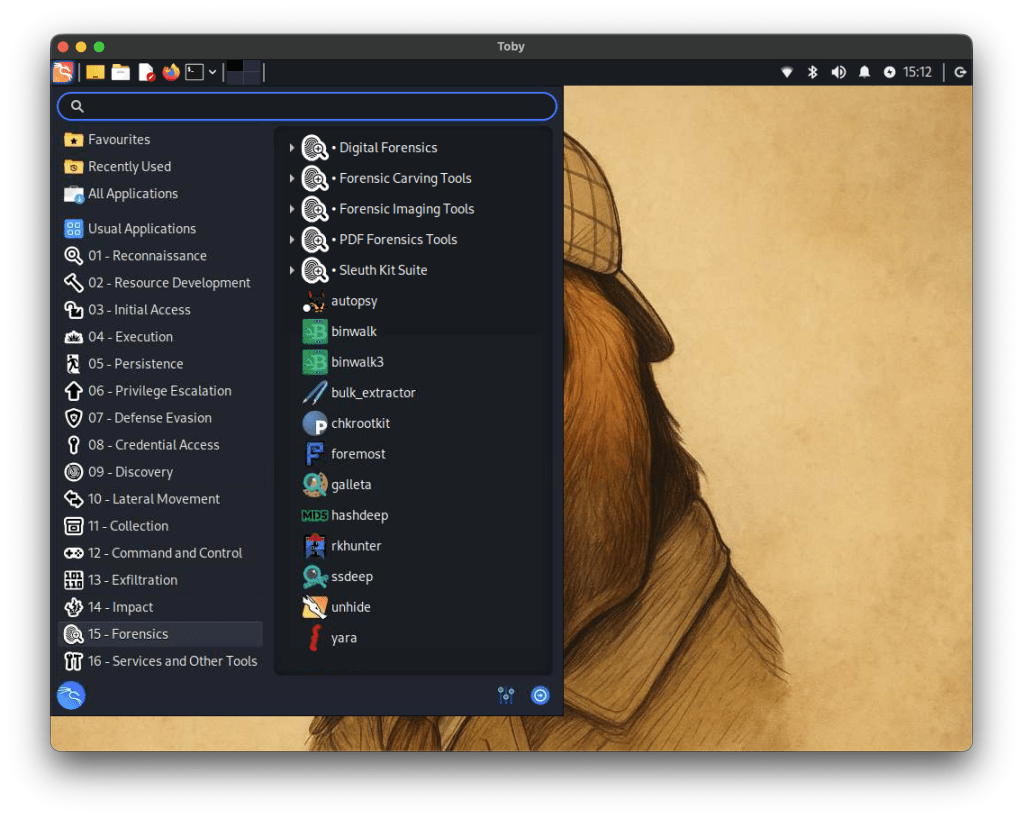
Toby running in desktop mode
To solve this, I added a compact USB-based HDMI capture device to the kit. It effectively turns any mobile device into a live monitor. By connecting Toby’s HDMI out to the capture card and plugging it into my iPad or iPhone, I can preview the Pi’s screen on the go. This setup also works with OBS, QuickTime, or dedicated capture apps for recording demos or screen sessions — handy for teaching or documenting tool usage.
Input is handled with a small wireless Bluetooth keyboard, which pairs cleanly with Toby for direct control. This combo — Pi output through HDMI capture and keyboard input via Bluetooth — lets me interact with Toby completely untethered.
In practice, I rarely need the GUI. But when I do, this setup lets me bring it up quickly without dragging along a dedicated screen.
Final Result: What Toby Can Do
Toby isn’t just a cute Pi rig with a name. It’s a real tool, and its current feature set reflects that.
💼 Mobile Forensics Platform
Mount, triage, and scan USB drives with fileanalyzer
Run YARA scans and generate custom rules from strings
Look up hashes via VirusTotal, MalwareBazaar, and NSRL
Analyze memory dumps with Volatility 3 (including plugin selection)
Run offline IOCs scans via mstrings or custom shell scripts
What’s Next for Toby
Building Toby was an exercise in maximizing power in a small footprint through deliberate choices. For educators, students, and curious tinkerers, Toby proves that hands-on, portable, and fun learning and teaching forensics can be achieved. If you’re building your own, start with what you have: a Pi, a Grid-It, and your imagination. Sometimes, the best tools aren’t the ones with the biggest screens or fastest chips—they’re the ones you have with you.
I’m already thinking about upgrades. One in consideration is a case upgrade, a true lunchbox-style metal enclosure — something retro and rugged, with a small screen inside the lid.
Let me know in the comments if you’d like a public release of toby-find as an add-on to install for Kali builds for forensics and malware analysis.
At this point, we’ve all heard the expression ‘There is no cloud; It’s just someone else’s computer.’ While there is some truth to that, there are some fundamental differences when it comes to digital forensics when cloud resources are part of the investigation.
I’ve been doing DFIR for about 15 years now. In the early days, almost all investigations involved having hands on access to the data or devices being investigated. As I moved into Enterprise Incident Response, it became more and more frequent that the devices I would be investigating would be in a remote location, be it another state – or even another country. As the scope of my investigations grew, so did my techniques need to evolve and adapt.
Cloud Forensics is the next phase of that evolution. While the systems under investigation may still be in another state or country, extra factors come into play like multi-tenancy and shared responsibility models. Cloud Forensics Demystified does a solid job of shedding light on those nuances.
The book is divided into three parts.
Part 1: Cloud Fundamentals
Part 2: Forensic Readiness: Tools, Techniques, and Preparation for Cloud Forensics
Part 3: Cloud Forensic Analysis: Responding to an Incident in the Cloud
Part 1: Cloud Fundamentals
This section provides a baseline knowledge of the three major cloud providers, Amazon Web Services (AWS), Google Cloud Platform (GCP) and Microsoft Azure. It breaks down the different architectural components of each, and how the platforms each handle the functions of virtual systems, networking and storage.
Part 1 also includes a broad yet thorough introduction to the different Cyber and Privacy legislation that come into play for cloud investigations. This section is not only valuable to investigators. Whether you’re a lawyer providing legal counsel for an organization, or responsible for an organizations overall security at a CISO level, this material is beneficial in understanding the challenges and responsibilities that come from hosting your data or systems in the cloud, and the different legislation and regulations that follow those choices.
Part 2: Forensic Readiness: Tools, Techniques, and Preparation for Cloud Forensics
As with enterprise investigations, logging is often where the hunting for incident indicators begins with telemetry and the correlation of different log sources. This section focuses on the different log sources available in AWS, GCP, and Azure. It also provides a detailed list of log types that are enabled by default and those that require manual activation to ensure that you have access to the most relevant data for your investigations when an incident occurs. This section also covers the different providers offerings for log analysis in the cloud including AWS Cloud Watch, Microsoft Sentinel and Google’s Cloud Security Command Center (Cloud SCC) as examples.
Part 3: Cloud Forensic Analysis: Responding to an Incident in the Cloud
As an Incident Responder, this was the section I enjoyed the most. While the first two sections are foundational for understanding the architectures of networking and storage, part three provides detailed information on how to acquire evidence for cloud investigations. The section covers both log analysis techniques as well as recommendations for host forensics and memory analysis tools. The book covers the use of commercial forensic suites, like Magnet Axiom, as well as open-source tools like CyLR and HAWK. Besides covering investigations of the three Cloud Service Providers (CSPs), there is also a section covering the cloud productivity services of Microsoft M365 and Google Workspace, as well as a brief section on Kubernetes.
Summary
Whether you’re a gray-haired examiner like me, or a neophyte in the world of digital forensics, chances are high that if you’re not running investigations in the cloud yet – you will be soon enough. Preparation is the first step in the Incident Response lifecycle. To properly prepare for incidents you need to know both what sources will be most informative to your investigations, as well as the methodology to capture and process that evidence efficiently.
Cloud Forensics Demystified is a comprehensive guide that covers cloud fundamentals, forensic readiness, and incident response. It provides valuable insights into cloud investigation techniques, log analysis, and evidence acquisition for major cloud providers and productivity services. The book is valuable for both experienced and novice digital forensics professionals to prepare for cloud investigations.






 Baker Street Forensics