Understanding adversary behavior is core to modern forensics and threat hunting. With the release of MalChela 3.0.2, I’ve added a new tool to your investigative belt: MITRE Lookup — a fast, offline way to search the MITRE ATT&CK framework directly from your MalChela workspace.
Whether you’re triaging suspicious strings, analyzing IOCs, or pivoting off YARA hits, MalChela can now help you decode tactics, techniques, and procedures without ever leaving your terminal or GUI. MITRE Lookup is powered by a local JSON snapshot of the ATT&CK framework (Enterprise Matrix), parsed at runtime with support for fuzzy searching and clean terminal formatting. No internet required.
What It Does
The MITRE_lookup tool lets you:
Search by Technique ID (e.g., T1027, T1566.001)
Search by topic or keyword (e.g., ‘RDP’, ‘Wizard Spider’)
Get tactic category, platforms, and detection guidance
Optionally include expanded content with the –full flag
Use from the CLI, MalChela launcher, or GUI modal
Example:
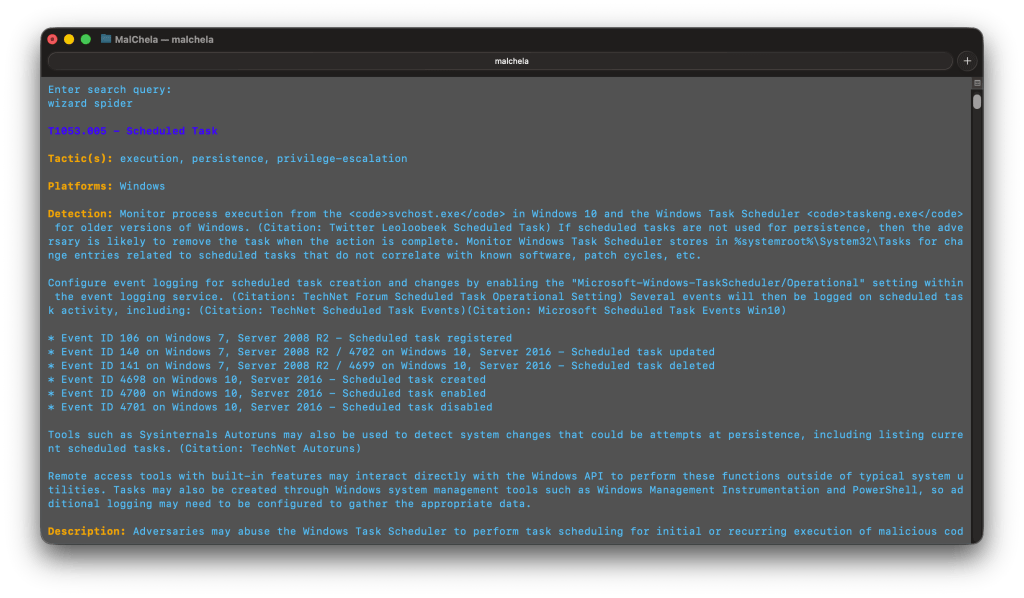
$ ./target/release/MITRE_lookup -- T1059.003
T1059.003 - Windows Command Shell
Tactic(s): execution
Platforms: Windows
Detection: Usage of the Windows command shell may be common on administrator, developer, or power user systems depending on job function. If scripting is restricted for normal users, then any attempt to enable scripts running on a system would be considered suspicious. If scripts are not commonly used on a system, but enabled, scripts running out of cycle from patching or other administrator functions are suspicious. Scripts should be captured from the file system when possible to determine their actions and intent...
MITRE Lookup (CLI)
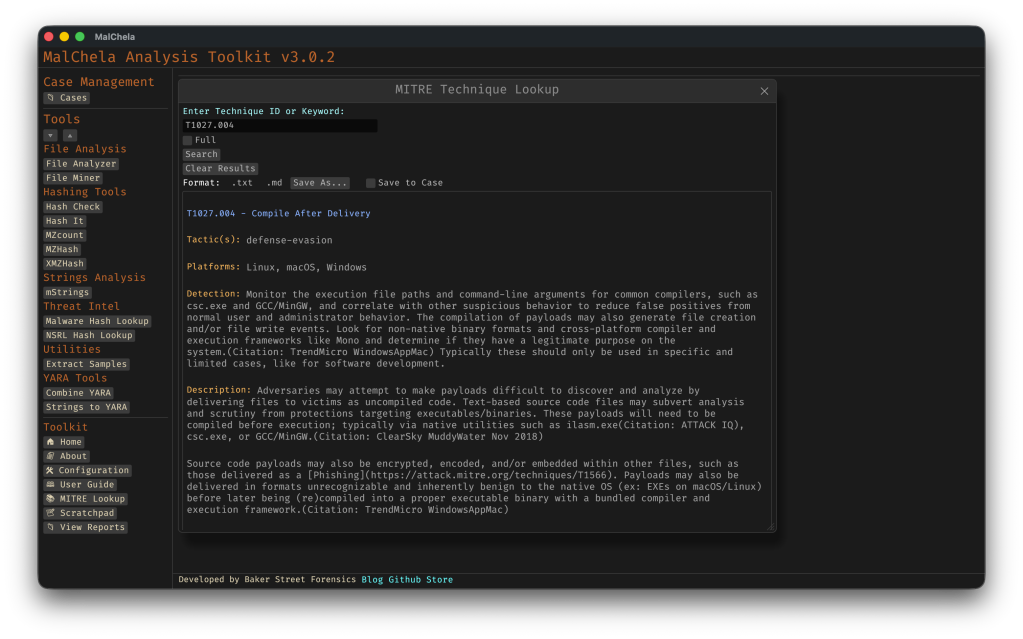
GUI Integration
Select MITRE Lookup in the left-hand Toolbox menu
Use the input field at the top of the modal to enter a keyword or technique ID (e.g., `T1059` or `registry`)
Use the “Full” checkbox for un-truncated output
“Save to Case” option
Saving for Later
You can save MITRE Lookup results directly from the GUI, either as a standalone markdown file to a designated folder, or into the active Case Notes panel for later reference. This makes it easy to preserve investigative context, cite specific TTPs in reports, or build a threat narrative across multiple tools. The saved output uses clean Markdown formatting — readable in any editor or compatible with case management platforms. This feature is already live in v3.0.2 and will evolve further with upcoming case linkage support.
Markdown view of a MITRE_lookup report
Why MITRE ATT&CK in MalChela?
MalChela already focuses on contextual forensics — understanding not just what an artifact is, but why it matters. By embedding MITRE ATT&CK into your daily toolchain:
You reduce pivot fatigue from switching between tools/web tabs
You boost investigation speed during triage and reporting
You enable a more threat-informed analysis process
Whether you’re tagging findings, crafting YARA rules, or writing case notes, the MITRE integration helps turn technical output into meaningful insight — all from within the MalChela environment.
In digital forensics, we often take a toolbox approach — success hinges on having the right tool for the job. Some tools offer broad functionality, while others are deeply specialized. Distributions like KALI and REMnux do a fantastic job bundling a wide range of forensic and security tools, but keeping track of what’s actually installed can be a challenge.
If you’re using a graphical interface, browsing through available packages is fairly intuitive. But when you’re living in the terminal — as many analysts do — that discoverability disappears. There’s no built-in index of command-line tools or how to invoke them.
The first version of Toby-Find was born out of necessity. I teach a Network Forensics course at the university, using a custom VM loaded with tools like Zeek, Tshark, Suricata, and more. I wanted students to have an easy, searchable way to see what CLI tools were available and how to run them — without needing to memorize commands or dig through man pages.
Later, when I built Toby (a forensic-focused Raspberry Pi rig running a customized KALI install), I updated Toby-Find to include the complete CLI toolset geared toward forensics and malware analysis from the KALI ecosystem.
And because I can’t leave well enough alone, I decided to build a REMnux-compatible version too.
⸻
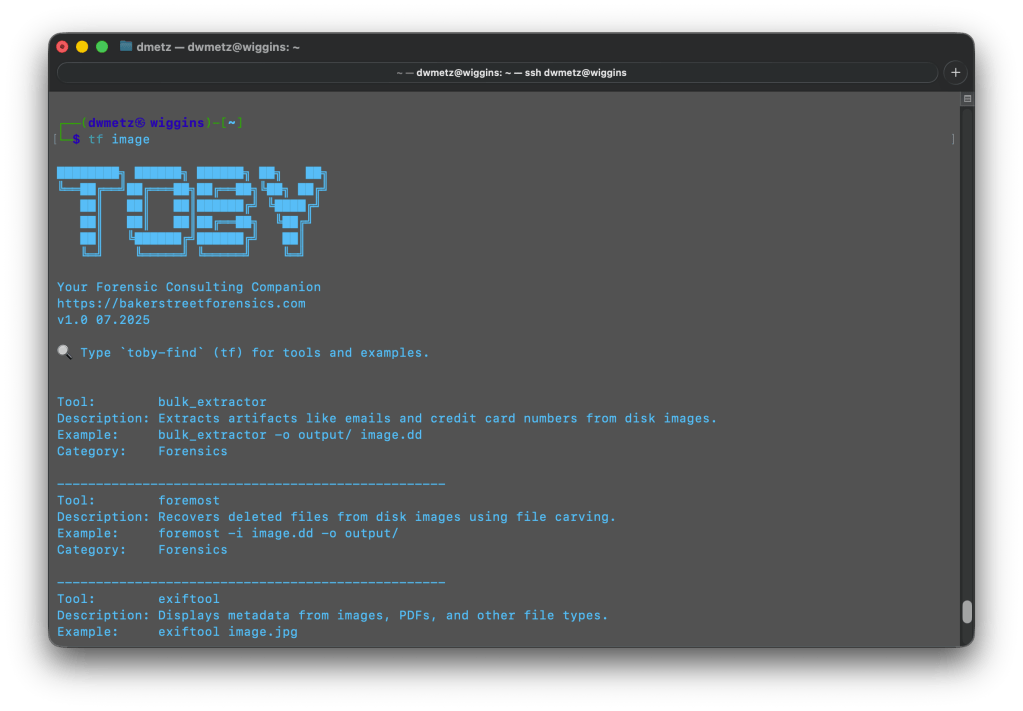
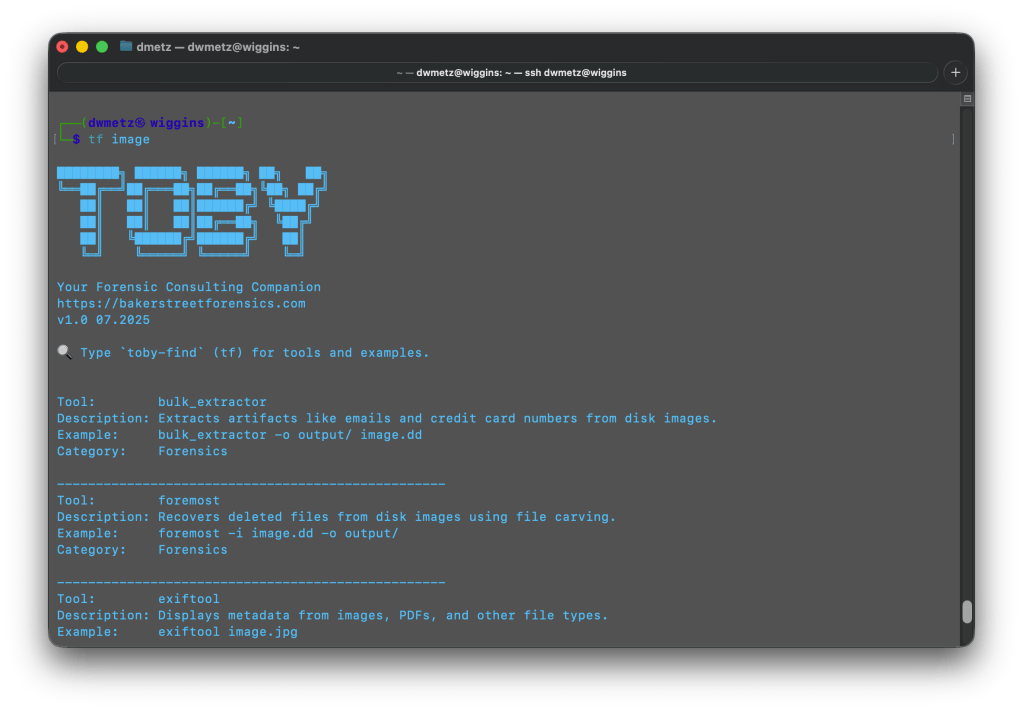
Once installed, you can launch Toby-Find (via tf, toby-find, or tf-help) from any terminal and instantly search for tools, descriptions, examples, and more.
Toby-Find on REMnux
Toby-Find on Kali
⸻
📦 Installation
1. Clone the repository:
git clone https://github.com/dwmetz/Toby.git
2. Make the install script executable:
cd Toby
chmod +x install.sh
3. Run the installer:
./install.sh
4. Follow the prompt to choose your environment (KALI or REMnux) 5. Open a new terminal or run:
source ~/.bashrc # or ~/.zshrc depending on shell
🚀 Usage
tf [keyword]
Examples:
tf yara
tf volatility
tf hash
To view the full list:
tf-help
Whether you’re working from a custom VM, a rugged Pi, or a hardened REMnux box, Toby-Find gives you a fast, terminal-friendly way to surface the tools at your disposal — without breaking focus. It’s lightweight, portable, and easy to extend for your own lab or classroom.
You can grab the full installer from GitHub, and contributions are always welcome. If you find it helpful — or build on it — I’d love to hear about it.
It’s a strange but satisfying feeling to hit version 3.0, then realize soon after you’re already back in the weeds fixing, refining, and optimizing. That’s what this 3.0.1 release is all about — a tight round of updates aimed at boosting clarity and cutting noise, especially when running mStrings or working within the FileMiner panel. Additionally, a number of optimizations came about in getting MalChela to run smoothly on Toby, and to minimize any unnecessary re-building of the binaries. This post walks through what’s new and improved.
🧠 Smarter Detections in mStrings
The mstrings tool — one of the most feature-rich in the toolkit — got a round of refinements:
Generic Executable detection removed: This was too noisy and matched a lot of clean files. It’s been replaced by more focused patterns.
Suspicious DLLs now detected more precisely: Legit Windows DLLs like ole32.dll and gdiplus.dll are now excluded unless they’re paired with indicators like GetProcAddress, LoadLibrary, or manual syscall patterns.
Rule cleanup and expansion: Several detections were removed, refined, or added (like packer stubs and dropper markers) to better target actual malicious behavior.
Tighter MITRE mapping: Each detection is now carefully aligned to a corresponding MITRE ATT&CK technique, often down to the sub-technique level.
If you’ve ever run mstrings and felt unsure which hits mattered most — or got buried in generic noise — this update should feel much cleaner.
Reminder: You can easily update the detection criteria by modifying detections.yaml.
Have a detection to contribute to the project?Submit a pull request.
🔍Built-In MITRE Lookup (GUI)
If a detection shows a MITRE ID like T1082, you can now look it up directly inside the GUI. The new MITRE Lookup Bar sits at the top of the config panel (only when running mstrings). Paste a technique ID, hit Lookup, and it’ll open the official MITRE ATT&CK page in your browser.
🗂️ FileMiner Improvements
The FileMiner GUI panel saw some polish too:
“Select All” functionality: You can now batch-run tools across multiple matching files in a case — a huge time-saver during triage.
🧰 Build and Setup Updates
Two quick notes for folks cloning the repo for the first time:
The release.sh script now builds all binaries in release mode — one command to build everything cleanly.
Docs and README were updated to recommend building in –release mode from the start, especially for smoother GUI usage.
🧪 Platform Testing
Confirmed functional on:
macOS (Silicon)
Ubuntu (Desktop and minimal)
REMnux (custom REMnux tools.yaml)
Raspberry Pi (Zero 2W and 4B)
Windows via WSL (CLI)
Still some quirks with native Windows support due to YARA compatibility and pathing, but if you’re a Windows power user and want to pitch in, I’d love your help.
💭 Final Thoughts
MalChela isn’t trying to replace your favorite tools — it’s trying to bundle them in ways that save time, reveal context, and give you clarity during analysis. The 3.0.1 release doesn’t bring sweeping new features, but it does make the experience tighter, more predictable, and more useful where it counts.
As always, thanks to those who’ve tested it, given feedback, or just watched quietly from the shadows. 🕵️♂️ If you want to contribute — whether it’s rules, regex, docs, or bugs — you’ll find me at dwmetz/MalChela.
Whether teaching, investigating, or tinkering on the road, there’s an undeniable appeal to a device that’s self-contained, headless, and versatile enough to support forensic analysis, malware triage, and field acquisition. That idea became the seed for Toby — a Raspberry Pi Zero 2 W–based micro-rig that can be managed from an iPad or mobile device.
It started off with a “what could I do with at Raspberry Pi” and the final result: a fully functional, go-anywhere forensics toolkit that fits in the palm of your hand, carefully packed into a Grid-It travel kit and loaded with purpose.
Why Build Toby?
Toby wasn’t born from necessity. It came from a blend of curiosity, constraint, and the spirit of joyful overengineering. The goal wasn’t just to get Kali Linux running on a Pi — that’s been done. The challenge was in how much capability could be packed into a minimalist footprint without compromising on control, security, or style.
Some driving goals from the outset:
Headless-first: Must be operable via SSH, or VNC — no screen needed.
Kali-based: Full access to familiar forensic and pentest tooling.
Discreet and functional: Everything should be secure, practical, and stowable.
Modular connectivity: USB OTG, video capture, remote keyboard/mouse, and VPN support all needed to be viable.
Portable power: Run from a battery pack for field ops or demo use without dependency on AC power.
Hardware Selection
Raspberry Pi Zero 2 W
The Pi Zero 2 W hits a sweet spot. It has enough power to run full Kali and perform triage analysis, especially with swap and careful headless tuning. It supports USB OTG and can be powered over micro-USB, making it ideal for lightweight builds.
Grid-It Travel Kit: The Physical Layout
Instead of housing the components in a fixed enclosure, I opted for flexibility: a Grid-It organizer sleeve. It allows each cable and tool to remain accessible and secured via elastic straps — perfect for quick swaps or field reconfiguration.
The current loadout includes:
Raspberry Pi Zero 2 W
HDMI mini to full adapter (for display recovery if needed)
USB micro to USB-C adapter combo (for powering Pi from laptop, iPad, or battery pack)
Anker battery pack (portable, long runtime)
Wireless keyboard (compact; paired via Bluetooth or USB receiver)
USB capture device (used for teaching, demoing webcam/VNC sessions)
Short USB OTG cable
The setup is light, self-contained, and TSA-friendly — a true digital go-bag for the forensically inclined.
Portable Power
Toby can be powered from the USB port of an iPad or from a battery pack or AC adapter, making it extremely flexible for field use.
Toby powered from iPad Pro
Toby powered from portable battery
Software
The OS is a clean, headless Kali Linux image configured specifically for ARM on the Pi Zero 2 W. Rather than trying to turn it into a desktop experience (even though it can), it boots fast, runs lean, and drops me directly into a terminal where I can get to work — whether over SSH or local keyboard.
Core Components:
• Base image: Raspbian (Debian-based) with Kali tools manually installed
Metapackages:
kali-linux-forensic
kali-linux-desktop
core/default Kali utilities and command-line tools, incrementally layered until the system was functionally equivalent to a full Kali install (minus unnecessary services)
One of Toby’s handiest features isn’t a tool you run—it’s a tool to remember tools. toby-find is a simple but powerful command-line helper built into the system. It gives you fast access to a curated list of CLI forensics tools available on Toby, along with short descriptions and usage tips.
It’s like having a searchable cheat sheet, always available—perfect for field use when memory is fuzzy or connectivity is limited.
toby-find utility
What It Does
When you run:
toby-find [keyword]
it will search the help file for any tool(s) mentioning the keyword in name or description, and provide back a simple command syntax for each tool.
Example:
dwmetz@toby:~$ toby-find strings
Tool: mstrings
Description: Extracts printable strings from files and maps them to MITRE ATT&CK techniques.
Example: mstrings suspicious.exe
Category: Malware
--------------------------------------------------
Tool: strings_to_yara
Description: Generates a basic YARA rule from strings gathered manually or via mstrings.
Example: strings_to_yara
Category: Malware
--------------------------------------------------
Tool: floss
Description: Extracts obfuscated strings from malware binaries.
Example: floss suspicious.exe
Category: Forensics
--------------------------------------------------
Tool: rephrase
Description: Analyzes and reformats strings from documents or binaries.
Example: rephrase input.txt
Category: Forensics
--------------------------------------------------
Installed Tools:
Many of the tools are native to Kali, but some, including MalChela, were compiled manually or added through custom scripts. (Bold == MalChela tools or custom scripts.)
Tool Name
Description
bat
Cat replacement with syntax highlighting and Git integration.
binwalk
Scans binaries for embedded files and executable code.
bulk_extractor
Extracts artifacts like emails and credit card numbers from disk images.
combine_yara
Combines multiple YARA rule files into a single merged rule set.
dff
Digital Forensics Framework with CLI and GUI modes.
dig
Performs DNS lookups to retrieve domain IPs and records.
exiftool
Displays metadata from images, PDFs, and other file types.
extract_samples
Extracts files from password-protected ZIP and RAR archives.
fileanalyzer
Analyzes file metadata, headers, and hashes to assist triage and detection.
fileminer
Recursively scans a directory for files of interest based on extensions and type.
floss
Extracts obfuscated strings from malware binaries.
foremost
Recovers deleted files from disk images using file carving.
hashcheck
Computes multiple cryptographic hashes and prints them side-by-side.
hashdeep
Generates and verifies file hashes for entire directories.
hashit
Quickly generate MD5, SHA1, SHA256, and SHA512 hashes of a file.
htop
Interactive system monitor showing real-time process usage.
ipcalc
Performs subnet calculations for IP ranges.
ipstatus
Shows interface configuration and public IP address.
malchela
Main CLI launcher for the MalChela forensic toolkit, with a menu-driven interface.
malhash
Looks up file hashes using VirusTotal and MalwareBazaar.
mosh
SSH replacement that maintains session state during roaming.
mstrings
Extracts printable strings from files and maps them to MITRE ATT&CK techniques.
mzcount
Tallies file extensions and MIME types in a directory.
mzhash
Recursively hash all files in a directory using MD5.
ncdu
Disk usage analyzer with an interactive interface.
nmap
Performs host discovery and port scanning on a network.
nsrlquery
Checks file hashes against the National Software Reference Library.
p0f
Performs passive OS fingerprinting from live network traffic.
reglookup
Queries Windows Registry hives from the command line.
regripper
Extracts and parses registry artifacts using Perl-based plugins.
rephrase
Analyzes and reformats strings from documents or binaries.
rifiuti2
Parses Windows Recycle Bin INFO2 files for forensic analysis.
rkhunter
Scans the system for known rootkits and suspicious behavior.
rsakeyfind
Searches RAM dumps for RSA private key patterns.
safecopy
Recovers data from damaged or unstable storage media.
samdump2
Extracts password hashes from Windows SAM files.
scalpel
Performs file carving on disk images using headers/footers.
screen
Terminal window manager similar to tmux.
scrounge-ntfs
Recovers deleted files from NTFS file systems.
speed
Performs a network speed test from the command line.
ssh
Standard secure shell for remote command-line access.
Generates a basic YARA rule from strings gathered manually or via mstrings.
tcpdump
Captures and displays raw network packets in real time.
tmux
Terminal multiplexer for managing multiple sessions.
toby-find
Lists available tools and examples installed on the Toby system.
truecrack
Attempts to brute-force passwords for TrueCrypt volumes.
tshark
Terminal version of Wireshark for packet capture and filtering.
undbx
Extracts messages from Outlook Express DBX mailboxes.
unar
Extracts files from .rar and other archives.
unhide
Detects hidden processes and tasks in Linux systems.
upx
Compresses or decompresses executable files.
uptime
Displays system uptime and load averages.
vinetto
Parses thumbnail caches from Internet Explorer and Firefox.
vnc-off
Stops the running VNC session.
vnc-on
Starts a VNC server session for remote desktop access.
volatility3
Memory forensics framework for analyzing RAM dumps.
vpn-off
Stops the active OpenVPN session.
vpn-on
Starts the OpenVPN client using the configured lab connection.
winregfs
Mounts Windows Registry hives as a read-only virtual filesystem.
xmount
Converts between forensic image formats (e.g. EWF to RAW).
xmzhash
Recursively hash all files in a directory using MD5, SHA1, and SHA256.
This setup enables lightweight static analysis, file triage, memory inspection, and network capture — all from a Pi that fits in a Altoids case.
Build Process (Step by Step)
1. Flashing and First Boot
Using the Raspberry Pi Imager, I selected the ARM64 Raspbian image, added SSH and Wi-Fi credentials, and flashed the SD card.
Tip: The “advanced” options in Raspberry Pi Imager let you configure headless behavior up front, saving time on first boot.
2. Swap, Networking, and System Setup
The Pi Zero 2 W is modest on RAM — just 512MB — so swap is essential. I configured a persistent 2GB file-based swap at /swapfile, which gave the system enough breathing room to compile, run heavier tools, and avoid out-of-memory crashes during extended sessions.
Networking is Wi-Fi-only, so multiple SSIDs were configured using wpa_supplicant.conf for home and hotspot SSIDs. VPN has also been configured for remote access to my home malware lab.
3. Building and Installing MalChela
I cloned the full MalChela repository directly and compiled tool-by-tool:
cd MalChela
for tool in fileanalyzer mstrings hashcheck extract_samples ...; do
cargo build --release -p $tool
done
4. Screen Choices
In addition to headless-mode, you can use a typical keyboard/monitor/mouse setup, for either cli mode or full gui.
The Pi Zero 2 W supports HDMI output via its mini-HDMI port, so you can plug it directly into any monitor or TV using a mini-HDMI to HDMI cable or adapter. For true portability, I needed something more flexible that didn’t require me packing a separate screen.
Toby running in desktop mode
To solve this, I added a compact USB-based HDMI capture device to the kit. It effectively turns any mobile device into a live monitor. By connecting Toby’s HDMI out to the capture card and plugging it into my iPad or iPhone, I can preview the Pi’s screen on the go. This setup also works with OBS, QuickTime, or dedicated capture apps for recording demos or screen sessions — handy for teaching or documenting tool usage.
Input is handled with a small wireless Bluetooth keyboard, which pairs cleanly with Toby for direct control. This combo — Pi output through HDMI capture and keyboard input via Bluetooth — lets me interact with Toby completely untethered.
In practice, I rarely need the GUI. But when I do, this setup lets me bring it up quickly without dragging along a dedicated screen.
Final Result: What Toby Can Do
Toby isn’t just a cute Pi rig with a name. It’s a real tool, and its current feature set reflects that.
💼 Mobile Forensics Platform
Mount, triage, and scan USB drives with fileanalyzer
Run YARA scans and generate custom rules from strings
Look up hashes via VirusTotal, MalwareBazaar, and NSRL
Analyze memory dumps with Volatility 3 (including plugin selection)
Run offline IOCs scans via mstrings or custom shell scripts
What’s Next for Toby
Building Toby was an exercise in maximizing power in a small footprint through deliberate choices. For educators, students, and curious tinkerers, Toby proves that hands-on, portable, and fun learning and teaching forensics can be achieved. If you’re building your own, start with what you have: a Pi, a Grid-It, and your imagination. Sometimes, the best tools aren’t the ones with the biggest screens or fastest chips—they’re the ones you have with you.
I’m already thinking about upgrades. One in consideration is a case upgrade, a true lunchbox-style metal enclosure — something retro and rugged, with a small screen inside the lid.
Let me know in the comments if you’d like a public release of toby-find as an add-on to install for Kali builds for forensics and malware analysis.