There’s a moment every analyst knows — the one where an unknown file lands on your desk and the clock starts ticking. You need answers, and you need them fast. MalChela was built for exactly that moment.
Today I’m excited to announce the MalChela Video Series on YouTube — a growing collection of tutorial episodes walking through real malware analysis workflows using MalChela, the open-source Rust-based toolkit I’ve been building for the DFIR community. Whether you’re new to the tool or already running it in your lab, there’s something here for you.
Four episodes are available right now in the playlist.
What’s in the Playlist
Ep0 | Installation & First Run
Every case starts somewhere. Episode 0 is your onboarding — installing MalChela, walking through its dependencies, and getting oriented with both the CLI and GUI modes. If you’ve been curious about the tool but weren’t sure where to start, this is the episode to bookmark.
Ep1 | First Contact: Hash, Inspect, Identify
You’ve just been handed a suspicious file. What do you do first?
This episode covers the first three tools in a malware triage workflow — the exact sequence I reach for every time I encounter an unknown file:
hashit — generate MD5, SHA1, and SHA256 hashes to protect chain of custody and enable deduplication
fileanalyzer — static inspection: entropy analysis, PE header fields, compile timestamps, and import tables
malhash — simultaneous lookup against VirusTotal and MalwareBazaar to identify known malware families
By the end of this episode, you’ll take an unknown file from zero to confirmed malware family identification in under five minutes — no sandboxing required.
Ep2 | From Strings to Signatures
Continuing from Episode 1, we go deeper into the confirmed RedLine info-stealer sample using mStrings — MalChela’s string extraction engine. Unlike the traditional strings utility, mStrings runs every extracted string through a detection ruleset and MITRE ATT&CK mapping layer simultaneously, turning raw output into actionable intelligence.
We walk through 62 detections, including PDB path artifacts, hard-coded dropper filenames, WMI queries, credential harvesting patterns, anti-debug checks, and a code injection setup. We then feed the extracted IOCs into Strings2YARA to auto-generate a structured YARA rule — and confirm it fires against the sample using File Analyzer.
By the end, you’ll be reading a malware file not as a pile of strings, but as a window into the attacker’s tradecraft.
Ep3 | REMnux Mode & Custom Tools
MalChela doesn’t work in isolation. Episode 3 covers how to extend the toolkit through the tools.yaml config file and how enabling REMnux mode surfaces an entire distro’s worth of malware analysis utilities directly within MalChela’s interface.
We also explore three built-in integrations: Volatility 3 with a dynamic plugin builder, T-Shark with a searchable reference, and YARA-X — a faster, Rust-native rewrite of YARA.
What’s Coming
The series is ongoing. Future episodes will push further into advanced workflows — think directory-scale triage, corpus management, and the AI-assisted analysis capabilities introduced in MalChela’s MCP integration. Stay subscribed and you won’t miss them.
Get Involved
If MalChela is useful in your work, the best thing you can do is help spread the word:
📺 Subscribe to the YouTube channel — Subscribe to the channel and save the playlist so you don’t miss new episodes as they land.
📖 Follow Baker Street Forensics — Writeups, major releases, and workflow deep dives live here.
💬 Share and comment — If an episode clicks for you, pass it along to a colleague or drop a comment on the video. That feedback genuinely shapes what comes next.
The game is afoot. Let’s get to work.
MalChela is open-source and freely available. Find the project on GitHub.
As 2025 draws to a close, I’m taking a moment to reflect on what turned out to be one of my most productive years in code. From major releases to entirely new projects, this year saw significant evolution across my DFIR toolkit—driven by real-world incident response needs, classroom teaching experiences, and late-night tinkering sessions fueled by good bourbon and better puzzles.
What started as continuing work on CyberPipe evolved into a year of substantial innovation: creating MalChela for YARA and malware analysis, building a portable Raspberry Pi forensics platform, developing automated timeline generation workflows, and crafting specialized utilities that solve specific problems I encountered in the field. Each tool represents not just lines of code, but practical solutions to challenges that digital forensics and incident response professionals face daily.
Whether you’re a seasoned forensic analyst, an incident responder building your toolkit, or a student just getting started in DFIR, my hope is that these open-source projects make your work a little easier and a lot more efficient. All tools remain freely available on GitHub, because I believe the best way to advance our field is to share knowledge and capabilities openly.
Here’s what kept me busy in 2025:
MalChela – YARA & Malware Analysis Toolkit (Rust)
My flagship project that evolved significantly throughout 2025:
March: Initial release – Combined 10 programs into one Rust workspace for YARA and malware analysis
May: v2.2 “REMnux Release” – Native support for REMnux, integrations with Volatility3, Tshark, YARA-X
June: v3.0 – Major update introducing Case Management system, FileMiner (replacing MismatchMiner), and tool suggestion capabilities based on file characteristics
July: v3.0.1 – Refinements to mStrings, improved MITRE mappings, “Select All” functionality, optimizations for running on Toby
Rust-based malware analysis toolkit combining YARA scanning, file analysis, hash generation, string extraction with MITRE ATT&CK mapping, and automated malware sample extraction from password-protected archives
Multiple specialized utilities including mzhash/xmzhash for corpus generation, file type mismatch detection, entropy analysis, PE structure examination, and fuzzy hashing capabilities
Integrated threat intelligence with VirusTotal and Malware Bazaar API support, NSRL database queries for known-good file filtering, and Sigma rule application for IOC identification
Case management system (v3.0) featuring unified tracking of files, tools, and notes in case.yaml format with auto-saved outputs, tagging, search functionality, and VS Code integration
Extensible architecture supporting custom tool integration via tools.yamlconfiguration, enhanced support for Volatility 3, TShark, and YARA-X, with both GUI and CLI modes (WSL2-compatible on Windows)
October: v5.2 – Improved collection methods with dual disk space validation, SHA-256 hashing of artifacts, single-file reporting, network collection simplification
November: v5.3 – Critical PowerShell 5.1 compatibility fixes, dual validation logic, enhanced reliability across all PowerShell environments
November: CyberPipe-Timeliner – New companion project to CyberPipe that automates the workflow from Magnet Response collections to unified forensic timelines using Eric Zimmerman’s EZ Tools and ForensicTimeliner
July: Released Toby – A compact forensics toolkit built on Raspberry Pi Zero 2 W running customized Kali Linux, designed for headless operation via SSH/VNC, perfect for field analysis and malware triage
July: Toby-Find – Terminal-based command-line helper tool for discovering CLI forensics tools in KALI and REMnux environments, created initially for university teaching
August: Released Crabwise – A lightweight USB benchmarking tool that measures true read/write speeds of USB devices for forensic workflows. Tests write throughput with pseudo-random data and read performance under uncached conditions. Includes logging functionality to track performance across different cables, hubs, and connection paths, helping forensic investigators optimize their hardware setups.
All projects are available on my GitHub at github.com/dwmetz, with detailed documentation on bakerstreetforensics.com. My goal is making DFIR and malware analysis more accessible, automated, and efficient for incident responders and forensic analysts.
MalChela, a Rust based toolkit for YARA and malware analysis, was released as a set of command-line apps just a few months ago. Now, it steps into a new realm with the introduction of a graphical user interface (GUI), bringing its powerful features to a broader audience.
The transition from command-line to GUI isn’t just a cosmetic upgrade; it’s a strategic move to make malware analysis more accessible. The GUI version retains all the robust functionalities of its predecessor while offering an intuitive interface that caters to both seasoned analysts and newcomers.
Key Features at a Glance
File Analyzer Module
The updated fileanalyzer module provides a comprehensive overview of suspect files. By simply providing the path to a file, users receive:
SHA-256 Hash,
Entropy analysis,
Regular expression detection for packing,
PE header information (for PE files),
File metadata,
Suspicious API calls,
YARA rule matches (against your local library)
and VirusTotal hash matches.
This module serves as an excellent first step in static analysis, offering a detailed snapshot of the file’s characteristics.
mStrings Integration
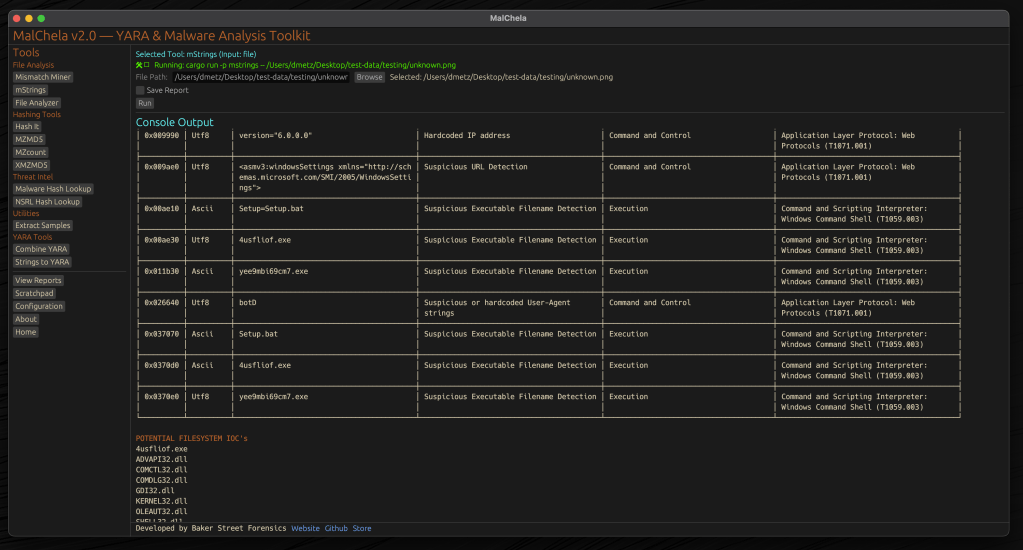
One of MalChela’s standout features, mstrings, is seamlessly integrated into the GUI. This function extracts strings from files and applies Sigma rules defined in YAML to evaluate threats, aligning results with the MITRE ATT&CK framework. It’s a powerful tool for identifying indicators of compromise (IOCs) and understanding malware behavior. Users of MalChela can easily customize their own detection rules in YAML. About 15 new detection rules were added in this release.
Other Tools in the MalChela Suite
Beyond mstrings and fileanalyzer, the MalChela suite includes a range of focused utilities designed to support malware triage and forensic workflows.
malhash lets you quickly query both Virus Total and Malware Bazaar via API calls. The GUI includes an API configuration utility. The CLI will walk you through it.
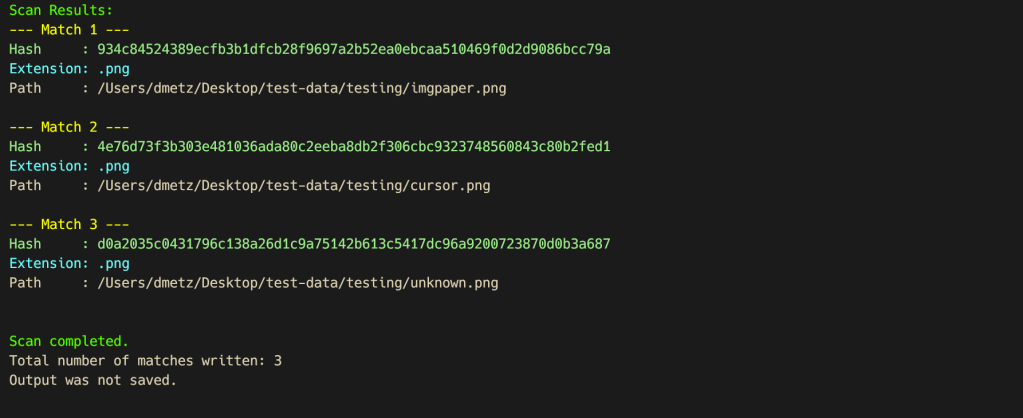
mismatchminer walks a directory or volume looking for executables disguised as other file types.
mzmd5 and xmzmd5 generate MD5 hash sets—useful for building known-good or known-bad reference hash sets for matching against large corpora.
mzcount provides a quick census of file types in a directory.
strings_to_yara lets you transform suspicious strings into functional YARA rules.
extract_samples recursively unpacks directories of password protected archives often used in malware distribution.
nsrlquery lets you quickly check a hash against the CIRCL hash database.
MalChela’s modular approach with support for custom rule generation, gives analysts what they need without unnecessary overhead. Each tool is designed to run independently but plays well within the broader GUI ecosystem.
Output for any included tool can be saved or skipped at runtime with a simple toggle in the GUI. Structured tools support exporting results in plain text and JSON formats, while YARA rule creation and notes can also be saved in YAML or Markdown.
The Scratchpad:
Notes, YARA Strings, and Analyst Flow
Analysis often involves scattered notes, pasted IOCs, potential YARA strings, and fleeting insights. The MalChela GUI brings structure to that chaos with a built-in scratchpad — a minimalist text editor embedded directly in the interface.
The scratchpad supports live note-taking during tool runs, temporary storage of strings for strings_to_yara, manual IOC tracking and observation logging, and a copy/paste buffer for hashes, commands, or decoded payloads.
Auto-Save & Formats
By default, the scratchpad auto-saves your content every 10 seconds to prevent loss during intense analysis sessions. A simple dropdown lets you export your notes in .txt, .yaml, or .md formats—ideal for integrating with reports or detection development pipelines.
VS Code Integration
For those who prefer a full-featured editor, the “Open in VS Code” button sends your current note directly to a VS Code window, assuming it’s installed and on your system path. This bridges the gap between in-tool triage and deeper rule crafting or documentation workflows.
Bonus Tip: strings_to_yara Compatibility
Lines in the scratchpad that begin with hash: are ignored by the strings_to_yara tool. This allows analysts to keep reference hashes or tagging metadata in the same document without interfering with rule generation. You can import your scratchpad into strings_to_yara in one click.
This feature isn’t just a notepad—it’s a tactical workspace. Whether you’re building detections, jotting notes mid-investigation, or scripting quick ideas, the scratchpad keeps yourn workflow grounded and your thoughts collected.
Last but not least, a crab with karma
Update Checker
The GUI includes a function to automatically check the GitHub repository for updates, encouraging users to pull the latest changes and ensure they have the most current tools at their disposal. 🦀
Enhancing the Analysis Workflow
The GUI version of MalChela doesn’t just replicate CLI functionalities; it enhances the overall workflow. The visual interface allows for easier navigation between modules, quick access to results, and a more streamlined analysis process.
For instance, after walking a directory with mismatchminer you find a suspect file. You run fileanalyzer and can directly proceed to mstrings if the initial findings warrant deeper investigation. From there VirusTotal and Malware Bazaar information can be queried with malhash. Drop your notes in the scratchpad as you go and then use strings_to_yara to draft a YARA rule without worrying about a single tab or indent.
But wait, there’s more
Integrating Third-Party Tools with YAML
The MalChela GUI supports third-party tool integration using a simple tools.yaml configuration file. This makes MalChela not just a toolkit, but a flexible launchpad for your broader forensic workflow.
Each entry in tools.yaml defines the command, input type, and category for a tool. MalChela parses this file at startup, populating the GUI dynamically. Analysts can add their own utilities—whether it’s a custom script, a Python tool, or an external binary—without needing to recompile the application.
- name: Extract Samples
  command: ["extract_samples"]
  input_type: folder
  category: "Utilities"
- name: File Analyzer
  command: ["fileanalyzer"]
  input_type: file
  category: "File Analysis"
# Example 3rd party integration:
# Below is a disabled example for capa
# Uncomment to enable if capa is in your PATH
#
# - name: capa
#   command: "capa"
#   input_type: "file"
#   category: "External"
#   optional_args: []
Once added, the tool appears in the GUI under its specified category, ready to be launched with a single click. Tools must be available in the system PATH, and input types must be one of: file, folder, or hash.
This keeps the interface clean, configurable, and analyst-driven—allowing teams to tailor MalChela to fit their exact needs without touching a single line of Rust.
MalChela is built with the belief that collaboration fuels innovation. I welcome contributions from the broader security and forensics community—whether it’s crafting new detection logic, enhancing YARA rule coverage, refining the GUI, or integrating additional tools via YAML. If you have an idea, patch, or workflow improvement, I’d love to see it. Together, we can make MalChela a more powerful and adaptable tool for every analyst.
To explore the GUI version of MalChela, visit the official GitHub repository:
Installation instructions and a user guide are available to help you get started. Whether you’re a seasoned analyst or just beginning your journey in malware analysis, the GUI version of MalChela offers a user-friendly yet powerful tool to aid your investigations.
MalChela GUI runs on Mac and Linux (with extra love for Mac users). For use on Windows the entire MalChela CLI toolset is supported under WSL 2.
It’s been just over a week since MalChela was initially released and already here have been a number of updates.
mStrings
In the previous post, I walked through the new mStrings function. I think this is one of my favorites so far. It extracts strings from a file and uses Sigma rules defined in YAML against the strings to evaluate threats and align results to the MITRE ATT&CK framework.
For fun I pointed it at an old WannaCry sample . I had a proud papa moment at the positive network IOC detection.
Check for Updates
Next came a function to automatically check the GitHub repo for updates and encourage a git pull to grab the latest… because apparently I can’t stop myself and this project will just keep growing, as my sleep keeps dwindling. Personally I found it ironic that you have to update in order to get the update telling you that updates are available… but it will work for all future updates as they come. So go ahead and update why don’t you.
Screenshot of MalChela indicating an update is available via git.
New File Analyzer module
Most recently a File Analyzer module has been added. Give it the path to your suspect file and it will return back:
SHA-256 Hash
Entropy (<7.5=high)
A RegEx detection for packing (mileage may vary)
PE Header info if it’s a PE
File Metadata
Yara Matches (any rules in yara_rules folder in workspace)
If there’s a positive match for the hash on VirusTotal (leverages the same key as previously in MalChela with the Virus Total / Malware Bazaar lookup)
Lastly, you’re given the option of whether or not you want to run strings on the file, or return to the main menu.
I really like the idea of using this as a possible first step in static analysis. Run this first and opt for strings. Things look interesting there, throw it into mStrings. Positive match on VirusTotal – use the malware hash lookup and get a more detailed analysis. Use the results from mStrings to craft a YARA rule and add it to your repo for future detections.





 Baker Street Forensics