

I’m excited to announce that v4.2 of MalChela is now available. While it may not be “the Answer to the Ultimate Question of Life, the Universe, and Everything,” or even The Malware Analysts Guide to the Galaxy, it does have some great new functionality.
This release has two big themes. First, the Mac side of the house — four tools now speak fluent .app bundle instead of making you dig out the binary inside Contents/MacOS/ yourself.
Second, and bigger: there’s a new way to run MalChela that doesn’t start with “which tool do I need for this file again?” It’s called Analyze, and it’s the closest thing this project has had to a an easy button.
Mac app bundle support (“Mac Stack”)
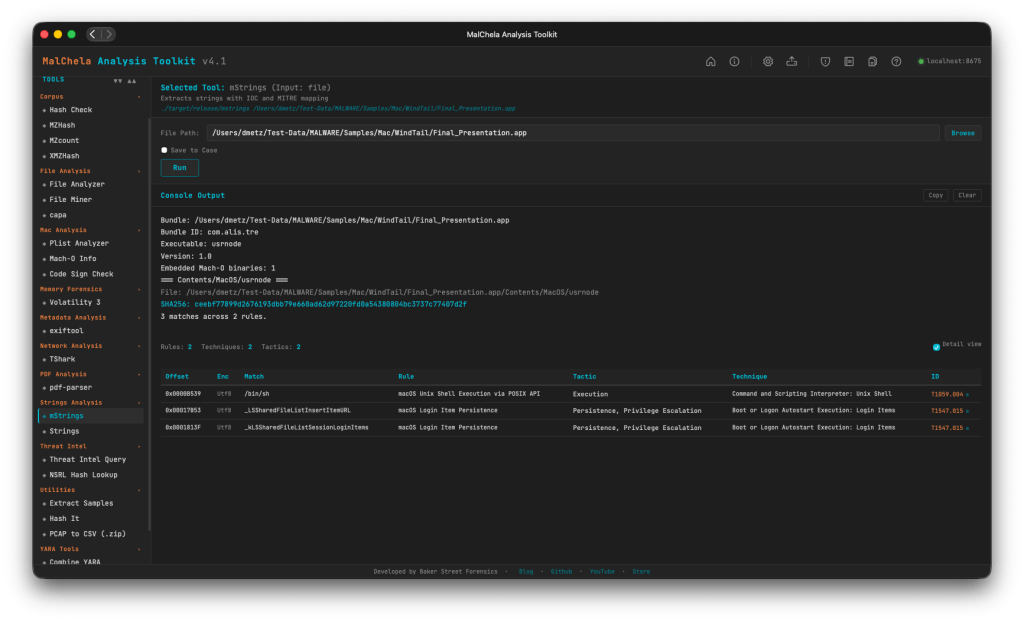
If you’ve ever pulled a .app bundle into MalChela before, you know the drill: find the actual binary buried in Contents/MacOS/, feed that to whatever tool you’re running, and hope you resolved the right one. That workaround is gone. Four tools now understand .app bundles directly — point macho_info, codesign_check, mstrings, or plist_analyzer at the bundle itself and they auto-resolve the main executable (via CFBundleExecutable, falling back to the sole binary in Contents/MacOS/ when needed).
What each one is actually looking for:
- macho_info — architecture, PIE/ASLR, __PAGEZERO, linked libraries, per-section entropy. It flags deprecated/EOL crypto libraries, RPATH entries (a classic dylib-hijacking setup), and the CoreFoundation+SystemConfiguration+Security dylib triad that shows up disproportionately often in C2 implants.
- codesign_check — signature status (Developer-signed / Ad-hoc / Unsigned), Bundle ID, Team ID, entitlements, and the get-task-allow flag (a tell for debug builds). It also catches Team ID mismatches between a bundle’s signer and its main executable’s signer — a supply-chain / hijack indicator that’s easy to miss by eye.
- plist_analyzer — flags LSUIElement/NSUIElement (an app hiding itself from the Dock), NSAllowsArbitraryLoads (App Transport Security turned off), custom CFBunda missing CFBundleSignature, and missing orextra binaries inside Contents/MacOS/.
- mstrings — now scans Mach-O binaries and bundles directly, with the same bundle-to-executable auto-resolution as the rest of the stack.
More Mac-specific detections are already in the pipeline for upcoming releases, so consider this the foundation, not the ceiling.
Analyze — one-click auto-triage
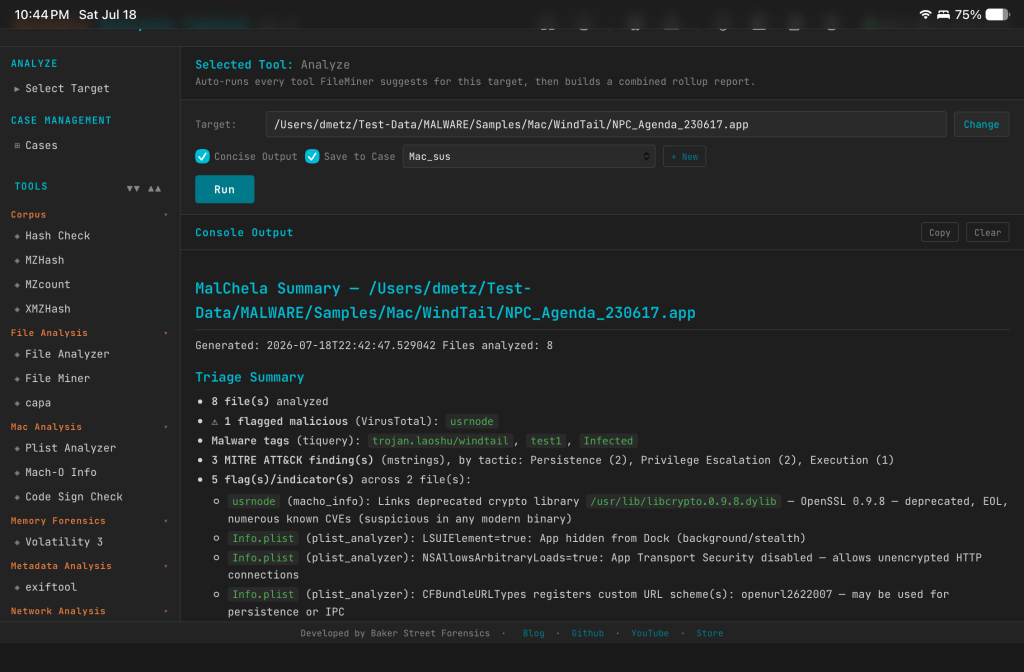
Point Analyze at a file, a folder, or a .app bundle, and it classifies everything with FileMiner, then automatically dispatches every tool FileMiner suggests for each file it finds. No more running FileMiner, reading the suggested-tools column, and manually kicking off each one yourself — Analyze closes that loop for you. It’s available in both the PWA and as a new analyze tool in the MCP server, so if you’re driving MalChela through Claude, the same triage workflow is one call away.
A couple of details worth knowing:
- Save to Case works exactly like every other tool panel — checkbox plus case dropdown, opt-in. On the MCP side, it follows the same rule as every other MCP tool: you need an active case (set_case) before Analyze will run, which keeps the behavior consistent across the whole server rather than special-casing this one workflow.
- Concise Output is on by default and renders the rollup report inline instead of the full expanded per-tool output — good default for a first pass, and easy to turn off if you want to see everything each tool produced.
The MalChela Summary rollup report
Every Analyze run produces one malchela_summary_<timestamp>.md, saved alongside the individual tool reports it’s summarizing. The goal here wasn’t just “concatenate the output” — it’s a real triage document, and it leads with a summary banner built to answer the questions you’d actually ask first:
- How many files, really? File counts, with automatic grouping of duplicate content — if the same bytes show up under five different filenames (extremely common with carved or exported artifacts), you get one write-up instead of five identical ones.
- Is anything flagged? Malicious verdicts pulled from VirusTotal, cross-referenced across both FileAnalyzer and tiquery — which matters more than it sounds like, since FileAnalyzer isn’t run against Mach-O files, so tiquery is what keeps Mac samples from falling through the cracks.
- What is it? Malware family and tag names pulled straight from tiquery’s multi-source lookups.
- What does it do? MITRE ATT&CK findings from mstrings, totaled and broken down by tactic, so you can see at a glance whether you’re looking at something built for persistence, defense evasion, discovery, or all of the above.
- What did it touch or talk to? Filesystem and network IOCs surfaced by mstrings.
- What’s structurally off? Flags and indicators from macho_info, plist_analyzer, and codesign_check — the RPATH entries, hidden-Dock plists, and Team ID mismatches mentioned above, all rolled up in one place.
Below the summary, each file gets its own section with every tool’s actual formatted report embedded — real tables, real headers, not a wall of raw console output. It reads cleanly whether you’re looking at it in the PWA or opening the file on its own.
Douglas Adams never actually tells us what the Question is — just the Answer. v4.2 doesn’t have that problem. The question was always “what’s actually in this sample,” and now Analyze, the Mac Stack, and the MalChela Summary answer it in one pass instead of five.
Pull the release, point Analyze at something, and see what the rollup finds. Don’t forget your towel. https://github.com/dwmetz/MalChela/releases/tag/v4.2


2 thoughts on “MalChela 4.2 Release”