Hot on the heels of v4.2… yep, v4.3. What can I say? The melatonin isn’t cutting it anymore to keep me asleep. Rather than count sheep – working on my favorite project helps. Granted I’ve still got bags under my eyes, but I’ve got something to show for it.
At A Glance
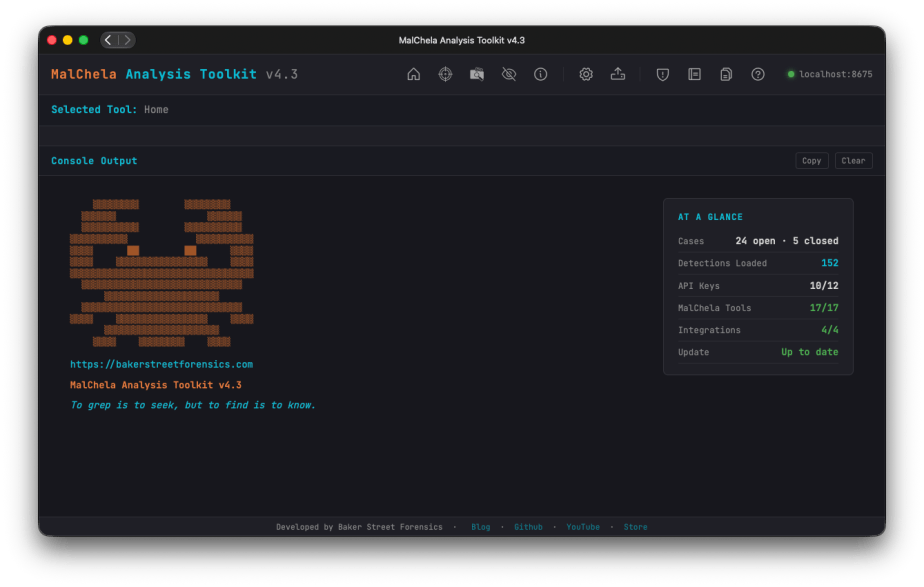
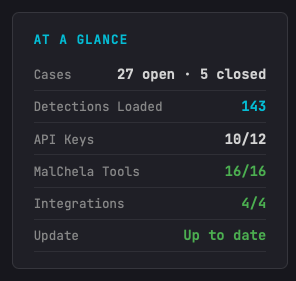
The first thing you’ll notice on this release, after all it’s impossible to miss, the At A Glance panel added to the Home Screen. In addition to the “Crabby Koans“, you see:
Number of open/closed cases
API key status
Number of MalChela tools loaded
Number of Integrations (3rd party tools) loaded; great for REMnux mode
GitHub status for available updates (it’s back!)
Other UI enhancements include new Analyze and Cases toolbar buttons, a collapsible Tools sidebar; and live progress updates during a run.
Airplane Mode / Offline Mode
While there’s a lot of great threat-intel information you can garner using TIQuery and the other utilities, sometimes internet isn’t an option – or maybe it’s a sample you want to handle so carefully you want to ensure there’s no external lookup activity. MalChela won’t mess with your Op-Sec. Rather than just have things fail gracefully (hopefully) when there’s no internet, there’s now a new Offline Mode toggle (Configuration screen), that cleanly skips every network call across the toolkit (NSRLQuery, TIQuery’s full multi-source lookup, FileAnalyzer’s VirusTotal + NSRL checks) instead of failing quietly or hanging, so labs and scenarios can run fully air-gapped.
Analyze Rollup
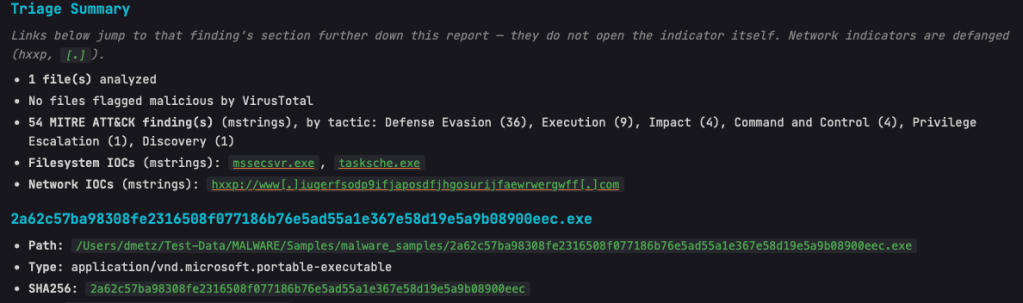
Triage Summary now links directly to the relevant section for flagged malicious files and their flags/indicators, plus the Filesystem and Network IOC lists — click a finding, jump straight to the detail.
Network IOCs in the rollup are shown defanged by default, with a note clarifying that links jump to the report section rather than the live URL.
Case ZIP/archive samples and containers found mid-scan (not just top-level) are now auto-extracted and analyzed automatically.
Includes the new dpp Extract tool: unwraps DMG/PKG containers to reach the real payload files inside.
mStrings
As the tools and the suite continue to grow, mStrings remains the star of the show. Updates in this release include:
Network IOCs in mStrings’ own report output are now defanged, matching the rollup.
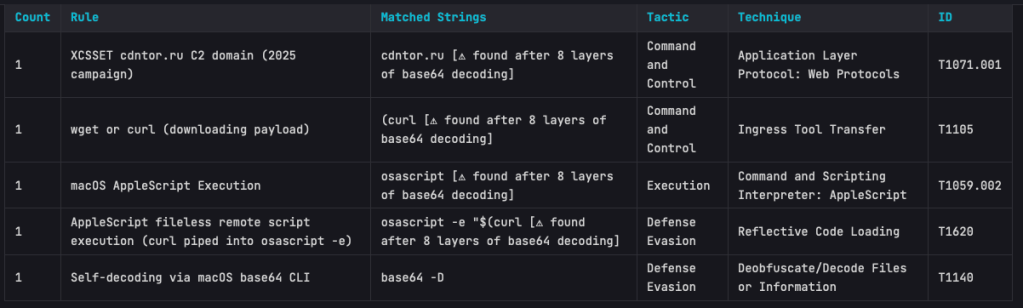
Base64 strings are now auto-decoded and recursively rescanned for further IOCs/detections.
Regex engine switched to fancy-regex, enabling lookaround-based detection patterns.
Better surfacing of bare-domain C2 IOCs and multi-layer obfuscation depth.
The Base64 scanning is impressive. On one of my test samples MalChela was able to extract strings in a file buried under 8 layers of Base64 encapsulation.
StringsToYARA
New refang capability: defanged URLs (hxxp://, [.]) in source strings are automatically restored to real URLs in the generated YARA rule.
Safely store your URLs in a defanged state – when it’s time to create the rule – then and only then does the live url get exposed.
Detections
25 new detection rules added (bringing the ruleset to 144), including full coverage for the Proton macOS RAT family, XCSSET, iWorm, EmPyre, Bella RAT, BirdMiner, and Python self-decompressing execution patterns.
Documentation
Full documentation pass covering all of the above, plus a new Offline Mode reference page and a Top Toolbar quick-reference table.
Bonus for me, the PDF User Guide is now generated via an automated, versioned build pipeline.
I’m excited to announce that v4.2 of MalChela is now available. While it may not be “the Answer to the Ultimate Question of Life, the Universe, and Everything,” or even The Malware Analysts Guide to the Galaxy, it does have some great new functionality.
This release has two big themes. First, the Mac side of the house — four tools now speak fluent .app bundle instead of making you dig out the binary inside Contents/MacOS/ yourself.
Second, and bigger: there’s a new way to run MalChela that doesn’t start with “which tool do I need for this file again?” It’s called Analyze, and it’s the closest thing this project has had to a an easy button.
Mac app bundle support (“Mac Stack”)
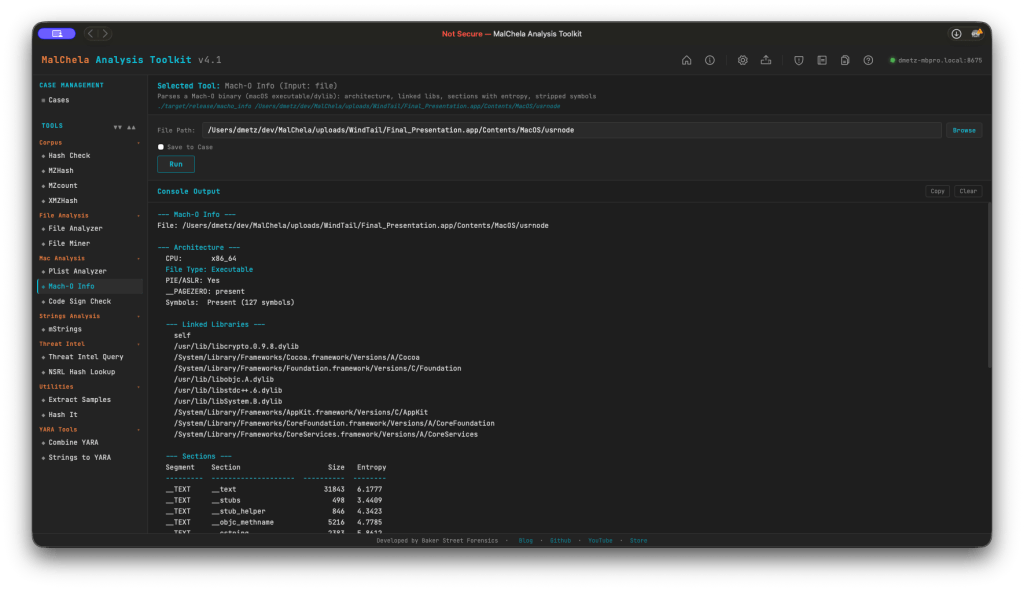
If you’ve ever pulled a .app bundle into MalChela before, you know the drill: find the actual binary buried in Contents/MacOS/, feed that to whatever tool you’re running, and hope you resolved the right one. That workaround is gone. Four tools now understand .app bundles directly — point macho_info, codesign_check, mstrings, or plist_analyzer at the bundle itself and they auto-resolve the main executable (via CFBundleExecutable, falling back to the sole binary in Contents/MacOS/ when needed).
What each one is actually looking for:
macho_info — architecture, PIE/ASLR, __PAGEZERO, linked libraries, per-section entropy. It flags deprecated/EOL crypto libraries, RPATH entries (a classic dylib-hijacking setup), and the CoreFoundation+SystemConfiguration+Security dylib triad that shows up disproportionately often in C2 implants.
codesign_check — signature status (Developer-signed / Ad-hoc / Unsigned), Bundle ID, Team ID, entitlements, and the get-task-allow flag (a tell for debug builds). It also catches Team ID mismatches between a bundle’s signer and its main executable’s signer — a supply-chain / hijack indicator that’s easy to miss by eye.
plist_analyzer — flags LSUIElement/NSUIElement (an app hiding itself from the Dock), NSAllowsArbitraryLoads (App Transport Security turned off), custom CFBunda missing CFBundleSignature, and missing orextra binaries inside Contents/MacOS/.
mstrings — now scans Mach-O binaries and bundles directly, with the same bundle-to-executable auto-resolution as the rest of the stack.
More Mac-specific detections are already in the pipeline for upcoming releases, so consider this the foundation, not the ceiling.
Analyze — one-click auto-triage
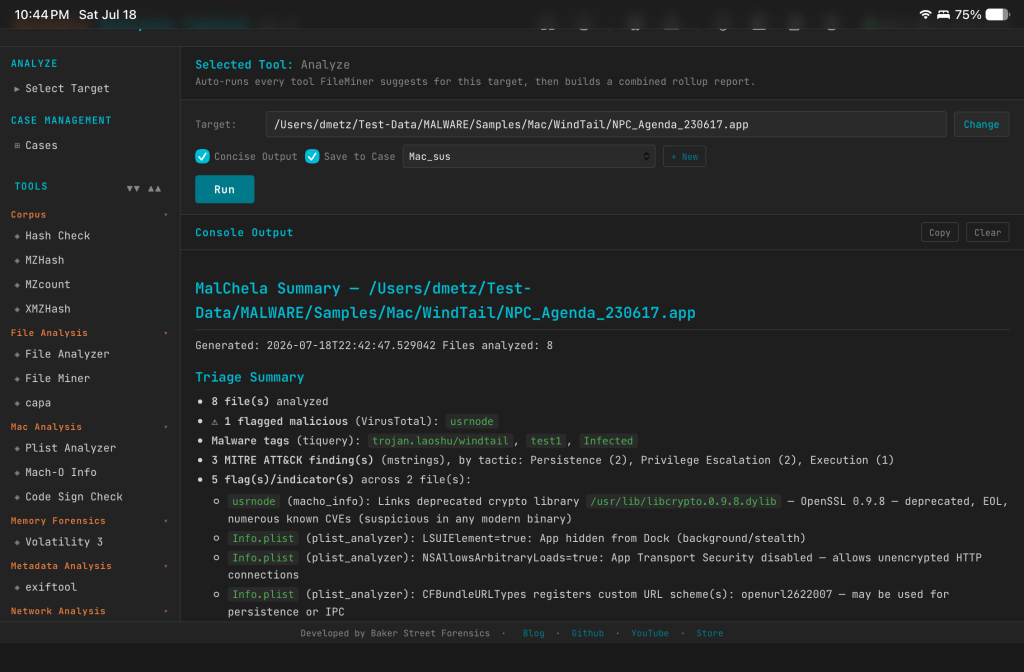
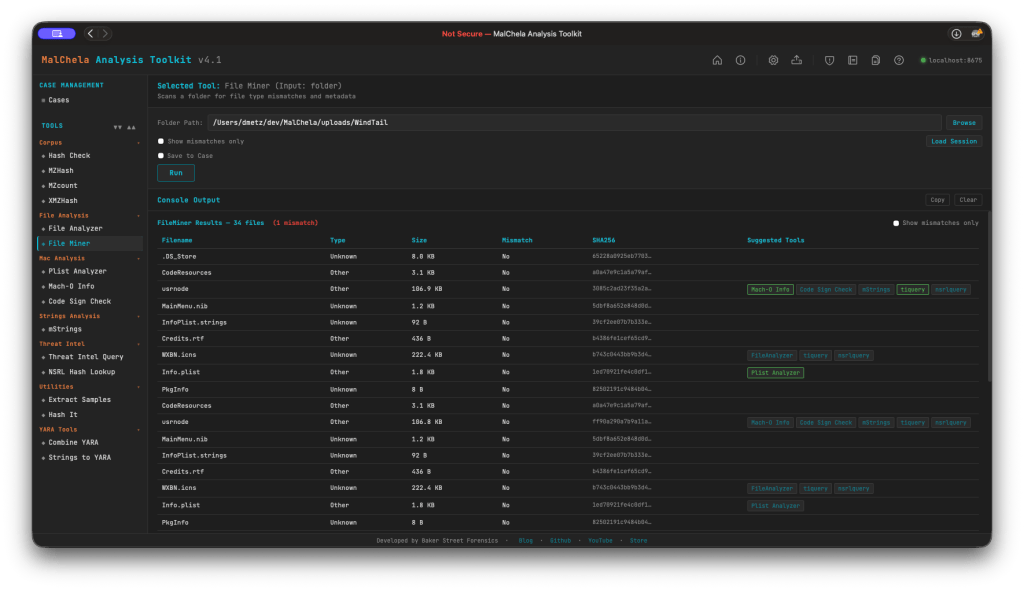
Point Analyze at a file, a folder, or a .app bundle, and it classifies everything with FileMiner, then automatically dispatches every tool FileMiner suggests for each file it finds. No more running FileMiner, reading the suggested-tools column, and manually kicking off each one yourself — Analyze closes that loop for you. It’s available in both the PWA and as a new analyze tool in the MCP server, so if you’re driving MalChela through Claude, the same triage workflow is one call away.
A couple of details worth knowing:
Save to Case works exactly like every other tool panel — checkbox plus case dropdown, opt-in. On the MCP side, it follows the same rule as every other MCP tool: you need an active case (set_case) before Analyze will run, which keeps the behavior consistent across the whole server rather than special-casing this one workflow.
Concise Output is on by default and renders the rollup report inline instead of the full expanded per-tool output — good default for a first pass, and easy to turn off if you want to see everything each tool produced.
The MalChela Summary rollup report
Every Analyze run produces one malchela_summary_<timestamp>.md, saved alongside the individual tool reports it’s summarizing. The goal here wasn’t just “concatenate the output” — it’s a real triage document, and it leads with a summary banner built to answer the questions you’d actually ask first:
How many files, really? File counts, with automatic grouping of duplicate content — if the same bytes show up under five different filenames (extremely common with carved or exported artifacts), you get one write-up instead of five identical ones.
Is anything flagged? Malicious verdicts pulled from VirusTotal, cross-referenced across both FileAnalyzer and tiquery — which matters more than it sounds like, since FileAnalyzer isn’t run against Mach-O files, so tiquery is what keeps Mac samples from falling through the cracks.
What is it? Malware family and tag names pulled straight from tiquery’s multi-source lookups.
What does it do? MITRE ATT&CK findings from mstrings, totaled and broken down by tactic, so you can see at a glance whether you’re looking at something built for persistence, defense evasion, discovery, or all of the above.
What did it touch or talk to? Filesystem and network IOCs surfaced by mstrings.
What’s structurally off? Flags and indicators from macho_info, plist_analyzer, and codesign_check — the RPATH entries, hidden-Dock plists, and Team ID mismatches mentioned above, all rolled up in one place.
Below the summary, each file gets its own section with every tool’s actual formatted report embedded — real tables, real headers, not a wall of raw console output. It reads cleanly whether you’re looking at it in the PWA or opening the file on its own.
Douglas Adams never actually tells us what the Question is — just the Answer. v4.2 doesn’t have that problem. The question was always “what’s actually in this sample,” and now Analyze, the Mac Stack, and the MalChela Summary answer it in one pass instead of five.
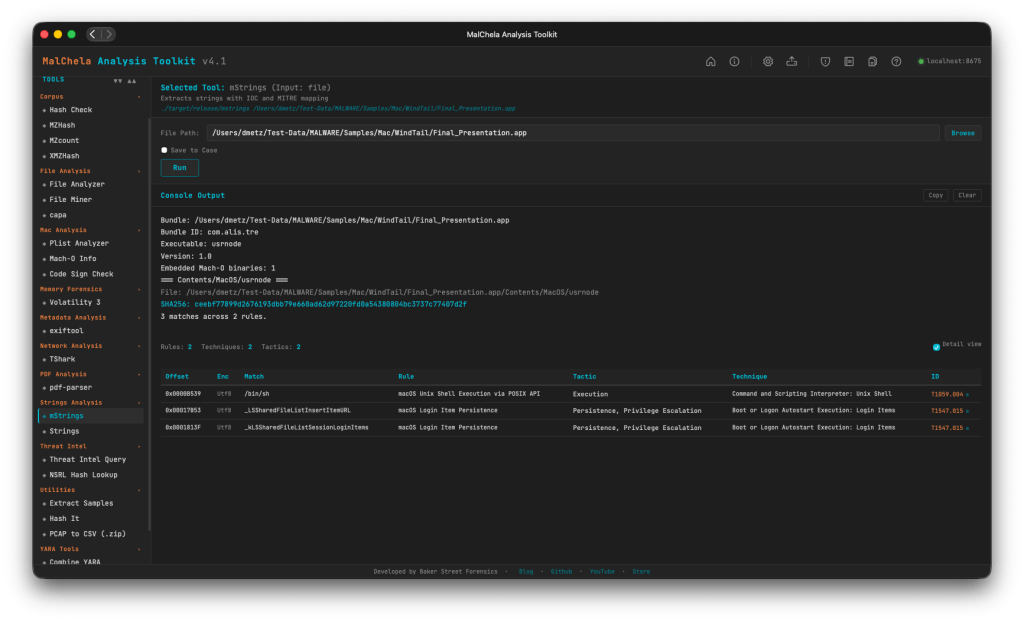
MalChela v4.1 is out today, and the headline is something I’ve been wanting to tackle for a while: dedicated Mac malware analysis tooling. If you’ve been following the channel or the blog, you know MalChela started as a triage-first toolkit aimed at the kinds of samples that show up in Windows-centric IR engagements. That coverage was never the full picture. Mac malware — infostealers, adware loaders, APT implants — has become too common to treat as an edge case. v4.1 is the start at addressing that directly.
New Tools: Mac Analysis
Three new tools land in this release, each targeting a different layer of Mac binary analysis. All three are available in the PWA under the Mac Analysis heading, accessible via CLI shortcodes, and included in the release scripts.
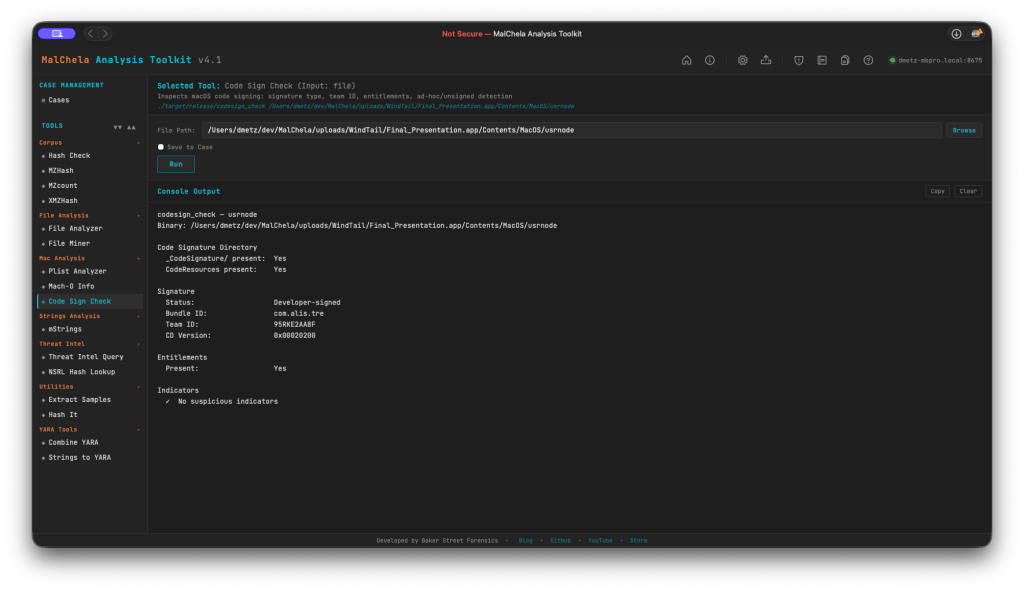
codesign_check (cs)
macOS code signatures are one of the first things worth checking on any suspicious binary. codesign_check accepts either an .app bundle or a bare Mach-O and reports signature status (Developer-signed, Ad-hoc, or Unsigned), Bundle ID, Team ID, and entitlement presence — including the get-task-allow flag that marks debug and development builds. It also verifies the _CodeSignature/ and CodeResources directory structure.
Indicators flagged: missing CMS blob, CS_ADHOC flag, absent Team ID, and get-task-allow entitlement. FileMiner now suggests Code Sign Check automatically for all Mach-O files in a scan. (Planned feature: adding a certificate revocation check).
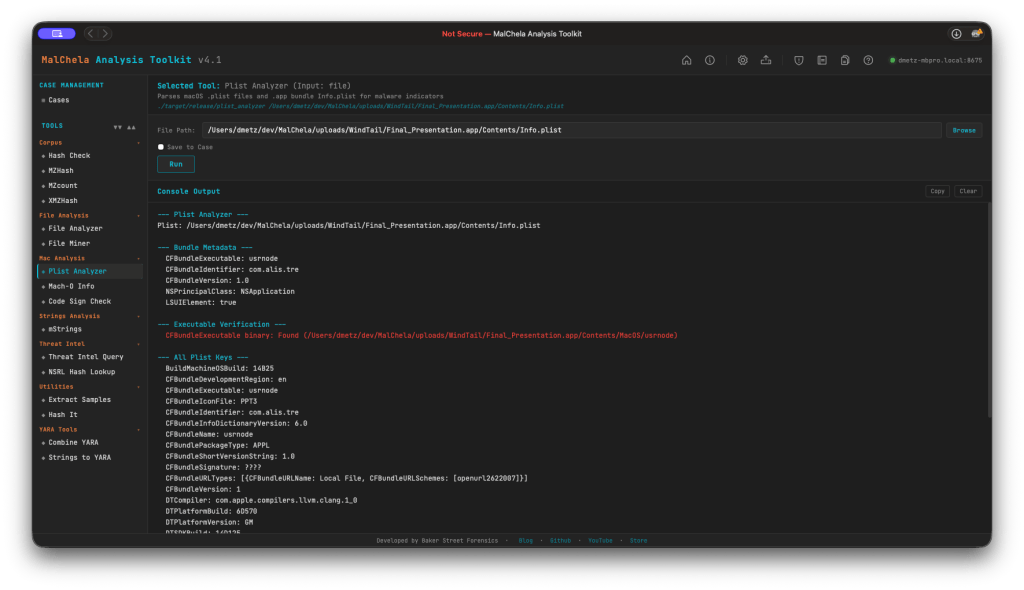
plist_analyzer (pa)
Parses macOS .plist files and .app bundle Info.plist for static malware indicators. This release includes four new detections:
LSUIElement / NSUIElement = true — app runs as a hidden background agent with no Dock icon. Both the modern LSUIElement and legacy NSUIElement (integer 1) forms are now detected, covering older macOS malware that used the pre-Sierra key.
NSAllowsArbitraryLoads = true — App Transport Security disabled, a classic C2 channel indicator.
CFBundleURLTypes with custom URL schemes — flags non-standard scheme registrations used for persistence or inter-process communication.
CFBundleSignature = ‘????’ — no creator code set, common in unsigned tools and malware.
macho_info (mo)
Parses thin and fat/universal Mach-O binaries and reports: architecture, linked libraries, section entropy, symbol status, RPATH entries, __PAGEZERO integrity, and PIE/ASLR flags.
This release also adds deprecated crypto library detection: macho_info now flags linkage against end-of-life OpenSSL libraries (libcrypto.0.9.8, libssl.0.9.8, and variants). There’s no legitimate reason for a modern binary to link these — flag it and investigate further.
mStrings — Mac Tuning
Running mStrings against Mach-O binaries previously produced a lot of noise: ObjC runtime stubs, Swift mangled symbols, and Apple system library paths that add volume without adding signal. A new is_objc_swift_noise() filter suppresses these categories:
_objc_* runtime stubs
@_* import stubs (including @_LSSharedFileList*, which was previously surfacing as false-positive filesystem IOCs)
Swift mangled symbols (_$s*, _T0, swift_*)
Apple system dylib paths under /System/Library/Frameworks/ and /usr/lib/swift/
ObjC type encoding strings
Alongside the noise filter, 12 new Mac-specific MITRE detection rules have been added to detections.yaml:
Rule
Technique
MacLaunchAgentDaemonPersistence
T1543.001
MacLoginItemPersistence
T1547.015
MacShellProfileInjection
T1546.004
MacCronJobPersistence
T1053.003
MacDylibInjection
T1574.006
MacKeychainAccess
T1555.001
MacAppleScriptExecution
T1059.002
MacUnixShellExecution
T1059.004
MacPrivilegeEscalation
T1548.004
MacSystemDiscovery
T1082
MacSandboxVMEvasion
T1497.001
MacSensitiveFileAccess
T1005
Mac path extraction also gets a dedicated regex: re_mac_path captures filesystem IOCs in Mac-style paths (.sh, .py, .dylib, .plist, .app, .pkg, .command) under /Users/, /Library/, /tmp/, and related directories.
FileMiner — Session Persistence
FileMiner scan results now persist across browser close and refresh. Results, the analyzed path, and the set of executed sub-tools survive in localStorage automatically. On each scan, a session.json is also written server-side to saved_output/fileminer/ — or to the active case folder under saved_output/cases/<case>/fileminer/ when Save to Case is checked.
A Load Session button in the FileMiner options bar opens a file browser pre-navigated to the correct session directory. Selecting a session.json restores the full results table and re-populates the path input. Like the previous GUI, fileminer now tracks tool runs for suggested tools (green indicates tool report already generated).
MalChela v4.1 is available now on GitHub. As I said this is just the start of the macOS malware support. I’m looking forward to taking this much further.
As one tends to do on Saturday mornings with coffee in hand, I was reviewing two samples that were attributed to the LunaStealer / LunaGrabber family. Originally I was validating that tiquery was working with the MCP configuration, however what started as a quick TI check turned into a full static analysis session — and it gave me a good opportunity to put the MalChela MCP integration through its paces in a real workflow. This post walks through how that investigation unfolded, what the pivot points were, and what we found at the bottom of the rabbit hole.
The Setup
If you haven’t seen the MalChela MCP plugin before, the short version is this: MalChela is a Rust-based malware analysis toolkit I’ve been building for a while — tools like tiquery, fileanalyzer, mstrings, and others. The MCP server exposes all of those tools to Claude Desktop natively, so instead of dropping to the terminal for every command, I can run analysis steps conversationally and let Claude help interpret the results and suggest next moves.
This is not replacing the terminal — it’s augmenting it. The pivot decisions still come from the analyst. But having a reasoning layer that can look at mstrings output and say “that SetDllDirectoryW + GetTempPathW combination is staging behavior, and here’s the ATT&CK mapping” is genuinely useful when you’re moving fast.
Both samples were sitting in a folder on my Desktop. I had SHA-256 hashes. Let’s go.
Phase 1: Threat Intelligence Query
First move is always TI. The MalChela tiquery tool hits MalwareBazaar, VirusTotal, Hybrid Analysis, MetaDefender, and Triage simultaneously and returns a combined results matrix. Two calls, two answers.
Sample 1 (4f3b8971...) came back confirmed LunaStealer across all five sources. First seen 2025-12-01. Original filename sdas.exe. VT tagged it trojan.generickdq/python — already telling us something about the build.
Sample 2 (d4f57b42...) was more interesting. MalwareBazaar returned both LunaGrabber and LunaStealer tags. Triage clustered it with BlankGrabber, GlassWorm, IcedID, and Luca-Stealer. The original filename was loader.exe. That’s a different kind of name than sdas.exe. One sounds like a throwaway test artifact. The other sounds deliberate.
The TI results alone suggested these weren’t just two copies of the same thing. They were potentially different components of the same campaign.
Phase 2: Static PE Analysis
fileanalyzer and mstrings on both samples.
The first thing that jumped out was the imphash — f3c0dbc597607baa2ea891bc3a114b19 — identical on both. Same section layout, same section sizes, same import count (146), same 7 PE sections including the .fptable section that PyInstaller uses for its frozen module table. These two samples were compiled from the same PyInstaller loader template with different payloads bundled inside.
But the entropy diverged sharply. Sample 1 (sdas.exe) came in at 3.9 — low, even for a PyInstaller bundle. Sample 2 (loader.exe) was 6.9 — high, indicating the embedded payload is compressed or encrypted more aggressively. Combined with the file size difference (47 MB vs 22 MB), this was the first signal that what was inside each bundle was meaningfully different.
mstrings gave us 22–23 ATT&CK-mapped detections across both samples — largely the same set: IsDebuggerPresent, QueryPerformanceCounter, SetDllDirectoryW, GetTempPathW, ExpandEnvironmentStringsW, OpenProcessToken. Standard infostealer staging behavior. Tcl_CreateThread showed up in both, which is a PyInstaller artifact from bundling Python with Tkinter. The VT python family tag made more sense in context.
Phase 3: PyInstaller Extraction
Both samples were extracted with pyinstxtractor-ng. This is where the two samples started to diverge clearly.
Sample 1 entry point: sdas.pyc — Python 3.13, 112 files in the CArchive, 752 modules in the PYZ archive.
The name cleaner.pyc inside a file called loader.exe is a tell. That’s not a stealer payload name. That’s something that runs after.
The bundled library sets were nearly identical between both — requests, requests_toolbelt, Cryptodome, cryptography, psutil, PIL, sqlite3, win32 — same stealer framework. But Sample 2 had a unique addition: a l.js reference (mapped to T1059 — Command and Scripting Interpreter). A JavaScript component not present in the December build. The OpenSSL versions also differed: Sample 1 bundled libcrypto-3.dll (OpenSSL 3.x), Sample 2 had libcrypto-1_1.dll (OpenSSL 1.1). Different build environments, roughly one month apart.
At this point the working theory was solid: Sample 1 is a standalone stealer. Sample 2 is a later-generation dropper/installer with an updated payload and additional capability.
Phase 4: Bytecode Decompilation
decompile3 couldn’t handle Python 3.11 or 3.13 bytecode. That’s a known limitation. pycdc (Decompyle++) handles both.
sdas.pyc decompiled cleanly — the import stack made the capability set immediately obvious:
from win32crypt import CryptUnprotectData
from Cryptodome.Cipher import AES
from PIL import Image, ImageGrab
from requests_toolbelt.multipart.encoder import MultipartEncoder
import sqlite3
CryptUnprotectData for browser master key decryption. AES for the decryption itself. ImageGrab for screenshots. MultipartEncoder for structured exfiltration. Classic infostealer, nothing surprising.
cleaner.pyc was a different story. The decompiler output opened with this:
Heavy obfuscation — byte arrays used to reconstruct eval, getattr, and __import__ at runtime so none of those strings appear in plain text. The approach is designed to evade static string detection. Decode the byte arrays and you get:
Standard Python malware obfuscation. But buried further down in the decompile output was a large binary blob — a bytes literal starting with \xfd7zXZ. That’s the LZMA magic header.
Phase 5: LZMA Stage 2 Extraction
The blob was located at offset 0x17d4 in the pyc file. Extract and decompress it:
import lzma
blob = open('cleaner.pyc', 'rb').read()
idx = blob.find(b'\xfd7zXZ')
decompressed = lzma.decompress(blob[idx:])
# → 102,923 bytes
One important detail: the decompression is wrapped in a try/except LZMAError block with os._exit(0) on failure. If the decompression fails — as it would in some emulated sandbox environments — the process exits silently with no error. That’s the anti-sandbox mechanism.
The decompressed payload was another obfuscated Python source using a custom alphabet substitution encoding. The final execution chain was compile() + exec(). Decoding the full stage 2 revealed everything:
This is the live Discord injection payload. The stage 2 pulls this JavaScript file from GitHub and injects it into the Discord desktop client’s core module, persisting across restarts.
The capability set from stage 2:
Anti-analysis checks on startup: process blacklist (~30 entries including wireshark, processhacker, vboxservice, ollydbg, x96dbg, pestudio), MAC address blacklist (80+ VM prefixes), HWID blacklist, IP blacklist, username/PC name blacklists
Discord token theft from all three release channels (stable, canary, PTB)
Browser credential theft across 20+ Chromium and non-Chromium browsers
Roblox session cookie harvesting (.ROBLOSECURITY= targeting with API validation)
The ping delay is a simple trick — the 3-second wait lets the process fully exit before the delete fires, so the file removes itself cleanly after execution.
What MalChela + MCP Added to This Workflow
The honest answer is: speed and synthesis.
tiquery hitting five TI sources in one call versus five separate browser tabs or CLI invocations is a meaningful time saving, but that’s the surface benefit. The deeper value showed up in the mstrings step — getting ATT&CK-mapped output with technique IDs alongside the raw strings meant the behavioral picture came together faster than manually correlating imports against the ATT&CK matrix.
The MCP integration meant each of those steps — TI query, PE analysis, string extraction — could happen within the same conversation context. Claude could see the fileanalyzer output and the mstrings output together and note that the entropy difference between the two samples was significant, that the identical imphash meant shared loader infrastructure, that the staging imports in mstrings were consistent with the exfil approach suggested by the TI tags. That cross-tool synthesis is where the integration earns its keep.
The parts that still required manual work: pyinstxtractor-ng, pycdc, the LZMA extraction, and decoding the stage 2. Those are terminal steps on the Mac.
If you’re running MalChela in your environment and want to reproduce the TI query steps, the MalChela MCP plugin source is on GitHub at github.com/dwmetz/MalChela. Questions or additions to the IOC list — find me on the usual channels.