It’s a strange but satisfying feeling to hit version 3.0, then realize soon after you’re already back in the weeds fixing, refining, and optimizing. That’s what this 3.0.1 release is all about — a tight round of updates aimed at boosting clarity and cutting noise, especially when running mStrings or working within the FileMiner panel. Additionally, a number of optimizations came about in getting MalChela to run smoothly on Toby, and to minimize any unnecessary re-building of the binaries. This post walks through what’s new and improved.
🧠 Smarter Detections in mStrings
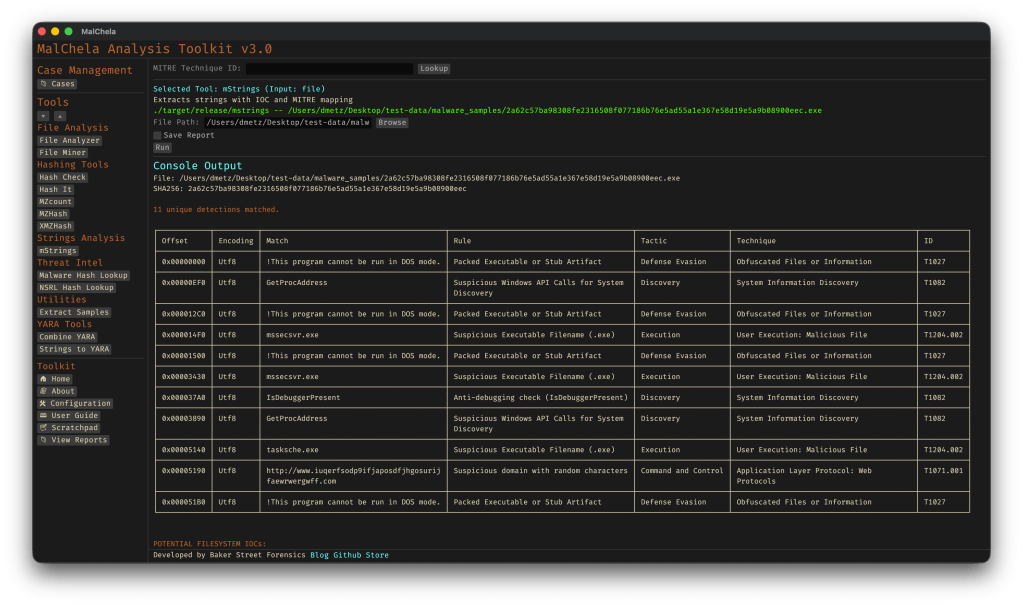
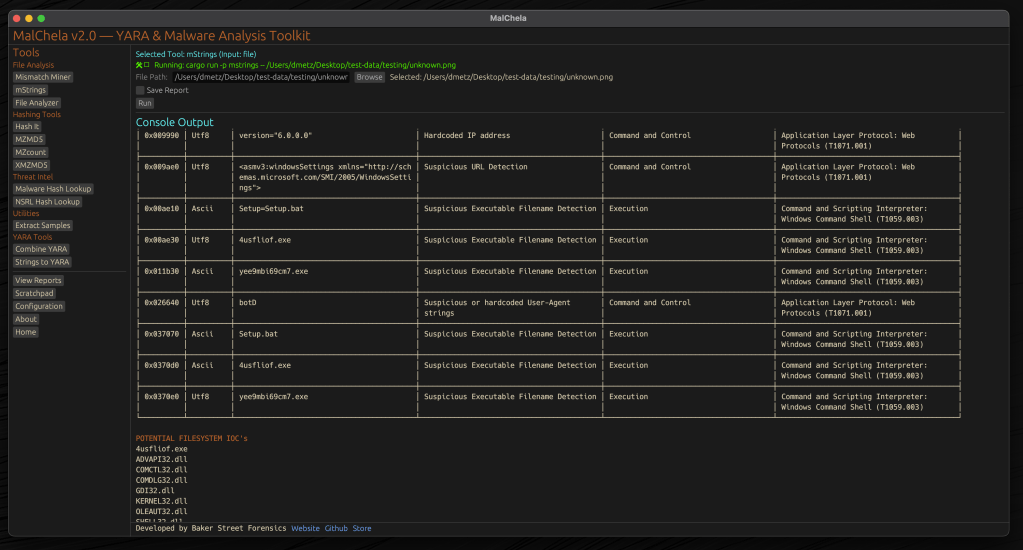
The mstrings tool — one of the most feature-rich in the toolkit — got a round of refinements:
Generic Executable detection removed: This was too noisy and matched a lot of clean files. It’s been replaced by more focused patterns.
Suspicious DLLs now detected more precisely: Legit Windows DLLs like ole32.dll and gdiplus.dll are now excluded unless they’re paired with indicators like GetProcAddress, LoadLibrary, or manual syscall patterns.
Rule cleanup and expansion: Several detections were removed, refined, or added (like packer stubs and dropper markers) to better target actual malicious behavior.
Tighter MITRE mapping: Each detection is now carefully aligned to a corresponding MITRE ATT&CK technique, often down to the sub-technique level.
If you’ve ever run mstrings and felt unsure which hits mattered most — or got buried in generic noise — this update should feel much cleaner.
Reminder: You can easily update the detection criteria by modifying detections.yaml.
Have a detection to contribute to the project?Submit a pull request.
🔍Built-In MITRE Lookup (GUI)
If a detection shows a MITRE ID like T1082, you can now look it up directly inside the GUI. The new MITRE Lookup Bar sits at the top of the config panel (only when running mstrings). Paste a technique ID, hit Lookup, and it’ll open the official MITRE ATT&CK page in your browser.
🗂️ FileMiner Improvements
The FileMiner GUI panel saw some polish too:
“Select All” functionality: You can now batch-run tools across multiple matching files in a case — a huge time-saver during triage.
🧰 Build and Setup Updates
Two quick notes for folks cloning the repo for the first time:
The release.sh script now builds all binaries in release mode — one command to build everything cleanly.
Docs and README were updated to recommend building in –release mode from the start, especially for smoother GUI usage.
🧪 Platform Testing
Confirmed functional on:
macOS (Silicon)
Ubuntu (Desktop and minimal)
REMnux (custom REMnux tools.yaml)
Raspberry Pi (Zero 2W and 4B)
Windows via WSL (CLI)
Still some quirks with native Windows support due to YARA compatibility and pathing, but if you’re a Windows power user and want to pitch in, I’d love your help.
💭 Final Thoughts
MalChela isn’t trying to replace your favorite tools — it’s trying to bundle them in ways that save time, reveal context, and give you clarity during analysis. The 3.0.1 release doesn’t bring sweeping new features, but it does make the experience tighter, more predictable, and more useful where it counts.
As always, thanks to those who’ve tested it, given feedback, or just watched quietly from the shadows. 🕵️♂️ If you want to contribute — whether it’s rules, regex, docs, or bugs — you’ll find me at dwmetz/MalChela.
MalChela’s 2.2 update is packed with practical and platform-friendly improvements. It includes native support for REMnux, better tool settings, and deeper integrations with analysis tools like YARA-X, Tshark, Volatility3, and the newly improved fileanalyzer module.
🦀 REMnux Edition: Built-In Support, Zero Tweaks
When the GUI loads a REMnux-specific tools.yaml profile, it enters REMnux mode.
Screenshot of yaml configuration applying REMnux mode
Native binaries and Python scripts like capa, oledump.py, olevba, and FLOSS are loaded into the MalChela tools menu, allowing you to mix and match operations with the embedded MalChela utilities and the full REMnux tool stack. No manual configuration needed—just launch and go. MalChela currently supports the following REMnux programs right out of the box:
Tool Name
Description
binwalk
Firmware analysis and extraction tool
capa
Identifies capabilities in executable files
radare2
Advanced reverse engineering framework
Volatility 3
Memory forensics framework for RAM analysis
exiftool
Extracts metadata from images, documents, and more
If you only need a subset of tools you can easily save and restore that a custom profile.
TShark Panel with Built-In Reference
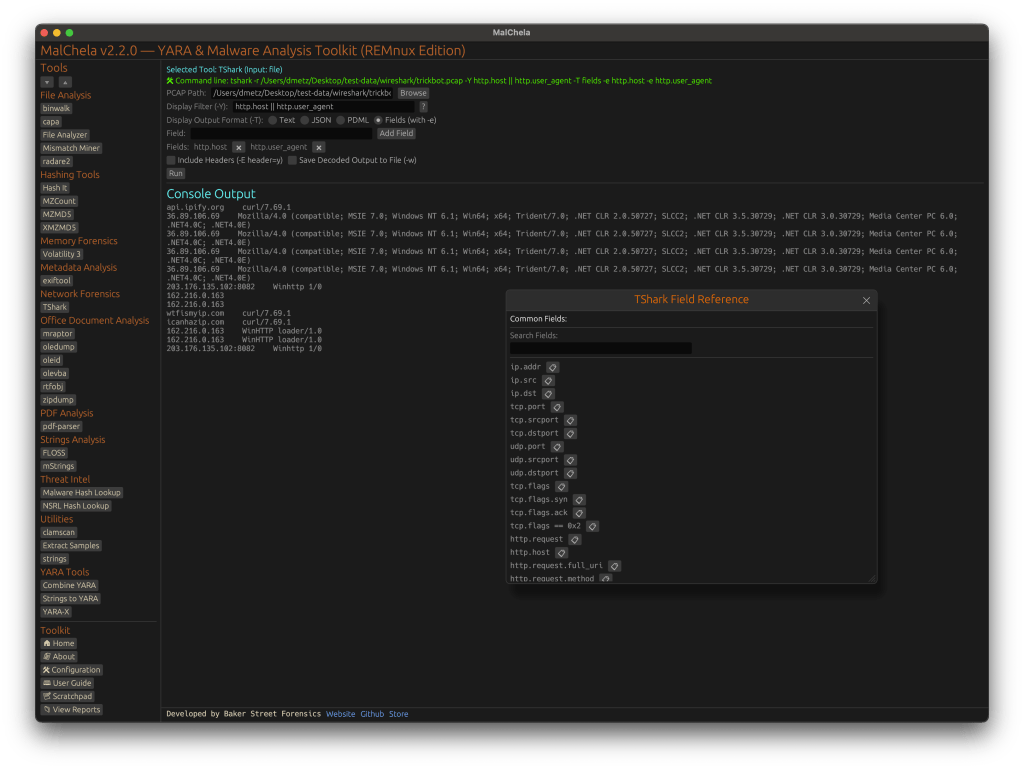
Tshark and the integrated field reference
A new TShark integration exposes features including:
A filter builder panel
Commonly used fields reference
Tooltip hints for each example (e.g., `ip.addr == 192.168.1.1` shows “Any traffic to or from 192.168.1.1”)
One-click copy support
This helps analysts build and understand filters quickly—even if TShark isn’t something they use every day. Using the syntax builder in MalChela you can use the exact commands directly in Tshark or Wireshark.
YARA-X Support (Install Guide Included)
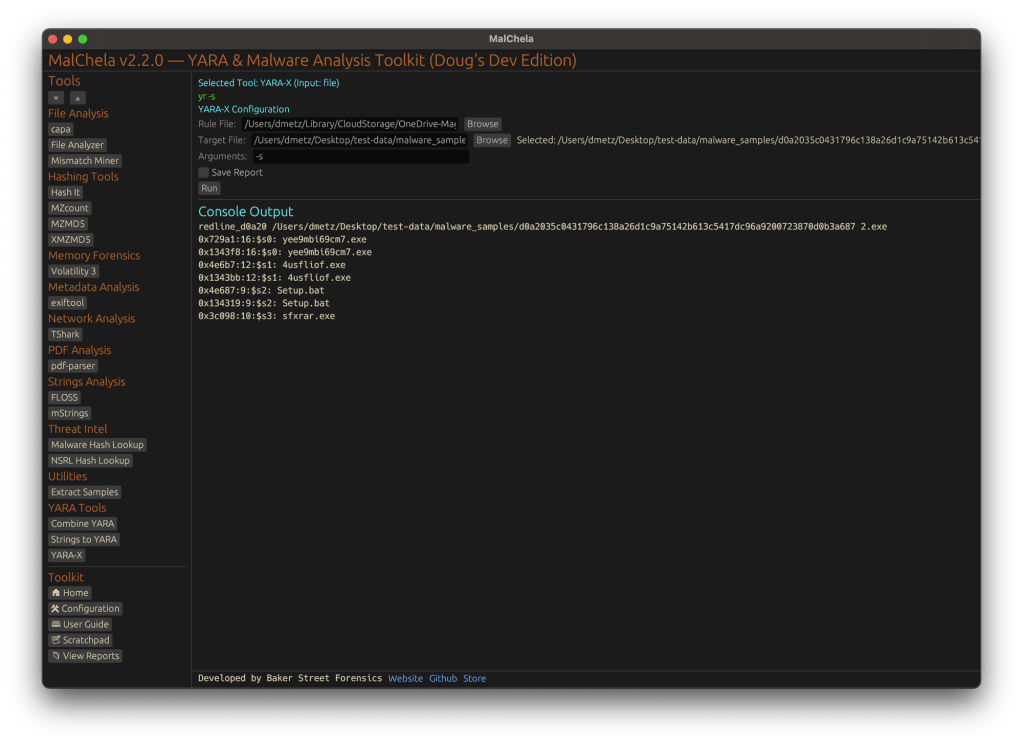
YARA-X module in MalChela
Support for YARA-X (via the `yr` binary) is now built in. YARA-X is not bundled with REMnux by default, but install instructions are included in the User Guide for both macOS and Linux users.
Once installed, MalChela allows for rule-based scanning from the GUI,and with YARA-X, it’s faster than ever.
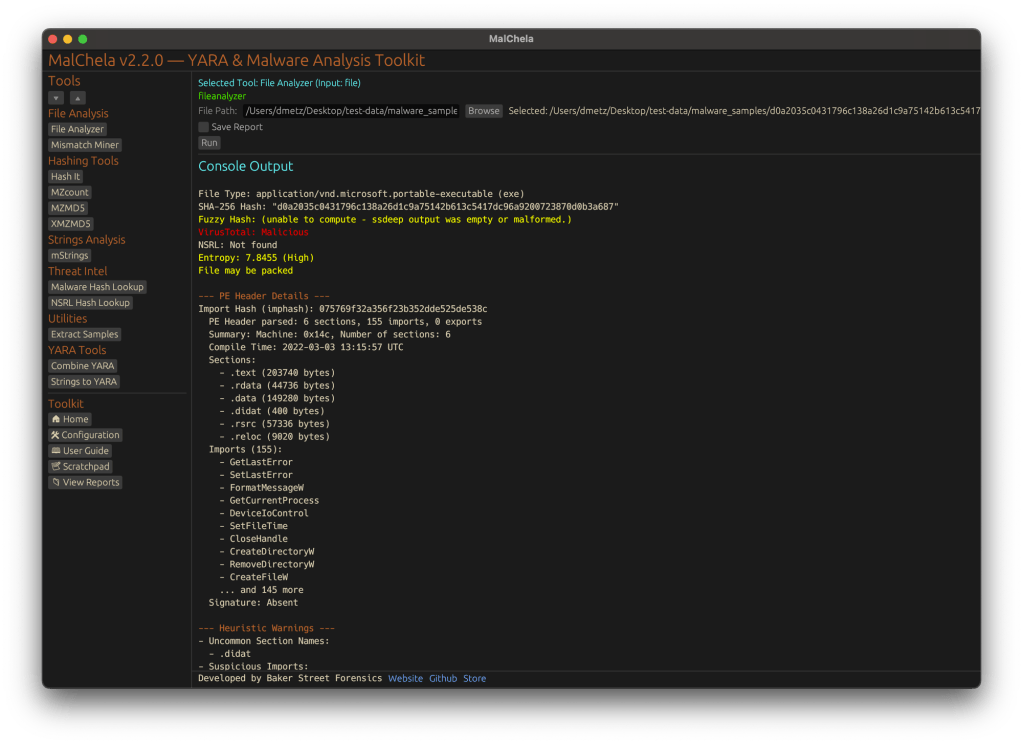
fileanalyzer: Fuzzy Hashing, PE Metadata, and More
Updated FileAnalyzer Module
MalChela’s fileanalyzer tool has also been updated to include:
Fuzzy hashing support via `ssdeep`
BLAKE3 hashing for fast, secure fingerprints
Expanded PE analysis, including:
Import and Export Table parsing (list of imported and exported functions)
Compilation Timestamp (for detection of suspicious or forged build times)
Section Characteristics (flags like IMAGE_SCN_MEM_EXECUTE, IMAGE_SCN_CNT_CODE, etc., for detecting anomalous sections)
These improvements provide deeper insight into executable structure, helping analysts detect anomalies such as packers, suspicious timestamps, or unexpected imports/exports. Useful for everything from sample triage to correlation, fileanalyzer now digs deeper—without slowing down.
Memory Forensics Gets a Boost: Volatility 3 Now Supported
With the 2.2 release, MalChela introduces support for Volatility 3, the modern Python-based memory forensics framework. Whether you’re running MalChela in REMnux or on a customized macOS or Linux setup, you can now access the full power of Volatility directly from the MalChela GUI.
Volatility 3 in MalChela
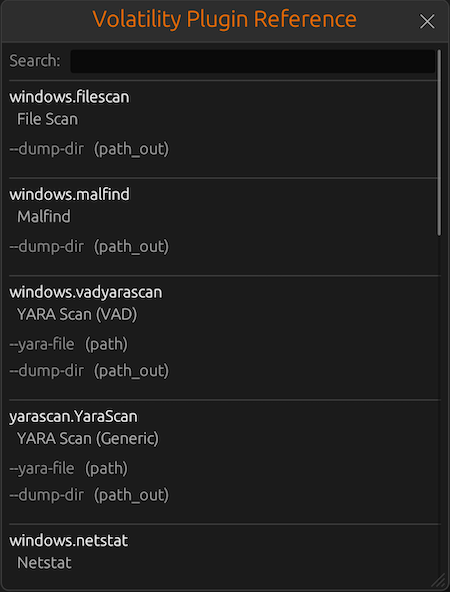
There’s an intuitive plugin selector that dynamically adjusts available arguments based on your chosen plugin,. You can search, sort, and browse available plugins, and even toggle output options like –dump-dir with ease.
Like Tshark, there is an added plugin reference panel with searchable descriptions and argument overviews — a real time-saver when navigating Volatility’s deep and often complex toolset.
Volatility Plugin Reference
Smarter Tool Configuration via YAML
The tool configuration system continues to evolve:
Tools now declare their input type (file, folder, or hash)
The GUI dynamically adjusts the interface to match
Alternate profiles (like REMnux setups) can be managed simply by swapping `tools.yaml` files via the GUI
Easily backup or restore your custom setups
Restore the default toolset to get back to basics
This structure helps keep things clean—whether you’re testing, teaching, or deploying in a lab environment.
Embedded Documentation Access
The GUI now includes a link to the full MalChela User Guide in PDF. You can also access the documentation online.
From tool usage and CLI flags to configuration tips and install steps, it’s all just a click away—especially useful in offline environments or when onboarding new analysts. I’ll be honest, this is likely the most comprehensive user guide I’ve ever written.
Whether you’re reviewing binaries, building hash sets, or exploring network captures—MalChela 2.2 is designed bring together the tools you need, and make it easier to interoperate between them.
The new REMnux mode makes it even easier to get up and running with dozens of third party integrations.
Have an idea for a feature or application you’d like to see supported — reach out to me.
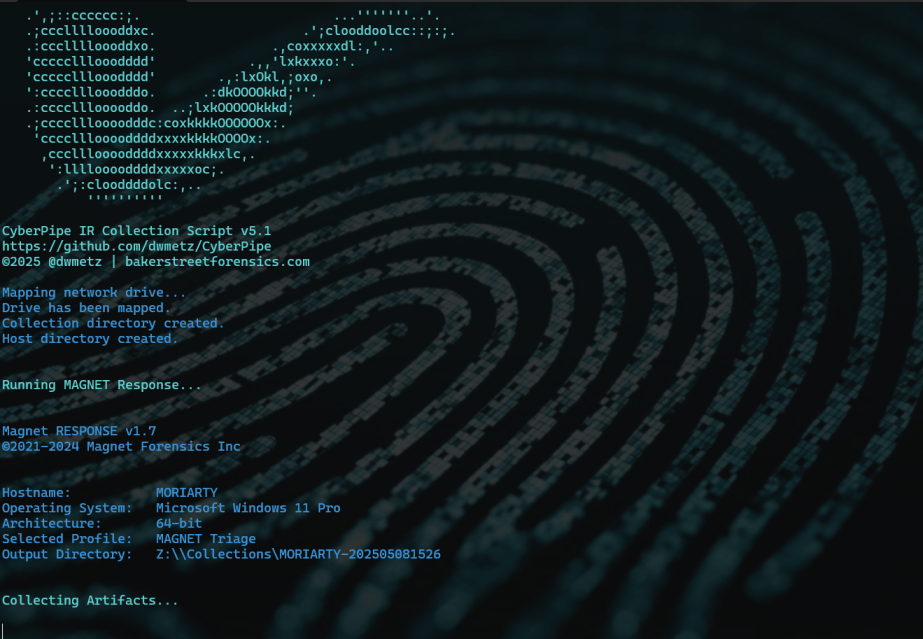
CyberPipe v5.1 is out with a few targeted improvements to make live response a bit smoother.
What’s New:
Collection profiles can now be passed directly as arguments using -CollectionProfile. No need to modify the script or hardcode anything — just run with the profile you need.
Improved support for saving to network shares, ideal for remote collections triggered by EDR.
Better error handling and logging, including clearer messages when tools are missing or when BitLocker key recovery fails.
The default profile still covers the most common triage needs:
✔️ Memory dump (RAM)
✔️ Pagefile
✔️ Volatile data (network config, hives, running procs)
✔️ System artifacts
But now, you can swap that out on the fly:
Usage Examples:
.\CyberPipe.ps1 ## default profile, capture RAM, Pagefile, Volatile and System Files

.\CyberPipe.ps1 -CollectionProfile RAMOnly ## just the RAM

.\CyberPipe.ps1 -CollectionProfile RAMSystem ## just the RAM and System Files (triage lite)

.\CyberPipe.ps1 -CollectionProfile RAMPage ## RAM & Pagefile

.\CyberPipe.ps1 -CollectionProfile Volatile ## Just Volatile data
Useful for tailoring collections based on available time, scope, or system stability — especially during incident response where conditions change quickly.
CyberPipe still captures memory with DumpIt or RAM Capture, grabs volatile system data, checks for encryption, and recovers the BitLocker key when possible. But now it’s just a bit easier to tailor to the job at hand — whether you’re responding interactively or invoking it remotely via EDR integration.
As always, no dependencies beyond what’s in the Tools folder, and no assumptions about the system you’re collecting from.
MalChela, a Rust based toolkit for YARA and malware analysis, was released as a set of command-line apps just a few months ago. Now, it steps into a new realm with the introduction of a graphical user interface (GUI), bringing its powerful features to a broader audience.
The transition from command-line to GUI isn’t just a cosmetic upgrade; it’s a strategic move to make malware analysis more accessible. The GUI version retains all the robust functionalities of its predecessor while offering an intuitive interface that caters to both seasoned analysts and newcomers.
Key Features at a Glance
File Analyzer Module
The updated fileanalyzer module provides a comprehensive overview of suspect files. By simply providing the path to a file, users receive:
SHA-256 Hash,
Entropy analysis,
Regular expression detection for packing,
PE header information (for PE files),
File metadata,
Suspicious API calls,
YARA rule matches (against your local library)
and VirusTotal hash matches.
This module serves as an excellent first step in static analysis, offering a detailed snapshot of the file’s characteristics.
mStrings Integration
One of MalChela’s standout features, mstrings, is seamlessly integrated into the GUI. This function extracts strings from files and applies Sigma rules defined in YAML to evaluate threats, aligning results with the MITRE ATT&CK framework. It’s a powerful tool for identifying indicators of compromise (IOCs) and understanding malware behavior. Users of MalChela can easily customize their own detection rules in YAML. About 15 new detection rules were added in this release.
Other Tools in the MalChela Suite
Beyond mstrings and fileanalyzer, the MalChela suite includes a range of focused utilities designed to support malware triage and forensic workflows.
malhash lets you quickly query both Virus Total and Malware Bazaar via API calls. The GUI includes an API configuration utility. The CLI will walk you through it.
mismatchminer walks a directory or volume looking for executables disguised as other file types.
mzmd5 and xmzmd5 generate MD5 hash sets—useful for building known-good or known-bad reference hash sets for matching against large corpora.
mzcount provides a quick census of file types in a directory.
strings_to_yara lets you transform suspicious strings into functional YARA rules.
extract_samples recursively unpacks directories of password protected archives often used in malware distribution.
nsrlquery lets you quickly check a hash against the CIRCL hash database.
MalChela’s modular approach with support for custom rule generation, gives analysts what they need without unnecessary overhead. Each tool is designed to run independently but plays well within the broader GUI ecosystem.
Output for any included tool can be saved or skipped at runtime with a simple toggle in the GUI. Structured tools support exporting results in plain text and JSON formats, while YARA rule creation and notes can also be saved in YAML or Markdown.
The Scratchpad:
Notes, YARA Strings, and Analyst Flow
Analysis often involves scattered notes, pasted IOCs, potential YARA strings, and fleeting insights. The MalChela GUI brings structure to that chaos with a built-in scratchpad — a minimalist text editor embedded directly in the interface.
The scratchpad supports live note-taking during tool runs, temporary storage of strings for strings_to_yara, manual IOC tracking and observation logging, and a copy/paste buffer for hashes, commands, or decoded payloads.
Auto-Save & Formats
By default, the scratchpad auto-saves your content every 10 seconds to prevent loss during intense analysis sessions. A simple dropdown lets you export your notes in .txt, .yaml, or .md formats—ideal for integrating with reports or detection development pipelines.
VS Code Integration
For those who prefer a full-featured editor, the “Open in VS Code” button sends your current note directly to a VS Code window, assuming it’s installed and on your system path. This bridges the gap between in-tool triage and deeper rule crafting or documentation workflows.
Bonus Tip: strings_to_yara Compatibility
Lines in the scratchpad that begin with hash: are ignored by the strings_to_yara tool. This allows analysts to keep reference hashes or tagging metadata in the same document without interfering with rule generation. You can import your scratchpad into strings_to_yara in one click.
This feature isn’t just a notepad—it’s a tactical workspace. Whether you’re building detections, jotting notes mid-investigation, or scripting quick ideas, the scratchpad keeps yourn workflow grounded and your thoughts collected.
Last but not least, a crab with karma
Update Checker
The GUI includes a function to automatically check the GitHub repository for updates, encouraging users to pull the latest changes and ensure they have the most current tools at their disposal. 🦀
Enhancing the Analysis Workflow
The GUI version of MalChela doesn’t just replicate CLI functionalities; it enhances the overall workflow. The visual interface allows for easier navigation between modules, quick access to results, and a more streamlined analysis process.
For instance, after walking a directory with mismatchminer you find a suspect file. You run fileanalyzer and can directly proceed to mstrings if the initial findings warrant deeper investigation. From there VirusTotal and Malware Bazaar information can be queried with malhash. Drop your notes in the scratchpad as you go and then use strings_to_yara to draft a YARA rule without worrying about a single tab or indent.
But wait, there’s more
Integrating Third-Party Tools with YAML
The MalChela GUI supports third-party tool integration using a simple tools.yaml configuration file. This makes MalChela not just a toolkit, but a flexible launchpad for your broader forensic workflow.
Each entry in tools.yaml defines the command, input type, and category for a tool. MalChela parses this file at startup, populating the GUI dynamically. Analysts can add their own utilities—whether it’s a custom script, a Python tool, or an external binary—without needing to recompile the application.
- name: Extract Samples
  command: ["extract_samples"]
  input_type: folder
  category: "Utilities"
- name: File Analyzer
  command: ["fileanalyzer"]
  input_type: file
  category: "File Analysis"
# Example 3rd party integration:
# Below is a disabled example for capa
# Uncomment to enable if capa is in your PATH
#
# - name: capa
#   command: "capa"
#   input_type: "file"
#   category: "External"
#   optional_args: []
Once added, the tool appears in the GUI under its specified category, ready to be launched with a single click. Tools must be available in the system PATH, and input types must be one of: file, folder, or hash.
This keeps the interface clean, configurable, and analyst-driven—allowing teams to tailor MalChela to fit their exact needs without touching a single line of Rust.
MalChela is built with the belief that collaboration fuels innovation. I welcome contributions from the broader security and forensics community—whether it’s crafting new detection logic, enhancing YARA rule coverage, refining the GUI, or integrating additional tools via YAML. If you have an idea, patch, or workflow improvement, I’d love to see it. Together, we can make MalChela a more powerful and adaptable tool for every analyst.
To explore the GUI version of MalChela, visit the official GitHub repository:
Installation instructions and a user guide are available to help you get started. Whether you’re a seasoned analyst or just beginning your journey in malware analysis, the GUI version of MalChela offers a user-friendly yet powerful tool to aid your investigations.
MalChela GUI runs on Mac and Linux (with extra love for Mac users). For use on Windows the entire MalChela CLI toolset is supported under WSL 2.









 Baker Street Forensics