Exploring Magnet Virtual Summit 2025 CTF Challenges (iOS)

A couple weeks ago, I participated in the Magnet Virtual Summit 2025 CTF (Capture the Flag). While I don’t think I will ever see a day where I win one of these, (speed is not my forte), I enjoyed working through a good number of the challenges, starting with the lower point values and working my way up. The CTF covered images/sources including: Cipher challenges, iOS and Android full file system images, Google takeouts, and images of a Windows 11 workstation and a Chromebook. I spent my available time working on the iOS and Windows challenges. I wasn’t able to complete all of them, but I’ll share what I was able to complete.

In this post I’ll be sharing my solutions for the iOS challenges. Warning: SPOILERS AHEAD!


To determine the version of iOS, I used the iLEAPP report for the device.

Another way of finding this information in Axiom is to review the Powerlog Battery Shutdown events.
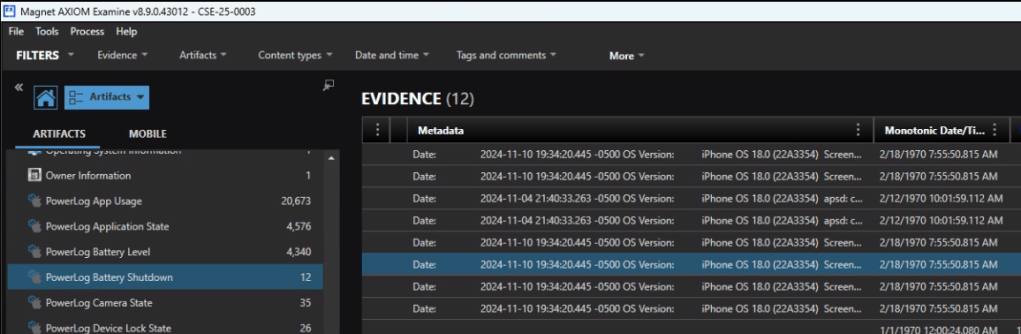
The answer is 18.0


Looking at the Owner information in Axiom is quick way to identify the telephone number associated with the device. 18024959063.


For this one you could start in Contacts or start with a Date/Time filter as that was very specific to the question. The answer is Mary.


Reviewing the iOS Call Logs in Axiom we see that the user never answers their phone. (I can relate.) The answer is “0”.


That’s a ducking odd thing to be curious about. According the the Keyboard Usage Stats, the answer is 51.

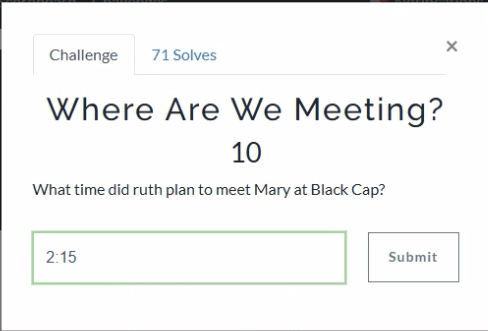
In a Discord chat, Mary and Ruth agree to meet up at 2:15 for coffee.


Started off with a global search on ‘bitmoji’ and then reviewed the media files. (Brown)

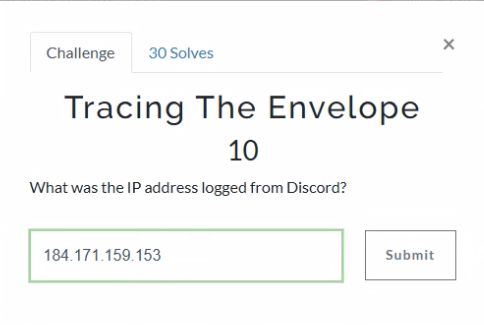
A global search on Discord narrows the results. There is an apple mail message from Discord about the user signing in from a new location. The IP address is 184.171.159.153.


Ah, Nashville. Home of the Magnet User Summit coming up in just a few weeks. iLEAPP can provide us with the Lat and Long of the cities configured in the Weather app.

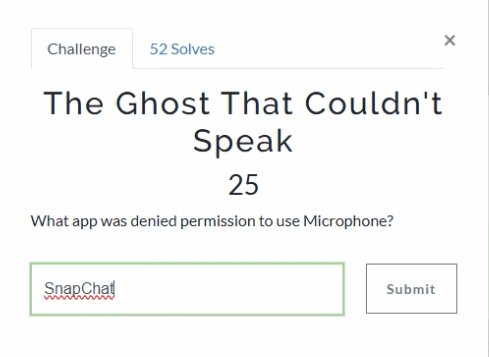
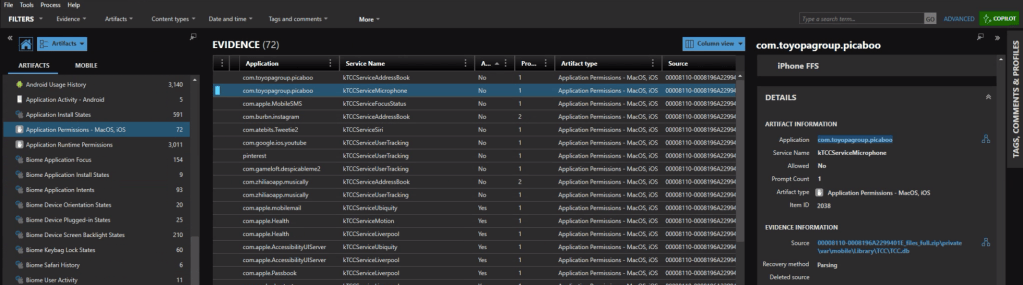
Looking at the Application Permission we can see which applications had (or were denied) access to the microphone. The app identifier com.toyopagroup.picaboo corresponds to Snapchat. The name “Picaboo” refers to Snapchat’s original name before it was rebranded.

In the iOS Messages, we find a number of ‘sale’ announcement from Zenni. EARLYBF24 is the code associated with the 40% off promotion.


First off, we need to know what TikTok video this is referring to. In the iOS messages we see a TikTok video that was shared.

Copy the url and head over to Ryan Benson’s Unfurl. Unfurl decodes the different elements of the url string. One of the details embedded in the string is the time the video was posted. 2024-11-12 22:11:09.

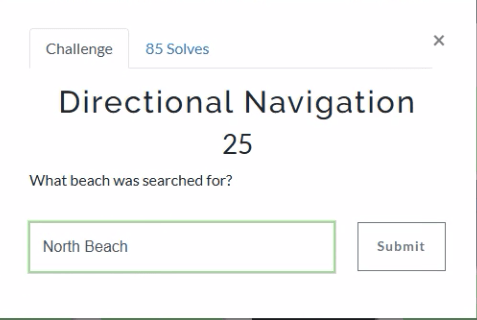
For this one we can take a look at the Apple Maps – Biome App Intents, and see a search for directions to North Beach Park.


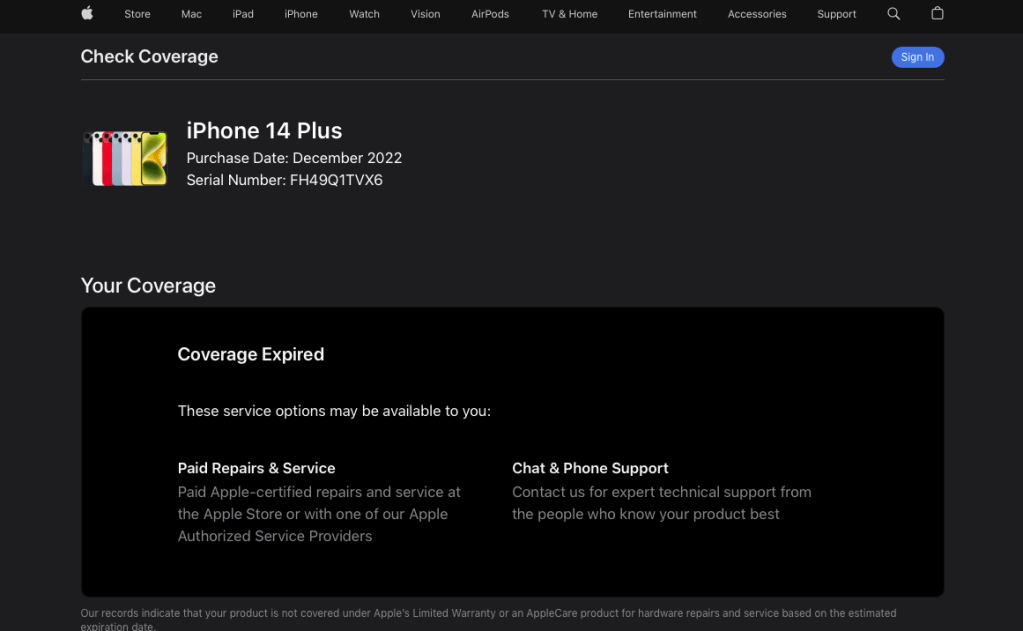
When I first looked at this one I thought there could be a “Welcome to your new iPhone” message or something similar. No dice. Besides, that would be too easy for a 25 pointer. A quick googling indicated was that one way to confirm the purchase date of an iPhone is too look up the warranty status on checkcoverage.apple.com.

We can grab the serial number for the device from iLEAPP.

Plugging that into the warranty coverage site we get: December 2022 (2022-12).
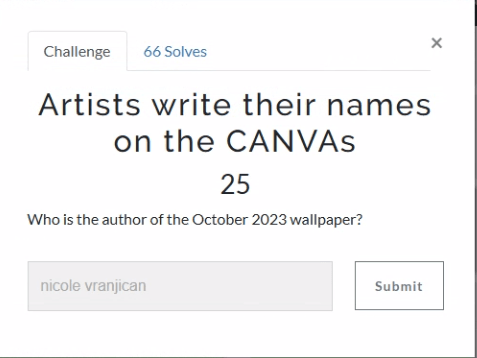
“October” is a good search to start with. Within the PDF documents we find a reference for an October-2023-iphone-wallpaper. In the details we see that the author of this image was nicole vranjican.


There were a few more higher point challenges in the iOS section, but that’s as far as I made it in the allotted time. I’m looking forward to reading other’s write-ups, both for the questions I was unable to solve, as well as seeing the unique and alternative ways that others solved the ones I did.

Stay tuned for my next post on the solutions for the Windows challenges.

If you’d like to access the images used for the CFT for your own training and investigation, you can find them at https://cfreds.nist.gov/all/Hexordia/2025MVSCTF.

Last but not least, my heartfelt appreciation to the team at Hexordia who put together the CTF. Another PUNderful job!

Upcoming talks at Magnet Virtual Summit 2025

Just two more weeks to the Magnet Virtual Summit 2025! If you’ve been procrastinating on registering, don’t miss out. It’s completely free! The conference is scheduled for February 10th through the 14th.

I’m excited to present two talks this year. The first one is titled “Unlocking DFIR: Free Resources for Efficient Triage and Acquisition.” In this talk, I’ll cover free triage acquisition solutions for Windows, Mac, and Linux.

The second talk is called “Zen & the Art of Digital Forensics: Enhancing Insight through Mindfulness.” In this talk, I’ll explore how applying Zen principles like mindfulness, non-attachment, and the ‘beginner’s mind’ can lead to improved investigations and mental well-being.

Register at https://magnetvirtualsummit.com/.

While you’re there, don’t forget to sign up for the Capture the Flag.

Book Review: Cloud Forensics Demystified

At this point, we’ve all heard the expression ‘There is no cloud; It’s just someone else’s computer.’ While there is some truth to that, there are some fundamental differences when it comes to digital forensics when cloud resources are part of the investigation.

Recently, I had the chance to read Cloud Forensics Demystified: Decoding cloud investigation complexities for digital forensic professionals, by Ganesh Ramakrishnan and Mansoor Haqanee. I received a complimentary this book in exchange for an honest and unbiased review. All opinions expressed are my own.

I’ve been doing DFIR for about 15 years now. In the early days, almost all investigations involved having hands on access to the data or devices being investigated. As I moved into Enterprise Incident Response, it became more and more frequent that the devices I would be investigating would be in a remote location, be it another state – or even another country. As the scope of my investigations grew, so did my techniques need to evolve and adapt.

Cloud Forensics is the next phase of that evolution. While the systems under investigation may still be in another state or country, extra factors come into play like multi-tenancy and shared responsibility models. Cloud Forensics Demystified does a solid job of shedding light on those nuances.

The book is divided into three parts.

  • Part 1: Cloud Fundamentals
  • Part 2: Forensic Readiness: Tools, Techniques, and Preparation for Cloud Forensics
  • Part 3: Cloud Forensic Analysis: Responding to an Incident in the Cloud

Part 1: Cloud Fundamentals

This section provides a baseline knowledge of the three major cloud providers, Amazon Web Services (AWS), Google Cloud Platform (GCP) and Microsoft Azure. It breaks down the different architectural components of each, and how the platforms each handle the functions of virtual systems, networking and storage.

Part 1 also includes a broad yet thorough introduction to the different Cyber and Privacy legislation that come into play for cloud investigations. This section is not only valuable to investigators. Whether you’re a lawyer providing legal counsel for an organization, or responsible for an organizations overall security at a CISO level, this material is beneficial in understanding the challenges and responsibilities that come from hosting your data or systems in the cloud, and the different legislation and regulations that follow those choices.

Part 2: Forensic Readiness: Tools, Techniques, and Preparation for Cloud Forensics

As with enterprise investigations, logging is often where the hunting for incident indicators begins with telemetry and the correlation of different log sources. This section focuses on the different log sources available in AWS, GCP, and Azure. It also provides a detailed list of log types that are enabled by default and those that require manual activation to ensure that you have access to the most relevant data for your investigations when an incident occurs. This section also covers the different providers offerings for log analysis in the cloud including AWS Cloud Watch, Microsoft Sentinel and Google’s Cloud Security Command Center (Cloud SCC) as examples.

Part 3: Cloud Forensic Analysis: Responding to an Incident in the Cloud

As an Incident Responder, this was the section I enjoyed the most. While the first two sections are foundational for understanding the architectures of networking and storage, part three provides detailed information on how to acquire evidence for cloud investigations. The section covers both log analysis techniques as well as recommendations for host forensics and memory analysis tools. The book covers the use of commercial forensic suites, like Magnet Axiom, as well as open-source tools like CyLR and HAWK. Besides covering investigations of the three Cloud Service Providers (CSPs), there is also a section covering the cloud productivity services of Microsoft M365 and Google Workspace, as well as a brief section on Kubernetes.

Summary

Whether you’re a gray-haired examiner like me, or a neophyte in the world of digital forensics, chances are high that if you’re not running investigations in the cloud yet – you will be soon enough.  Preparation is the first step in the Incident Response lifecycle. To properly prepare for incidents you need to know both what sources will be most informative to your investigations, as well as the methodology to capture and process that evidence efficiently. 

Cloud Forensics Demystified is a comprehensive guide that covers cloud fundamentals, forensic readiness, and incident response. It provides valuable insights into cloud investigation techniques, log analysis, and evidence acquisition for major cloud providers and productivity services. The book is valuable for both experienced and novice digital forensics professionals to prepare for cloud investigations.

MAGNET Virtual Summit 2024 Capture the Flag

I’ve been participating in the MAGNET sponsored Capture the Flag (CTF) events since before being happily employed there. In a way you could say that one helped facilitate the other, but that’s a story for another time. This blog actually started back in 2020 to, among other things, share my write-ups of that years CTF.

The 2024 CTF event was part of the Virtual Summit that ran from February 27th to March 7th. There were more than 50 presentations about topics like mobile forensics, artificial intelligence, eDiscovery, malware, ransomware, digital evidence review, video forensics, and live Q&A sessions.

If you missed my talk on Investigating Malware With Free Tools and Magnet AXIOM Cyber, you can now watch that and all the other recordings at the 2024 Replays site.

The CTF questions were divided into three groups, iOS, Android & Ciphers. The evidence sources included a full file system extraction of an iPhone 14, a logical extraction of an Android phone, a Facebook ‘Download Your Data’ export and an export of Discord messages. I focused almost entirely on the iOS questions, and even had a few of those left on the table when the 3 hours allotted for the challenge was up. The numbers in parenthesis represent the point value which is intended to align to question difficulty. I processed the iOS extraction with AXIOM Cyber and iLEAPP.

MVS 2024 CTF: iOS

Why are your messages green? (5)

For this one we’ll use MAGNET Axiom, specifically the Conversation View. In the message thread below, we can determine from the conversation that the first time the two persons met was December 17, 2003.


Where /r u going on Safari? (5)

Examining the users Safari history we see that the user visited the url https://www.reddit.com/r/Twitch


IMAGEine living in pain (5)

The question title suggests (not so surreptitiously) that we’re going to be dealing with an image file. In the MEDIA > Photos Media Information we see a picture of a store shelf of a pain relief gel. (I know the feeling. Take care of yourself young forensicators; and don’t forget the sunscreen.) The price of the item was $10.99.


Answer the call (5)

In the Refined Results for Web Chat URLs we see the user visiting a Discord server with the guild ID of 136986169563938816.


Don’t ghost me (5)

To solve this one we’re first going to need to know what MYAI refers to. Running a global search for MYAI shows that it’s a SnapChat “Artificial Intelligence” bot. Again we’ll switch to Conversation View. Once we do so we can see that Chadwick was annoyed with MYAI on December 26th at 11:27:45 UTC.


Build me up, buttercup (5)

For this question I found it easier to produce the result from the iLEAPP report. What I found interesting is identifying all the other locations where the build ID of the device may be captured, like in the user’s YouTube playback history.


Warning Signs (5)

In order to get this flag we need to combine two iOS iMessage events. We see that the user joined Boost Mobile on November 29th. The warning about reaching maximum data usage was received on December 27. There are 18 days between those dates.


One is The Loneliest Number (10)

The answer for this one can be found in the iOS snapshots on the device. This is often an interesting artifact for me as you get a glimpse (literally) into the applications that have been used on the device. These snapshot images are recorded whenever a user switches between one application and another, and is what produces the carousel like view when switching apps. It looks like Chad’s feeling a little short on friends. I can sympathize at times. Meanwhile the advice from ChatGPT is good advice for making and maintaining connections in the DFIR community as well.


For when I can’t Find My gear (10)

Drilling into the Cached Locations and examining in World map view, we see a cluster of activity around the Neptune Mountaineering. (You’ll also be able to find that Chad connected to their Guest Wi-Fi when he was visiting the store.)


Just a couple steps away (10)

Apple Health Steps is one of the artifacts found under Connected Devices. If we apply a filter for just events on 12/3, we see four values recorded. Add the four together and you get the total steps for the day.


I hear Stanley cups are all the rage (25)

While perusing the photos I saw that there was one captured at a hockey game on December 22. In the image we can see that the game took place at the Ball Arena.

My sports knowledge is on par with my cooking abilities – not good. I decided to ‘phone a friend’ to help with this one, the Google Bard (now Gemini) AI.


Can anyone Kelp? (25)

If you filter out the applications from apple (com.apple…) there aren’t too many remaining, and of those only a few are games. Of those I can only see one dealing with greens.

The name of the application Terrarium was not accepted for an answer. Checking iLEAPP to see if there was another application that I had missed, I saw the full name of the game is Terrarium: Garden Idle. It’s a good idea to always validate your evidence with at least one addition tool from your primary.


The easy way or the hard way (25)

Again looking at the chat history we have a conversation between Chad an Rocco. The last message sent was on December 21, 2023 at 06:29:36 UTC.


Follow the Breadcrumbs (50)

This answer was easier to grab from iLEAPP as there’s a specific entry for Biome Text Input Sessions. Filtering for amazon, we see 4 entries. 2 of those occurred on December 24.


Season’s Greetings (75)

Start off with a search for Susan and we can see there’s a iMessage chat history. Chadwick’s first message to Susan says “Christmas Susan! 🪴 how have you been?”


MVS 2024 CTF: Ciphers

While working through the iOS questions I diverted my attention to a few of the Cipher questions when I needed to give my brain a change of pace. I only did a few of them.

Have you ever tried reading the alphabet in reverse? (5)

For this one we’ll throw the sample text into dcode.fr. Doing so suggests it is an Atbash Cipher.

“Atbash (Mirror code), a substitution cipher replacing the first letter of the alphabet with the last, the second with the penultimate etc.”

That sounds to me like a backwards alphabet. Decode the text using the Atbash Cipher on dcode.fr.


Why did the bicycle fall over? It was tired of all the ROTation! (5)

From the clue we can be pretty sure this is a ROT cipher. Using CyberChef we can try the ROT13 Brute Force. Scanning through the output we see that the output for a rotation of 2 produces a legible result and is the answer for the challenge.


VIGorous ENcrypting? Embrace the Riddle’s Essence, it’s “essential”! (10)

A quick Googling on VIG and cipher and we learn there’s a Vigenère cipher.

Off to CyberChef. Choose the Vigenère cipher recipe, enter the input provided in the question, QshprMzepw, and use the key “essential”. The decoded text is MapleTrees.


That’s all for me. Thanks to Jessica Hyde and her team at Hexordia and the students at Champlain College that put all the effort into coming up with the challenges. Also thanks to the winningest Kevin who took the year off from competition to join the CTF creation team.

As always it was a lot of fun, and I learned a couple things along the way.