MalChela 2.2 “REMnux” Release

MalChela’s 2.2 update is packed with practical and platform-friendly improvements. It includes native support for REMnux, better tool settings, and deeper integrations with analysis tools like YARA-X, Tshark, Volatility3, and the newly improved fileanalyzer module.

🦀 REMnux Edition: Built-In Support, Zero Tweaks

When the GUI loads a REMnux-specific tools.yaml profile, it enters REMnux mode.

Screenshot of yaml configuration applying REMnux mode

Native binaries and Python scripts like capa, oledump.py, olevba, and FLOSS are loaded into the MalChela tools menu, allowing you to mix and match operations with the embedded MalChela utilities and the full REMnux tool stack. No manual configuration needed—just launch and go. MalChela currently supports the following REMnux programs right out of the box:

Tool Name Description
binwalkFirmware analysis and extraction tool
capaIdentifies capabilities in executable files
radare2Advanced reverse engineering framework
Volatility 3Memory forensics framework for RAM analysis
exiftoolExtracts metadata from images, documents, and more
TSharkTerminal-based network packet analyzer (Wireshark CLI)
mraptorDetects malicious macros in Office documents
oledumpParses OLE files and embedded streams
oleidIdentifies features in OLE files that may indicate threats
olevbaExtracts and analyzes VBA macros from Office files
rtfobjExtracts embedded objects from RTF documents
zipdumpInspects contents of ZIP files, including suspicious payloads
pdf-parserAnalyzes structure and contents of suspicious PDFs
FLOSSReveals obfuscated and decoded strings in binaries
clamscanOn-demand virus scanner using ClamAV engine
stringsExtracts printable strings from binary files
YARA-XNext-generation high-performance YARA rule scanner

If you only need a subset of tools you can easily save and restore that a custom profile.


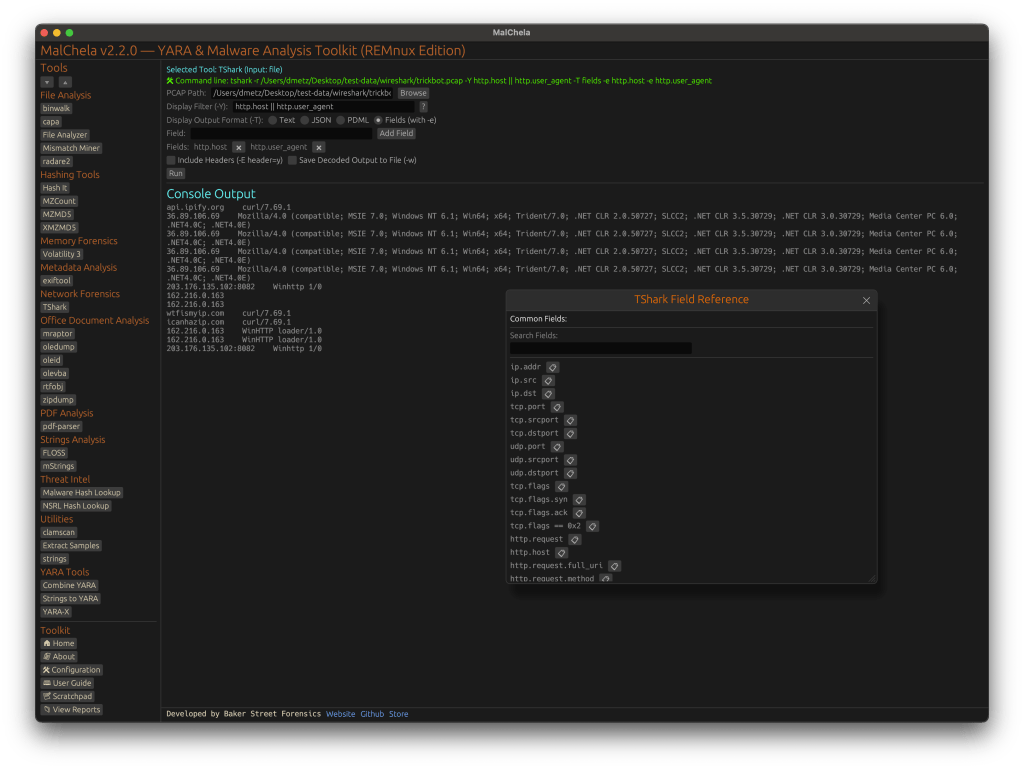
TShark Panel with Built-In Reference

Tshark and the integrated field reference

A new TShark integration exposes features including:

  • A filter builder panel
  • Commonly used fields reference
  • Tooltip hints for each example (e.g., `ip.addr == 192.168.1.1` shows “Any traffic to or from 192.168.1.1”)
  • One-click copy support

This helps analysts build and understand filters quickly—even if TShark isn’t something they use every day. Using the syntax builder in MalChela you can use the exact commands directly in Tshark or Wireshark.


YARA-X Support (Install Guide Included)

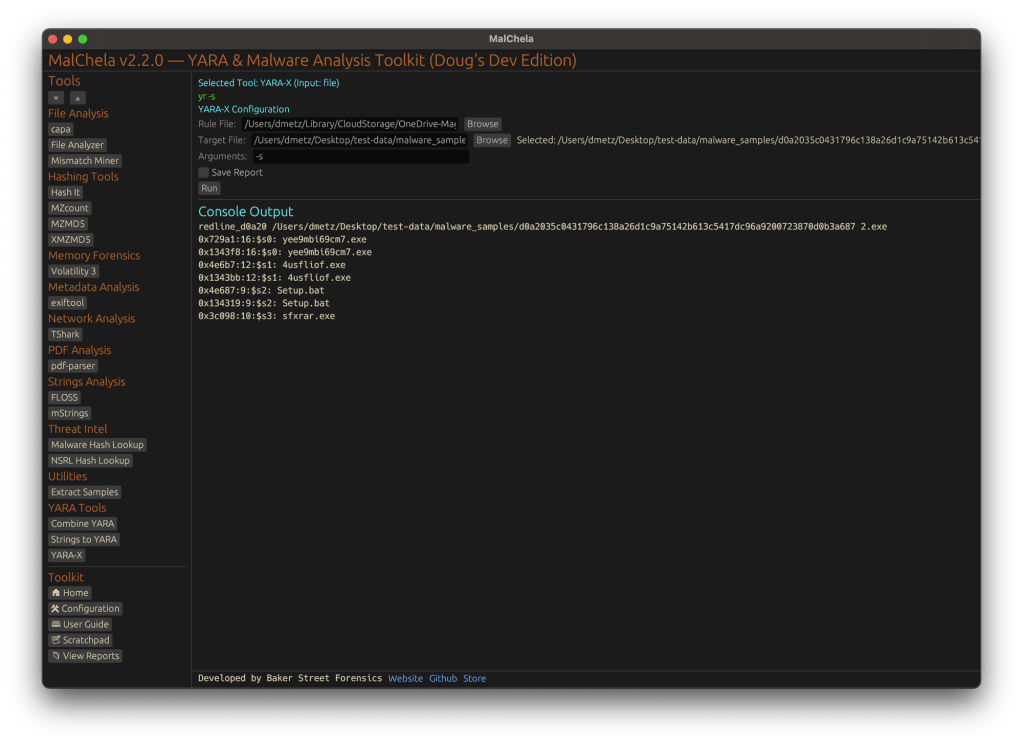
YARA-X module in MalChela

Support for YARA-X (via the `yr` binary) is now built in. YARA-X is not bundled with REMnux by default, but install instructions are included in the User Guide for both macOS and Linux users.

Once installed, MalChela allows for rule-based scanning from the GUI,and with YARA-X, it’s faster than ever.


fileanalyzer: Fuzzy Hashing, PE Metadata, and More

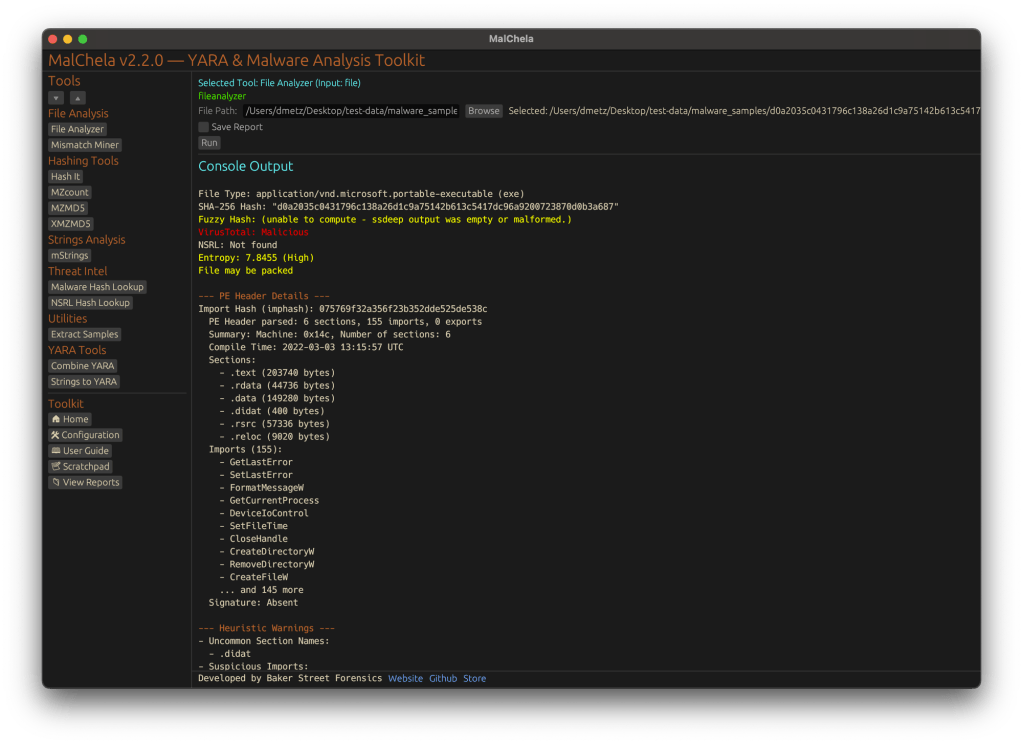
Updated FileAnalyzer Module

MalChela’s fileanalyzer tool has also been updated to include:

  • Fuzzy hashing support via `ssdeep`
  • BLAKE3 hashing for fast, secure fingerprints
  • Expanded PE analysis, including:
  • Import and Export Table parsing (list of imported and exported functions)
  • Compilation Timestamp (for detection of suspicious or forged build times)
  • Section Characteristics (flags like IMAGE_SCN_MEM_EXECUTE, IMAGE_SCN_CNT_CODE, etc., for detecting anomalous sections)

These improvements provide deeper insight into executable structure, helping analysts detect anomalies such as packers, suspicious timestamps, or unexpected imports/exports. Useful for everything from sample triage to correlation, fileanalyzer now digs deeper—without slowing down.


Memory Forensics Gets a Boost: Volatility 3 Now Supported

With the 2.2 release, MalChela introduces support for Volatility 3, the modern Python-based memory forensics framework. Whether you’re running MalChela in REMnux or on a customized macOS or Linux setup, you can now access the full power of Volatility directly from the MalChela GUI.

Volatility 3 in MalChela

There’s an intuitive plugin selector that dynamically adjusts available arguments based on your chosen plugin,. You can search, sort, and browse available plugins, and even toggle output options like –dump-dir with ease.

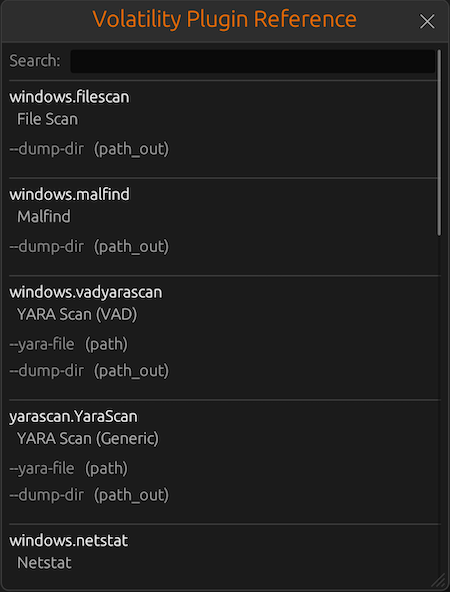
Like Tshark, there is an added plugin reference panel with searchable descriptions and argument overviews — a real time-saver when navigating Volatility’s deep and often complex toolset.

Volatility Plugin Reference

Smarter Tool Configuration via YAML

The tool configuration system continues to evolve:

  • Tools now declare their input type (file, folder, or hash)
  • The GUI dynamically adjusts the interface to match
  • Alternate profiles (like REMnux setups) can be managed simply by swapping `tools.yaml` files via the GUI
  • Easily backup or restore your custom setups
  • Restore the default toolset to get back to basics

This structure helps keep things clean—whether you’re testing, teaching, or deploying in a lab environment.


Embedded Documentation Access

The GUI now includes a link to the full MalChela User Guide in PDF. You can also access the documentation online.

From tool usage and CLI flags to configuration tips and install steps, it’s all just a click away—especially useful in offline environments or when onboarding new analysts. I’ll be honest, this is likely the most comprehensive user guide I’ve ever written.


Whether you’re reviewing binaries, building hash sets, or exploring network captures—MalChela 2.2 is designed bring together the tools you need, and make it easier to interoperate between them.

The new REMnux mode makes it even easier to get up and running with dozens of third party integrations.

Have an idea for a feature or application you’d like to see supported — reach out to me.


GitHub: REMnux Release

MalChela User Guide: Online, PDF, Web

Shop: T-shirts, hats, stickers, and more

MalChela Updates: New Features and Enhancements

It’s been just over a week since MalChela was initially released and already here have been a number of updates.

mStrings

In the previous post, I walked through the new mStrings function. I think this is one of my favorites so far. It extracts strings from a file and uses Sigma rules defined in YAML against the strings to evaluate threats and align results to the MITRE ATT&CK framework.

For fun I pointed it at an old WannaCry sample . I had a proud papa moment at the positive network IOC detection.

Check for Updates

Next came a function to automatically check the GitHub repo for updates and encourage a git pull to grab the latest… because apparently I can’t stop myself and this project will just keep growing, as my sleep keeps dwindling. Personally I found it ironic that you have to update in order to get the update telling you that updates are available… but it will work for all future updates as they come. So go ahead and update why don’t you.

Screenshot of MalChela indicating an update is available via git.

New File Analyzer module

Most recently a File Analyzer module has been added. Give it the path to your suspect file and it will return back:

  • SHA-256 Hash
  • Entropy (<7.5=high)
  • A RegEx detection for packing (mileage may vary)
  • PE Header info if it’s a PE
  • File Metadata
  • Yara Matches (any rules in yara_rules folder in workspace)
  • If there’s a positive match for the hash on VirusTotal (leverages the same key as previously in MalChela with the Virus Total / Malware Bazaar lookup)

Lastly, you’re given the option of whether or not you want to run strings on the file, or return to the main menu.

I really like the idea of using this as a possible first step in static analysis. Run this first and opt for strings. Things look interesting there, throw it into mStrings. Positive match on VirusTotal – use the malware hash lookup and get a more detailed analysis. Use the results from mStrings to craft a YARA rule and add it to your repo for future detections.


Mal-Hash Updates

Mal-Hash.ps1

  • The script takes the input of a file, calculates the hashes (MD5, SHA1, SHA256), and then submits the SHA256 hash to Virus Total* for analysis.
  • The script will also run Strings against the sample.
  • The script will check Malware Bazaar to see if a sample matching the hash is available.
  • The hashes, strings, Virus Total and Malware Bazaar results are both displayed on screen and saved to a text report.
  • Timestamp of the analysis is recorded in UTC.

VTHashSub.ps1

  • The script takes a hash value as input and submits the hash to Virus Total* for analysis.
  • The script will check Malware Bazaar to see if a sample matching the hash is available.
  • The hashes, Virus Total and Malware Bazaar results are both displayed on screen and saved to a text report.
  • Timestamp of the analysis is recorded in UTC.

Mal-Hash.ps1 and VTHashSub.ps1 will operate (via PowerShell) on Windows, Mac & Linux.

* Virus Total API key expected in vt-api.txt.

Latest updates:

  • n of x vendors detected
  • VT permalink
  • Malware Bazaar results

Both scripts available on my GitHub page:

https://github.com/dwmetz/Mal-Hash

Magnet Weekly CTF, Week 12 Solution Walk Through

The final challenge (#12) – Part 1:

What is the PID of the application where you might learn “how hackers hack, and how to stop them”?

Format: #### Warning: Only 1 attempt allowed!

The first thing I did was open the memdump file in HxD Hex Editor. A quick search found several hits.

I considered mapping the Offset back to the process memory but before going down that road (anticipating it to be math heavy) I decided to drop the individual process memory instead. Looking at the text surrounding “How Hackers Hack…” it appears to be html code. Looking even closer I’d say that it was in response to a search request for “how to stop getting hacked over and over.” Based on that I knew I’d be looking for a browser process.

Running pslist in Volatility we see that there’s multiple browser processes running for both Chrome and Internet Explorer.

I decided to focus on the iexplore.exe processes for Internet Explorer first – for 2 reasons. 1 – there were less running than Chrome so it was a smaller set to work through first. 2 – I did happen to find a Parsed Search Query in Axiom for “how to stop getting hacked over and over.”

The URL indicates a search from Bing.com. Only a sociopath would use Bing to search within Chrome so Internet Explorer it is.

I used the memdump Volatility plugin to dump the process memory for both IE processes.

Next I ran strings against each dump file to see if there was a hit.

We see that in the second file 4480.dmp (associated with PID 4480) contains the content we’re looking for. What is the PID of the application where you might learn “how hackers hack, and how to stop them”? 4480 [Flag 1]


The final challenge (#12) – Part 2:

What is the product version of the application from Part 1?

Format: XX.XX.XXXX.XXXXX

OK, so we need to know what version of Internet Explorer was used for the Bing search. Off to the Google to find that the IE version information is stored in the registry in HKEY_LOCAL_MACHINE\Software\Microsoft\Internet Explorer in the svcVersion value.

From here I mount the full memory image using MemprocFS.

Using the file structure to navigate to the registry key I open svcVersion.txt and verify that the IE version running is 11.0.9600.18860. Back to the scoreboard to submit the bittersweet ending to a very fun challenge and ….. WRONG.

Hmm, so everything I knew (which was limited to be honest) told me that I had the version right, but that wasn’t the right answer. Over on the Discord channel I saw I wasn’t the only one to have the same quandry.

I waited and lurked, waited and lurked – but wasn’t seeing any update to the question. The following day while meditating on the matter in the shower I was thinking about what other means existed to identify details like this.

I used the procdump Volatility plugin to dump the process executable for PID 4480.

Once I had executable.4480.exe I uploaded the file to Virus Total.

Scrolling down on the details tab we see that the exe is correctly identified as Internet Explorer and shows a File Version of 11.00.9600.18858. This is very similar to what we identified earlier (…58 vs …60).

Answer: 11.00.9600.18858 [Flag 2] CORRECT!

I’ll be very interested to learn how others who got the flag identified the correct version information. I suspect there’s additional artifacts that I didn’t explore that hold those clues but for the time being – it’s a mystery to me.

Who am I kidding? It’s gonna be killing me til I know the answer.