2025 Year in Review: Open Source DFIR Tools and Malware Analysis Projects

As 2025 draws to a close, I’m taking a moment to reflect on what turned out to be one of my most productive years in code. From major releases to entirely new projects, this year saw significant evolution across my DFIR toolkit—driven by real-world incident response needs, classroom teaching experiences, and late-night tinkering sessions fueled by good bourbon and better puzzles.

What started as continuing work on CyberPipe evolved into a year of substantial innovation: creating MalChela for YARA and malware analysis, building a portable Raspberry Pi forensics platform, developing automated timeline generation workflows, and crafting specialized utilities that solve specific problems I encountered in the field. Each tool represents not just lines of code, but practical solutions to challenges that digital forensics and incident response professionals face daily.

Whether you’re a seasoned forensic analyst, an incident responder building your toolkit, or a student just getting started in DFIR, my hope is that these open-source projects make your work a little easier and a lot more efficient. All tools remain freely available on GitHub, because I believe the best way to advance our field is to share knowledge and capabilities openly.

Here’s what kept me busy in 2025:

MalChela – YARA & Malware Analysis Toolkit (Rust)

My flagship project that evolved significantly throughout 2025:

  • March: Initial release – Combined 10 programs into one Rust workspace for YARA and malware analysis
  • May: v2.1 – Added smoother workflows, better third-party tool integration, and enhanced argument handling
  • May: v2.2 “REMnux Release” – Native support for REMnux, integrations with Volatility3, Tshark, YARA-X
  • June: v3.0 – Major update introducing Case Management system, FileMiner (replacing MismatchMiner), and tool suggestion capabilities based on file characteristics
  • July: v3.0.1 – Refinements to mStrings, improved MITRE mappings, “Select All” functionality, optimizations for running on Toby
  • August: v3.0.2 – Enhanced threat hunting with MITRE ATT&CK technique lookup

MalChela at a Glance

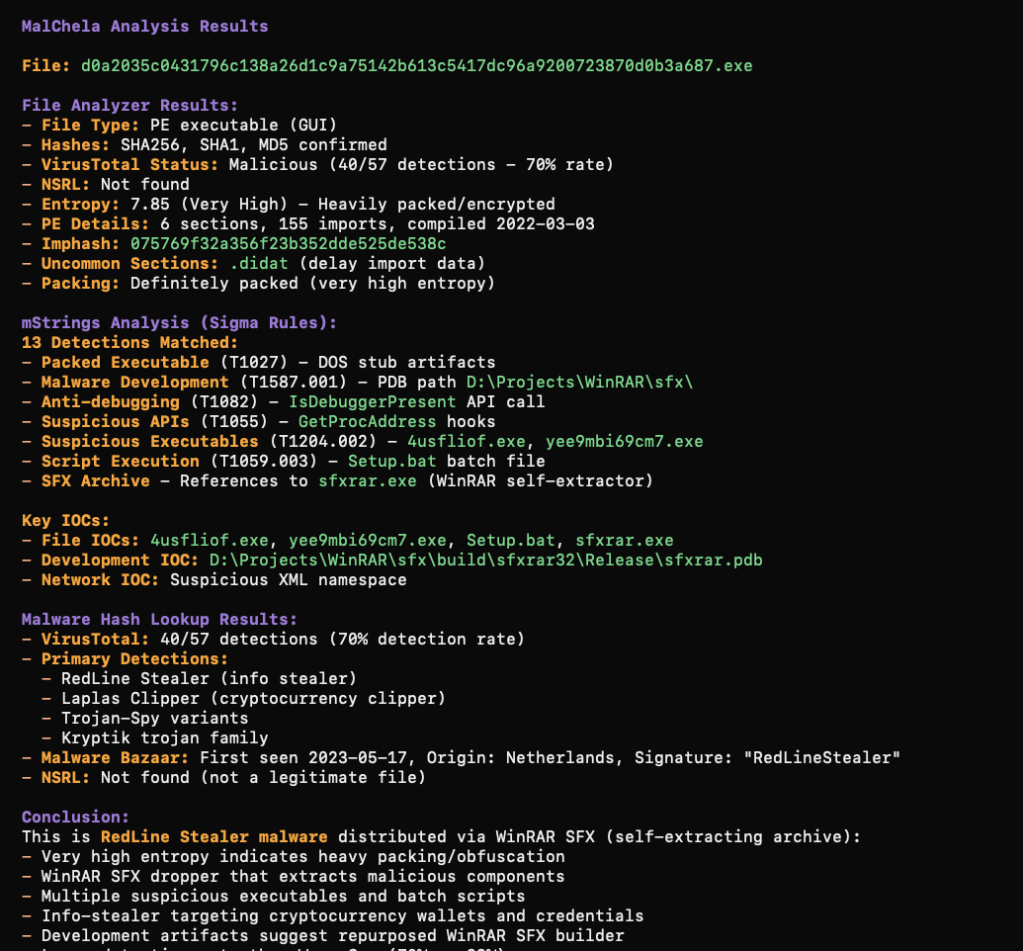
  • Rust-based malware analysis toolkit combining YARA scanning, file analysis, hash generation, string extraction with MITRE ATT&CK mapping, and automated malware sample extraction from password-protected archives 
  • Multiple specialized utilities including mzhash/xmzhash for corpus generation, file type mismatch detection, entropy analysis, PE structure examination, and fuzzy hashing capabilities 
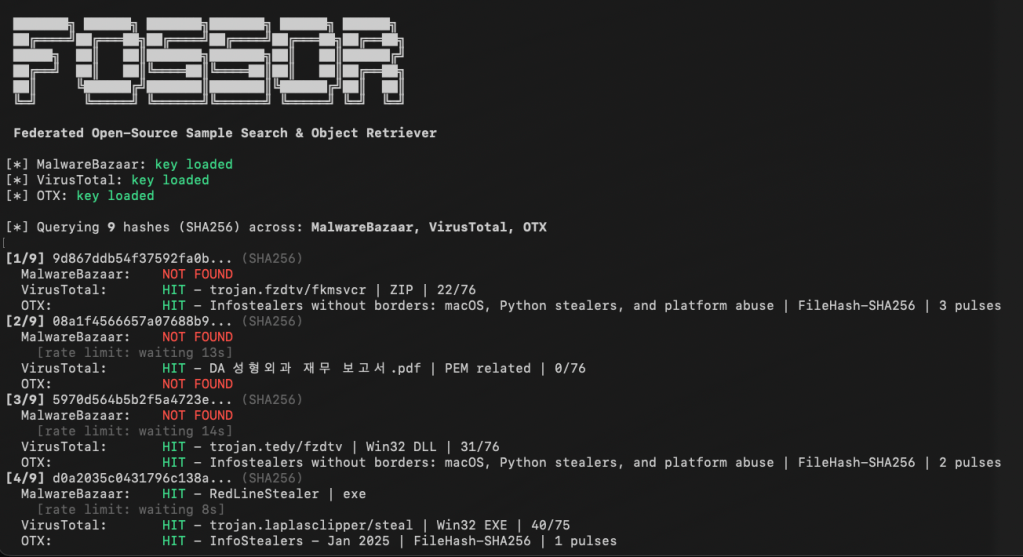
  • Integrated threat intelligence with VirusTotal and Malware Bazaar API support, NSRL database queries for known-good file filtering, and Sigma rule application for IOC identification 
  • Case management system (v3.0) featuring unified tracking of files, tools, and notes in case.yaml format with auto-saved outputs, tagging, search functionality, and VS Code integration 
  • Extensible architecture supporting custom tool integration via tools.yamlconfiguration, enhanced support for Volatility 3, TShark, and YARA-X, with both GUI and CLI modes (WSL2-compatible on Windows)
  • Complete documentation embedded as PDF or online

https://github.com/dwmetz/MalChela

CyberPipe – Incident Response Collection Tool (PowerShell)

Continued evolution of the enterprise digital evidence collection script:

  • May: v5.1 – Streamlined profiles with better flexibility, customizable collection profiles
  • October: v5.2 – Improved collection methods with dual disk space validation, SHA-256 hashing of artifacts, single-file reporting, network collection simplification
  • November: v5.3 – Critical PowerShell 5.1 compatibility fixes, dual validation logic, enhanced reliability across all PowerShell environments

https://github.com/dwmetz/CyberPipe

CyberPipe-Timeliner ✱New✱ (PowerShell)

  • NovemberCyberPipe-Timeliner – New companion project to CyberPipe that automates the workflow from Magnet Response collections to unified forensic timelines using Eric Zimmerman’s EZ Tools and ForensicTimeliner

https://github.com/dwmetz/CyberPipe-Timeliner

Toby – Portable Raspberry Pi Forensics Toolkit

  • July: Released Toby – A compact forensics toolkit built on Raspberry Pi Zero 2 W running customized Kali Linux, designed for headless operation via SSH/VNC, perfect for field analysis and malware triage

Toby-Find

  • JulyToby-Find – Terminal-based command-line helper tool for discovering CLI forensics tools in KALI and REMnux environments, created initially for university teaching

https://github.com/dwmetz/Toby

Crabwise – USB Device Benchmark Utility (Rust)

  • August: Released Crabwise – A lightweight USB benchmarking tool that measures true read/write speeds of USB devices for forensic workflows. Tests write throughput with pseudo-random data and read performance under uncached conditions. Includes logging functionality to track performance across different cables, hubs, and connection paths, helping forensic investigators optimize their hardware setups.

https://github.com/dwmetz/Crabwise

Toolbox Utilities – Specialized Python and Bash Scripts

Standalone tools maintained in the Toolbox repository:

  • OctoberCoreBreaker.py – Breaks large yara-rules-core files into smaller .yar files for tool ingestion
  • OctoberEtTu.py – Caesar cipher brute force decoder (created for Murdle puzzle solving); After all, All work and no play makes Jack a dull boy.
  • Novembercloudtrail_timeline.py – Parses AWS CloudTrail JSON logs and outputs CSV format for Timeline Explorer
  • Novembermac_triage_timeline.sh – Processes Mac-Triage ZIP files and generates timeline for Timeline Explorer
  • Novemberuac_timeline.sh – Processes UAC tar.gz files and generates timeline for Timeline Explorer (Linux/macOS)

https://github.com/dwmetz/Toolbox


All projects are available on my GitHub at github.com/dwmetz, with detailed documentation on bakerstreetforensics.com. My goal is making DFIR and malware analysis more accessible, automated, and efficient for incident responders and forensic analysts.

CyberPipe v5.3: Enhanced PowerShell Compatibility and Reliability

I’m pleased to announce the release of CyberPipe v5.3, bringing critical compatibility improvements for Windows PowerShell 5.1 and enhanced reliability across all PowerShell environments.

The Problem

After releasing v5.2 with the new unified banner design, several users reported an interesting issue: CyberPipe would execute perfectly in PowerShell Core, but in Windows PowerShell 5.1, the script would complete the Magnet Response collection successfully—then immediately fail with an exit code error and stop before running EDD and BitLocker key recovery.

The collected artifacts were there. The output looked successful. But the script refused to continue.

The Root Cause

This turned out to be a known quirk in Windows PowerShell 5.1: the $process.ExitCode property isn’t always reliably populated after calling WaitForExit() on a process object. Even when Magnet Response completed successfully with exit code 0, PowerShell 5.1 would sometimes report a non-zero value, causing CyberPipe to think the collection had failed.

The Solution

Version 5.3 introduces dual validation logic that checks both the exit code and verifies that files were actually collected. If Magnet Response reports a non-zero exit code but artifacts were successfully collected, CyberPipe recognizes this as a PS 5.1 reporting issue and continues the workflow with a warning message.

The script now validates success based on what actually matters: did we collect the evidence?

Bonus: Adaptive Banners

While fixing the PS 5.1 compatibility, I also enhanced the banner display:

  • PowerShell Core: Displays the full Unicode box-drawing banner with visual flair
  • Windows PowerShell 5.1: Shows a clean ASCII banner optimized for automation, EDR deployment, and environments where Unicode rendering may be inconsistent

The script automatically detects which PowerShell edition is running and adjusts accordingly.

Testing & Validation

CyberPipe v5.3 has been tested and verified on:

  • ✅ Windows PowerShell 5.1
  • ✅ PowerShell Core 7.x
  • ✅ All collection profiles (Volatile, RAMOnly, RAMPage, RAMSystem, QuickTriage, Full)

The script now executes flawlessly in both environments with no workflow interruptions.

Compatibility Notes

This is a drop-in replacement for v5.2 with no breaking changes:

  • All command-line parameters work identically
  • Existing automation scripts require no modifications
  • All collection profiles function as before

Why This Matters

For incident response work, reliability is non-negotiable. When you’re collecting evidence from a potentially compromised system, you need tools that work consistently across different Windows environments—corporate workstations running PS 5.1, modern systems with PS Core, virtual machines, and physical hardware.

CyberPipe v5.3 ensures that whether you’re running an interactive collection or deploying via EDR automation, the script executes reliably from start to finish.

Get CyberPipe v5.3

DownloadCyberPipe v5.3 on GitHub

DocumentationGitHub Repository

As always, feedback and issue reports are welcome on the GitHub repository.


CyberPipe is a free, open-source incident response collection tool for Windows systems, automating memory capture, triage collection, encrypted disk detection, and BitLocker key recovery.

Streamline Digital Evidence Collection with CyberPipe 5.2

I first wrote CyberPipe when I was on the front lines of incident response, driven by the need for more robust and efficient triage collections, whether online or off.  Over the years, CyberPipe continues to adapt and improve, addressing the ever-changing challenges faced by incident response practitioners. 

CyberPipe (formerly CSIRT-Collect) is a PowerShell script that is designed to streamline the collection of digital evidence using Magnet Response in enterprise environments, ensuring that responders can gather critical data efficiently and effectively.  Other features include detection of encrypted drives, BitLocker key recovery, and memory image collection.

The most recent update includes enhancements in three areas: Collection, Capabilities, and Reliability.

Screenshot of CyberPipe

🔍 What’s New in 5.2

Intelligent Collection

  • The script now includes dual disk space validation, checking both the target drive and the system drive with profile-aware thresholds to prevent sudden failures due to insufficient space. 
  • A pre-collection volatile snapshot captures uptime, users, connections, and processes to preserve transient state before heavy operations begin.
  • Reports virtual environment detection (VMware, Hyper-V, VirtualBox, etc.) to help analysts understand collection limitations.
  • Real-time progress indicators provide accurate size tracking during the collection, offering responders visibility into the remaining data capture.

Enhanced Capabilities

  • The new QuickTriage profile allows for rapid collection of volatile and system artifacts when time is ticking.
  • BitLocker recovery now includes all volumes, not just the C: drive.
  • A single-file report (CyberPipe-Report.txt) consolidates metadata and a summary of collected artifacts in a human-readable format.
  • All collected artifacts and logs are hashed using SHA-256 to enhance integrity and chain of custody.
  • Output compression is available via the -Compress flag, aiding in storage and transfer.
  • Network collection is simplified with the -Net parameter, eliminating the need for manual network path or configuration edits.

Improved Reliability

  • Profile-aware space checks alert when free space is insufficient for a chosen profile, preventing silent failures.
  • The script now validates exit codes from MAGNET Response to detect failures more effectively.
  • Artifact verification after collection ensures that all expected items were gathered.
  • Error handling and messaging have been refined to provide clearer feedback to the operator.

What I’m hoping this delivers

CyberPipe 5.2 aims to address some challenges observed in real-world triage and live-response operations:

  • Resilience in constrained environments — dual drive checks and profile awareness help prevent mid-collection failures.
  • Better transparency and oversight — real-time progress display and post-collection verification enhance confidence.
  • Faster response options — the QuickTriage profile is suitable when speed is paramount.
  • Stronger forensic hygiene — SHA-256 hashing, improved error detection, and full-volume BitLocker key recovery contribute to defensibility.
  • Easier network deployments — built-in ‘-Net‘ support facilitates smoother remote collection.

As always, CyberPipe is freely available at https://github.com/dwmetz/CyberPipe. Forks and Contributions welcome and appreciated. 

Is there a feature you’d like to see? I think next I might work on support for copying output to AWS/Azure. Thoughts?

Cross-Platform DFIR Tools: MalChelaGUI on Windows

It’s a Trick and a Treat

Sometimes the best breakthroughs are the ones you don’t plan for.  After a routine Windows update this week, I launched MalChelaGUI from the Ubuntu terminal on an Ubuntu WSL2 instance — and it simply opened. No X-server, no environment tweaks, no extra packages.

🎉 😱 A Rust native GUI app on Windows, via Ubuntu WSL terminal!

The latest WSL 2.5 + WSLg 1.0.66 update from Microsoft quietly unlocked full Wayland and GPU acceleration for Linux GUI apps on Windows 11 24H2.  (Note the latest WSL at the time of this post is 2.61)

The result? MalChelaGUI now runs as a true desktop app on Windows, powered entirely by Ubuntu WSL.  


Why This Matters

  •  🧰 No configuration needed — just follow the default instructions at GItHub, and build MalChela as usual.  (WSL, Ubuntu 24.04 or later)
  • 🪟 Native windowing — Clipboard, display scaling, and GPU acceleration all handled automatically.  
  • 🦀 Cross-platform parity — macOS, Linux, and now Windows (via WSL) all run the same GUI experience.

It’s a small but meaningful proof of concept: cross-platform DFIR tooling can now live comfortably in every environment analysts work in — even Windows, without compromise.


Call for Testers

If you’re running Windows 11 24H2 or newer, update WSL and give it a try:

```powershell
wsl --update

Then from Ubuntu WSL

./target/release/MalChelaGUI

If it launches successfully, drop me a note or tag me — I’d love to hear how it behaves across different hardware and GPU setups.