It’s been just over a week since MalChela was initially released and already here have been a number of updates.
mStrings
In the previous post, I walked through the new mStrings function. I think this is one of my favorites so far. It extracts strings from a file and uses Sigma rules defined in YAML against the strings to evaluate threats and align results to the MITRE ATT&CK framework.
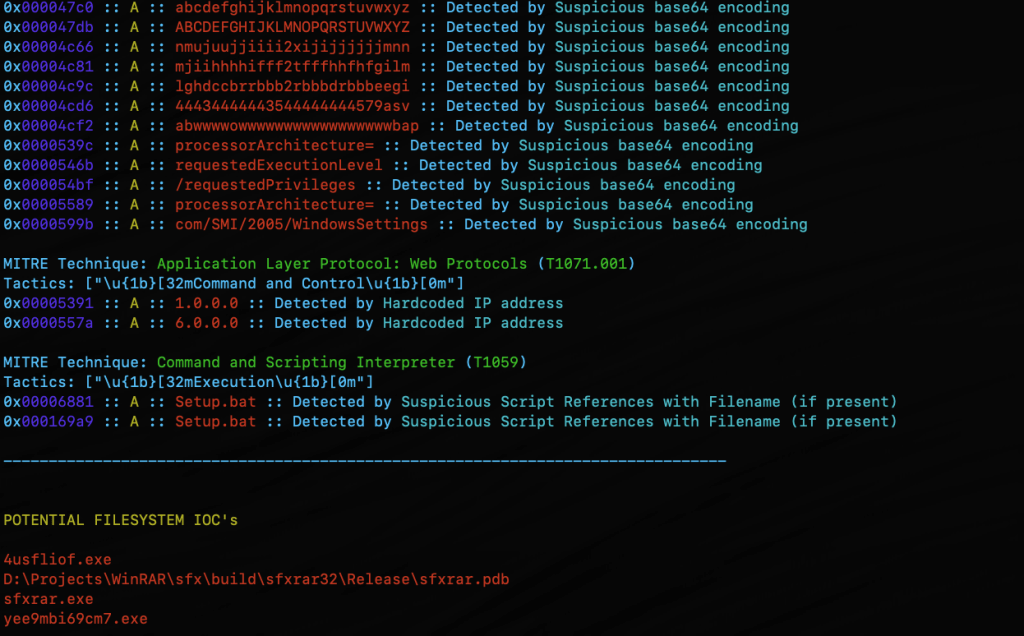
For fun I pointed it at an old WannaCry sample . I had a proud papa moment at the positive network IOC detection.
Check for Updates
Next came a function to automatically check the GitHub repo for updates and encourage a git pull to grab the latest… because apparently I can’t stop myself and this project will just keep growing, as my sleep keeps dwindling. Personally I found it ironic that you have to update in order to get the update telling you that updates are available… but it will work for all future updates as they come. So go ahead and update why don’t you.
Screenshot of MalChela indicating an update is available via git.
New File Analyzer module
Most recently a File Analyzer module has been added. Give it the path to your suspect file and it will return back:
SHA-256 Hash
Entropy (<7.5=high)
A RegEx detection for packing (mileage may vary)
PE Header info if it’s a PE
File Metadata
Yara Matches (any rules in yara_rules folder in workspace)
If there’s a positive match for the hash on VirusTotal (leverages the same key as previously in MalChela with the Virus Total / Malware Bazaar lookup)
Lastly, you’re given the option of whether or not you want to run strings on the file, or return to the main menu.
I really like the idea of using this as a possible first step in static analysis. Run this first and opt for strings. Things look interesting there, throw it into mStrings. Positive match on VirusTotal – use the malware hash lookup and get a more detailed analysis. Use the results from mStrings to craft a YARA rule and add it to your repo for future detections.
String analysis is a cornerstone of malware investigation, revealing embedded commands, URLs, and other artifacts that can expose a threat’s intent. mStrings, a Rust-based tool, simplifies this process by scanning files, extracting meaningful strings, and structuring results for efficient analysis.
At its core, mStrings is more than a simple string extraction tool. It integrates regex-based detection rules to identify key indicators, offering a refined approach to analyzing malware artifacts. In addition to console output it also presents data in a structured JSON format, allowing for seamless integration into other security workflows.
screenshot from mStrings
In addition to specialized string searching, mStrings detections associate results with MITRE ATT&CK. When malware indicators map to known MITRE ATT&CK techniques, analysts can quickly understand the intent and behavior of a threat. Instead of just seeing a suspicious string, they can recognize that it corresponds to credential dumping, command-and-control, or privilege escalation, enabling faster triage and response.
Optimized for Practical Investigation
Security professionals often need to cross-reference findings in a hex editor. mStrings accounts for this by capturing detailed string locations in hex, allowing for immediate context when reviewing suspicious files. This level of granularity is particularly valuable when analyzing packed or obfuscated malware, where offsets can provide crucial insights.
mStrings showing hex location for identified string
After the scan, reviewing the complete strings dump is just as easy with an option to open the results directly in VS Code.
mStrings prompt to review saved strings
Technology That Powers It
Built in Rust, mStrings leverages its robust ecosystem to enhance performance and reliability. Sigma-based detection rules allow for flexible and easily modifiable patterns, giving analysts control over what indicators to track. The tool’s structured approach ensures that results are not just extracted but meaningfully categorized for deeper analysis.
A Tool That Grows with You
mStrings is extensible, enabling you to customize detections. Not satisfied with the existing detection rules? You can easily write your own in Sigma. Future improvements will refine regex patterns, enhance Windows compatibility, and introduce new features to improve investigative workflows. Designed with usability in mind, mStrings serves as a practical companion for analysts who need clear, structured, and insightful data extraction.
MStrings is one of many malware analysis utilities included in MalChela. Download from Github and let me know what you think. If you’ve already installed Malchela, git pull will download the latest updates.
Try this out for a workflow. Use Hash It (3) and give it the file path for a malware file. Use the hash from Hash It and check it against VirusTotal an Malware Bazaar with the Malware Hash Lookup (10). Then jump into mStrings (4), give it the same file path again, and start pulling out the interesting strings. Once you have what you think is a good number of indicators, run Strings to YARA (9) and generate a fully formatted YARA rule for use in any of your security tools.
Just two more weeks to the Magnet Virtual Summit 2025! If you’ve been procrastinating on registering, don’t miss out. It’s completely free! The conference is scheduled for February 10th through the 14th.
I’m excited to present two talks this year. The first one is titled “Unlocking DFIR: Free Resources for Efficient Triage and Acquisition.” In this talk, I’ll cover free triage acquisition solutions for Windows, Mac, and Linux.
The second talk is called “Zen & the Art of Digital Forensics: Enhancing Insight through Mindfulness.” In this talk, I’ll explore how applying Zen principles like mindfulness, non-attachment, and the ‘beginner’s mind’ can lead to improved investigations and mental well-being.
At this point, we’ve all heard the expression ‘There is no cloud; It’s just someone else’s computer.’ While there is some truth to that, there are some fundamental differences when it comes to digital forensics when cloud resources are part of the investigation.
I’ve been doing DFIR for about 15 years now. In the early days, almost all investigations involved having hands on access to the data or devices being investigated. As I moved into Enterprise Incident Response, it became more and more frequent that the devices I would be investigating would be in a remote location, be it another state – or even another country. As the scope of my investigations grew, so did my techniques need to evolve and adapt.
Cloud Forensics is the next phase of that evolution. While the systems under investigation may still be in another state or country, extra factors come into play like multi-tenancy and shared responsibility models. Cloud Forensics Demystified does a solid job of shedding light on those nuances.
The book is divided into three parts.
Part 1: Cloud Fundamentals
Part 2: Forensic Readiness: Tools, Techniques, and Preparation for Cloud Forensics
Part 3: Cloud Forensic Analysis: Responding to an Incident in the Cloud
Part 1: Cloud Fundamentals
This section provides a baseline knowledge of the three major cloud providers, Amazon Web Services (AWS), Google Cloud Platform (GCP) and Microsoft Azure. It breaks down the different architectural components of each, and how the platforms each handle the functions of virtual systems, networking and storage.
Part 1 also includes a broad yet thorough introduction to the different Cyber and Privacy legislation that come into play for cloud investigations. This section is not only valuable to investigators. Whether you’re a lawyer providing legal counsel for an organization, or responsible for an organizations overall security at a CISO level, this material is beneficial in understanding the challenges and responsibilities that come from hosting your data or systems in the cloud, and the different legislation and regulations that follow those choices.
Part 2: Forensic Readiness: Tools, Techniques, and Preparation for Cloud Forensics
As with enterprise investigations, logging is often where the hunting for incident indicators begins with telemetry and the correlation of different log sources. This section focuses on the different log sources available in AWS, GCP, and Azure. It also provides a detailed list of log types that are enabled by default and those that require manual activation to ensure that you have access to the most relevant data for your investigations when an incident occurs. This section also covers the different providers offerings for log analysis in the cloud including AWS Cloud Watch, Microsoft Sentinel and Google’s Cloud Security Command Center (Cloud SCC) as examples.
Part 3: Cloud Forensic Analysis: Responding to an Incident in the Cloud
As an Incident Responder, this was the section I enjoyed the most. While the first two sections are foundational for understanding the architectures of networking and storage, part three provides detailed information on how to acquire evidence for cloud investigations. The section covers both log analysis techniques as well as recommendations for host forensics and memory analysis tools. The book covers the use of commercial forensic suites, like Magnet Axiom, as well as open-source tools like CyLR and HAWK. Besides covering investigations of the three Cloud Service Providers (CSPs), there is also a section covering the cloud productivity services of Microsoft M365 and Google Workspace, as well as a brief section on Kubernetes.
Summary
Whether you’re a gray-haired examiner like me, or a neophyte in the world of digital forensics, chances are high that if you’re not running investigations in the cloud yet – you will be soon enough. Preparation is the first step in the Incident Response lifecycle. To properly prepare for incidents you need to know both what sources will be most informative to your investigations, as well as the methodology to capture and process that evidence efficiently.
Cloud Forensics Demystified is a comprehensive guide that covers cloud fundamentals, forensic readiness, and incident response. It provides valuable insights into cloud investigation techniques, log analysis, and evidence acquisition for major cloud providers and productivity services. The book is valuable for both experienced and novice digital forensics professionals to prepare for cloud investigations.






 Baker Street Forensics