The Game Is Afoot: Introducing the MalChela Video Series

There’s a moment every analyst knows — the one where an unknown file lands on your desk and the clock starts ticking. You need answers, and you need them fast. MalChela was built for exactly that moment.

Today I’m excited to announce the MalChela Video Series on YouTube — a growing collection of tutorial episodes walking through real malware analysis workflows using MalChela, the open-source Rust-based toolkit I’ve been building for the DFIR community. Whether you’re new to the tool or already running it in your lab, there’s something here for you.

Four episodes are available right now in the playlist.


What’s in the Playlist

Ep0 | Installation & First Run

Every case starts somewhere. Episode 0 is your onboarding — installing MalChela, walking through its dependencies, and getting oriented with both the CLI and GUI modes. If you’ve been curious about the tool but weren’t sure where to start, this is the episode to bookmark.


Ep1 | First Contact: Hash, Inspect, Identify

You’ve just been handed a suspicious file. What do you do first?

This episode covers the first three tools in a malware triage workflow — the exact sequence I reach for every time I encounter an unknown file:

  • hashit — generate MD5, SHA1, and SHA256 hashes to protect chain of custody and enable deduplication
  • fileanalyzer — static inspection: entropy analysis, PE header fields, compile timestamps, and import tables
  • malhash — simultaneous lookup against VirusTotal and MalwareBazaar to identify known malware families

By the end of this episode, you’ll take an unknown file from zero to confirmed malware family identification in under five minutes — no sandboxing required.


Ep2 | From Strings to Signatures

Continuing from Episode 1, we go deeper into the confirmed RedLine info-stealer sample using mStrings — MalChela’s string extraction engine. Unlike the traditional strings utility, mStrings runs every extracted string through a detection ruleset and MITRE ATT&CK mapping layer simultaneously, turning raw output into actionable intelligence.

We walk through 62 detections, including PDB path artifacts, hard-coded dropper filenames, WMI queries, credential harvesting patterns, anti-debug checks, and a code injection setup. We then feed the extracted IOCs into Strings2YARA to auto-generate a structured YARA rule — and confirm it fires against the sample using File Analyzer.

By the end, you’ll be reading a malware file not as a pile of strings, but as a window into the attacker’s tradecraft.


Ep3 | REMnux Mode & Custom Tools

MalChela doesn’t work in isolation. Episode 3 covers how to extend the toolkit through the tools.yaml config file and how enabling REMnux mode surfaces an entire distro’s worth of malware analysis utilities directly within MalChela’s interface.

We also explore three built-in integrations: Volatility 3 with a dynamic plugin builder, T-Shark with a searchable reference, and YARA-X — a faster, Rust-native rewrite of YARA.


What’s Coming

The series is ongoing. Future episodes will push further into advanced workflows — think directory-scale triage, corpus management, and the AI-assisted analysis capabilities introduced in MalChela’s MCP integration. Stay subscribed and you won’t miss them.


Get Involved

If MalChela is useful in your work, the best thing you can do is help spread the word:

  • 📺 Subscribe to the YouTube channel — Subscribe to the channel and save the playlist so you don’t miss new episodes as they land.
  • 📖 Follow Baker Street Forensics — Writeups, major releases, and workflow deep dives live here.
  • 💬 Share and comment — If an episode clicks for you, pass it along to a colleague or drop a comment on the video. That feedback genuinely shapes what comes next.

The game is afoot. Let’s get to work.


MalChela is open-source and freely available. Find the project on GitHub.

2025 Year in Review: Open Source DFIR Tools and Malware Analysis Projects

As 2025 draws to a close, I’m taking a moment to reflect on what turned out to be one of my most productive years in code. From major releases to entirely new projects, this year saw significant evolution across my DFIR toolkit—driven by real-world incident response needs, classroom teaching experiences, and late-night tinkering sessions fueled by good bourbon and better puzzles.

What started as continuing work on CyberPipe evolved into a year of substantial innovation: creating MalChela for YARA and malware analysis, building a portable Raspberry Pi forensics platform, developing automated timeline generation workflows, and crafting specialized utilities that solve specific problems I encountered in the field. Each tool represents not just lines of code, but practical solutions to challenges that digital forensics and incident response professionals face daily.

Whether you’re a seasoned forensic analyst, an incident responder building your toolkit, or a student just getting started in DFIR, my hope is that these open-source projects make your work a little easier and a lot more efficient. All tools remain freely available on GitHub, because I believe the best way to advance our field is to share knowledge and capabilities openly.

Here’s what kept me busy in 2025:

MalChela – YARA & Malware Analysis Toolkit (Rust)

My flagship project that evolved significantly throughout 2025:

  • March: Initial release – Combined 10 programs into one Rust workspace for YARA and malware analysis
  • May: v2.1 – Added smoother workflows, better third-party tool integration, and enhanced argument handling
  • May: v2.2 “REMnux Release” – Native support for REMnux, integrations with Volatility3, Tshark, YARA-X
  • June: v3.0 – Major update introducing Case Management system, FileMiner (replacing MismatchMiner), and tool suggestion capabilities based on file characteristics
  • July: v3.0.1 – Refinements to mStrings, improved MITRE mappings, “Select All” functionality, optimizations for running on Toby
  • August: v3.0.2 – Enhanced threat hunting with MITRE ATT&CK technique lookup

MalChela at a Glance

  • Rust-based malware analysis toolkit combining YARA scanning, file analysis, hash generation, string extraction with MITRE ATT&CK mapping, and automated malware sample extraction from password-protected archives 
  • Multiple specialized utilities including mzhash/xmzhash for corpus generation, file type mismatch detection, entropy analysis, PE structure examination, and fuzzy hashing capabilities 
  • Integrated threat intelligence with VirusTotal and Malware Bazaar API support, NSRL database queries for known-good file filtering, and Sigma rule application for IOC identification 
  • Case management system (v3.0) featuring unified tracking of files, tools, and notes in case.yaml format with auto-saved outputs, tagging, search functionality, and VS Code integration 
  • Extensible architecture supporting custom tool integration via tools.yamlconfiguration, enhanced support for Volatility 3, TShark, and YARA-X, with both GUI and CLI modes (WSL2-compatible on Windows)
  • Complete documentation embedded as PDF or online

https://github.com/dwmetz/MalChela

CyberPipe – Incident Response Collection Tool (PowerShell)

Continued evolution of the enterprise digital evidence collection script:

  • May: v5.1 – Streamlined profiles with better flexibility, customizable collection profiles
  • October: v5.2 – Improved collection methods with dual disk space validation, SHA-256 hashing of artifacts, single-file reporting, network collection simplification
  • November: v5.3 – Critical PowerShell 5.1 compatibility fixes, dual validation logic, enhanced reliability across all PowerShell environments

https://github.com/dwmetz/CyberPipe

CyberPipe-Timeliner ✱New✱ (PowerShell)

  • NovemberCyberPipe-Timeliner – New companion project to CyberPipe that automates the workflow from Magnet Response collections to unified forensic timelines using Eric Zimmerman’s EZ Tools and ForensicTimeliner

https://github.com/dwmetz/CyberPipe-Timeliner

Toby – Portable Raspberry Pi Forensics Toolkit

  • July: Released Toby – A compact forensics toolkit built on Raspberry Pi Zero 2 W running customized Kali Linux, designed for headless operation via SSH/VNC, perfect for field analysis and malware triage

Toby-Find

  • JulyToby-Find – Terminal-based command-line helper tool for discovering CLI forensics tools in KALI and REMnux environments, created initially for university teaching

https://github.com/dwmetz/Toby

Crabwise – USB Device Benchmark Utility (Rust)

  • August: Released Crabwise – A lightweight USB benchmarking tool that measures true read/write speeds of USB devices for forensic workflows. Tests write throughput with pseudo-random data and read performance under uncached conditions. Includes logging functionality to track performance across different cables, hubs, and connection paths, helping forensic investigators optimize their hardware setups.

https://github.com/dwmetz/Crabwise

Toolbox Utilities – Specialized Python and Bash Scripts

Standalone tools maintained in the Toolbox repository:

  • OctoberCoreBreaker.py – Breaks large yara-rules-core files into smaller .yar files for tool ingestion
  • OctoberEtTu.py – Caesar cipher brute force decoder (created for Murdle puzzle solving); After all, All work and no play makes Jack a dull boy.
  • Novembercloudtrail_timeline.py – Parses AWS CloudTrail JSON logs and outputs CSV format for Timeline Explorer
  • Novembermac_triage_timeline.sh – Processes Mac-Triage ZIP files and generates timeline for Timeline Explorer
  • Novemberuac_timeline.sh – Processes UAC tar.gz files and generates timeline for Timeline Explorer (Linux/macOS)

https://github.com/dwmetz/Toolbox


All projects are available on my GitHub at github.com/dwmetz, with detailed documentation on bakerstreetforensics.com. My goal is making DFIR and malware analysis more accessible, automated, and efficient for incident responders and forensic analysts.

Toby-Find: Simplifying Command-Line Forensics Tools

In digital forensics, we often take a toolbox approach — success hinges on having the right tool for the job. Some tools offer broad functionality, while others are deeply specialized. Distributions like KALI and REMnux do a fantastic job bundling a wide range of forensic and security tools, but keeping track of what’s actually installed can be a challenge.

If you’re using a graphical interface, browsing through available packages is fairly intuitive. But when you’re living in the terminal — as many analysts do — that discoverability disappears. There’s no built-in index of command-line tools or how to invoke them.

The first version of Toby-Find was born out of necessity. I teach a Network Forensics course at the university, using a custom VM loaded with tools like Zeek, Tshark, Suricata, and more. I wanted students to have an easy, searchable way to see what CLI tools were available and how to run them — without needing to memorize commands or dig through man pages.

Later, when I built Toby (a forensic-focused Raspberry Pi rig running a customized KALI install), I updated Toby-Find to include the complete CLI toolset geared toward forensics and malware analysis from the KALI ecosystem.

And because I can’t leave well enough alone, I decided to build a REMnux-compatible version too.

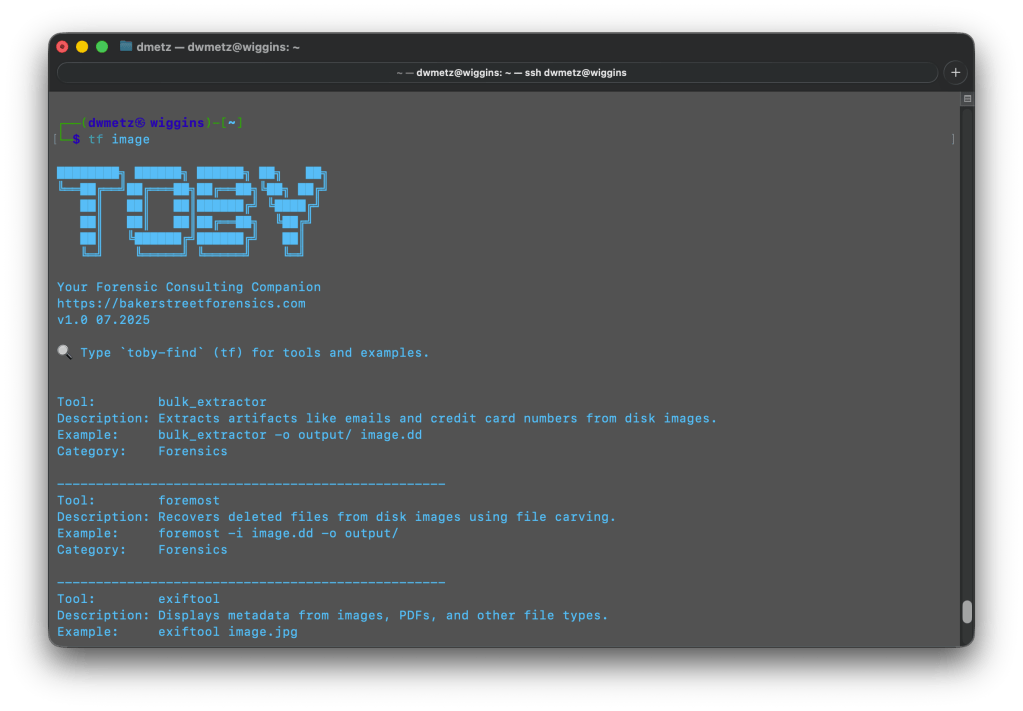
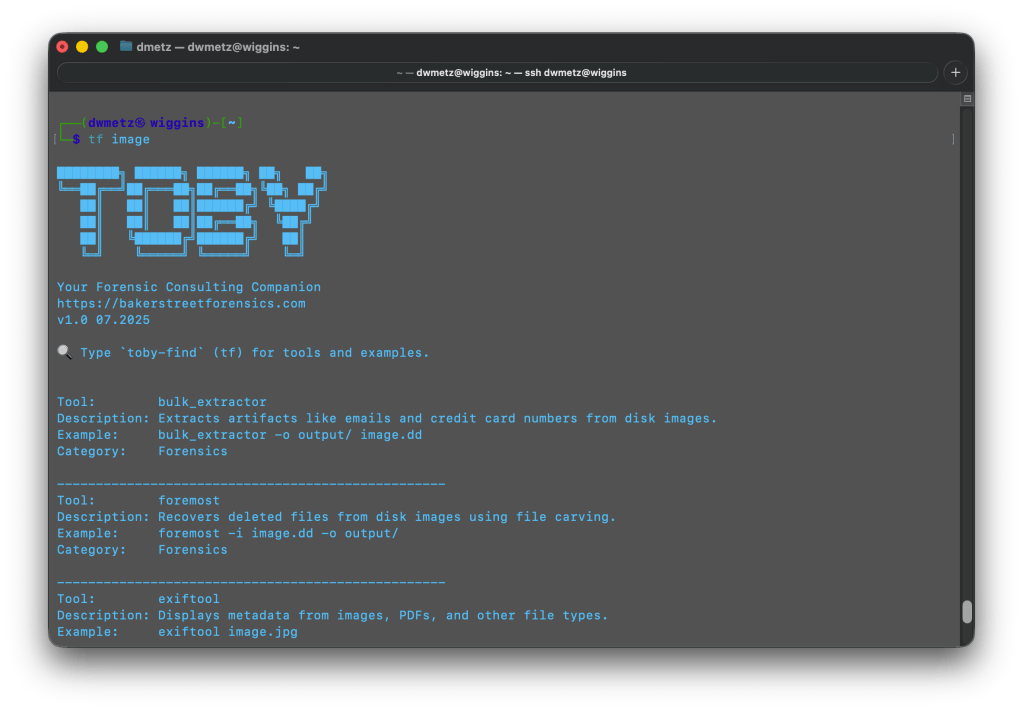
Once installed, you can launch Toby-Find (via tf, toby-find, or tf-help) from any terminal and instantly search for tools, descriptions, examples, and more.

Toby-Find on REMnux
Toby-Find on Kali

📦 Installation

1. Clone the repository:

git clone https://github.com/dwmetz/Toby.git

2. Make the install script executable:

cd Toby
chmod +x install.sh

3. Run the installer:

./install.sh

4. Follow the prompt to choose your environment (KALI or REMnux)
5. Open a new terminal or run:

source ~/.bashrc   # or ~/.zshrc depending on shell

🚀 Usage

tf [keyword]

Examples:

tf yara
tf volatility
tf hash

To view the full list:

tf-help

Whether you’re working from a custom VM, a rugged Pi, or a hardened REMnux box, Toby-Find gives you a fast, terminal-friendly way to surface the tools at your disposal — without breaking focus. It’s lightweight, portable, and easy to extend for your own lab or classroom.

You can grab the full installer from GitHub, and contributions are always welcome. If you find it helpful — or build on it — I’d love to hear about it.


MalChela v3.0: Case Management, FileMiner, and Smarter Triage

With the release of MalChela v3.0, I’m introducing features that shift the focus from tool-by-tool execution to a more structured investigative workflow. While the core philosophy of lightweight, file-first analysis remains unchanged, this version introduces smarter ways to manage investigations, track findings, and automate common analysis patterns, all with minimal fuss.

In this post, I’ll walk through the new Case Management system, the replacement of MismatchMiner with FileMiner, and the ability to identify and launch suggested tools — even in batch — based on file characteristics. These changes aim to reduce friction in multi-tool workflows and help analysts move faster without losing visibility or control.

Cases: A Lightweight Way to Stay Organized

Until now, MalChela has operated in an ephemeral mode. You selected a tool, pointed it at a file or folder, and reviewed the output. Any saved results would be grouped by tool, but without much context.

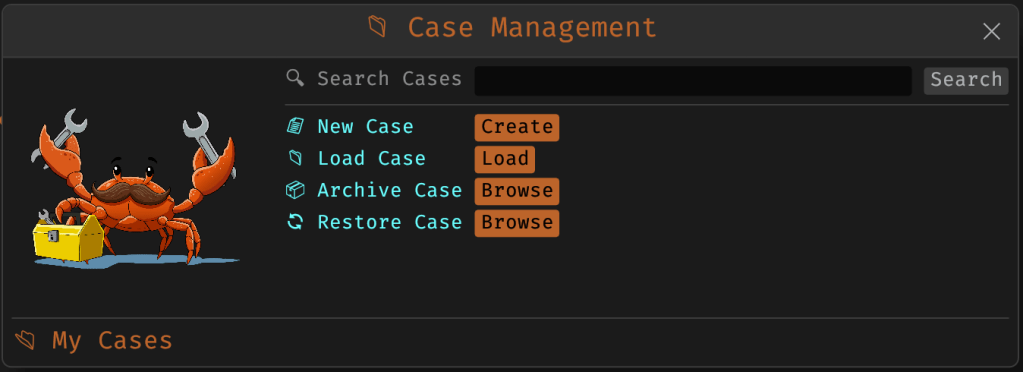
Cases change that. In v3.0, you can start a new case from a file or folder — and everything from that point forward is grouped under that case. Tool outputs are saved to a dedicated case folder, file hashes are tracked, and metadata is preserved for review or reanalysis.

Case Management

You don’t need to create a case for every run — MalChela still supports standalone tool execution. But when you’re working with a malware sample set, an incident directory, or a disk image extract, cases give you the ability to:

  • Save tool results in a consistent location
  • Track analysis history per file
  • Reopen previous sessions with full context
  • Add notes, tags, and categorization (e.g., “suspicious”, “clean”, “needs review”)

Hello FileMiner: Goodbye MismatchMiner

The MismatchMiner tool was originally designed to surface anomalies between file names and actual content — a common trick in malicious attachments or script dropper chains. It worked well, but its scope was narrow.

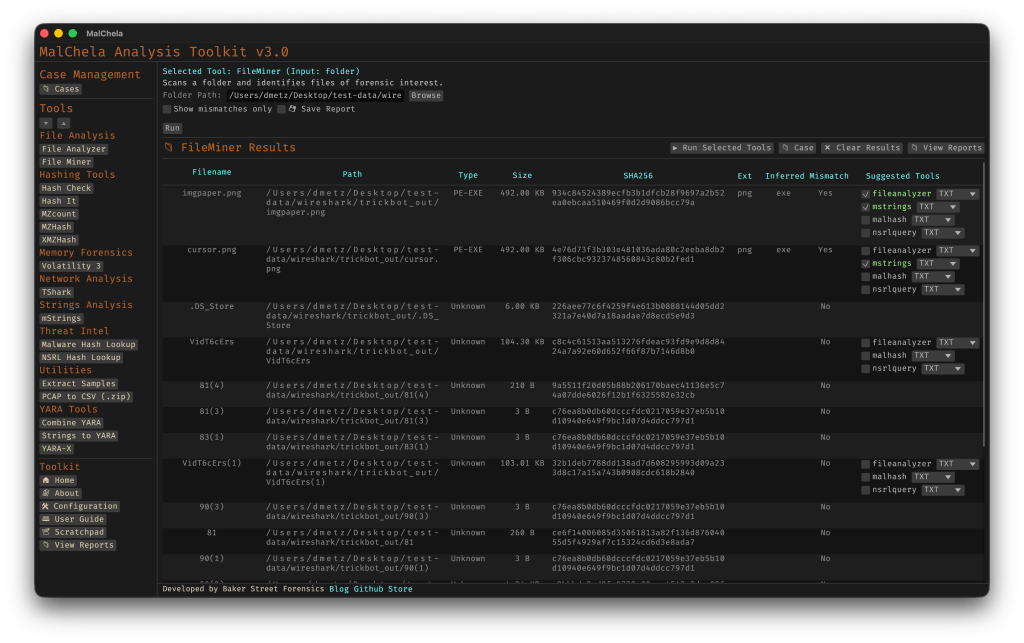
FileMiner replaces it, expanding the logic to support full file-type classification and metadata inspection across an entire folder. It still flags mismatches, but now it also:

  • Detects embedded file types using magic bytes
  • Groups files by class (e.g., images, documents, executables, archives)
  • Calculates hashes for correlation and NSRL comparison
  • Extracts size, extension, and other key metadata
  • Saves both a human-readable .txt summary and a structured .json report

The output is designed to be used both manually and programmatically — which brings us to one of v3.0’s most important additions: tool suggestions.

The new FileMiner app

Suggested Tools and Batch Execution

Once FileMiner runs, it doesn’t just stop at reporting. Based on each file’s type and characteristics, it can now suggest one or more appropriate tools from the MalChela suite.  These suggestions are surfaced right in the GUI — or in the CLI if you’re running FileMiner interactively. From there, you can choose to launch the recommended tool(s) on a per-file basis or queue up several for batch execution.

This makes it much faster to pivot from triage to deeper inspection. No more switching tools manually or copying paths. You stay within the flow — and more importantly, you reduce the risk of skipping important analysis steps.

CLI and GUI Improvements Aligned

These features are available in both the CLI and GUI editions of MalChela. In the CLI, FileMiner presents an interactive table of results. You can pick a file, see its suggested tools, and choose which one to run. When you’re done, you can return to the table and continue with the next file.

The GUI extends this even further, allowing you to:

  • View and scroll through full case history
  • Run tools with live output streaming
  • Reopen previous FileMiner runs from saved reports
  • Run all suggested tools on all files with one click (if desired)

These features let you treat MalChela more like a toolbox with memory, not just a launcher.


CLI Enhancements:

The command-line interface has also received a quiet but meaningful upgrade. Tool menus are now organized with clear numeric indexes and shortcodes, making it faster to navigate and launch tools without needing to retype full names. This small change goes a long way during repetitive tasks or when working in a time-constrained triage setting.

FileMiner supports an interactive loop: after running a tool on a selected file, you’re returned to the main results table — no need to restart the scan or re-navigate the menu. This allows you to run additional tools on different files within the same dataset, making FileMiner feel more like a lightweight control center for follow-up actions. It’s a subtle shift, but one that significantly reduces friction in batch-style or exploratory workflows.


Closing Thoughts

MalChela 3.0 reflects a steady evolution — not a revolution. It’s built on real-world feedback and a desire to make forensic and malware analysis a little less scattered. Whether you’re a one-person IR team or just trying to stay organized during a reverse engineering exercise, the new case features and smarter triage capabilities should save you time.

If you’ve been using MalChela already, I think this update will feel like a natural (and welcome) extension. And if you haven’t tried it yet, there’s never been a better time to start.

Download: https://github.com/dwmetz/MalChela/releases

User Guide: https://dwmetz.github.io/MalChela/