I’m excited to share that I’ll be speaking at MITRE ATT&CKcon 7.0, October 27–28, 2026, at MITRE in McLean, VA and online.
My talk, From Strings to Techniques: AI-Augmented Malware Analysis with MalChela and Claude Desktop, looks at what happens when you give an AI co-analyst real tools instead of just a chat window. Using MalChela’s MCP server integration with Claude Desktop, I’ll walk through a workflow that goes from raw string extraction to ATT&CK-mapped findings, synthesizes results across multiple tools, and ends with something defenders can actually use: detection content.
Expect a practical look at:
ATT&CK-mapped string analysis with mStrings, turning noise into techniques
Cross-tool synthesis, letting the co-analyst correlate output from tiquery, fileanalyzer, and more
Closing the loop, from static analysis to YARA and Sigma rules ready for detection engineering
If you’re going to be in McLean, come say hello. I’m always up for talking DFIR, malware, open-source tooling, or where AI fits (and doesn’t) in our workflows. If you can’t make the trip, ATT&CKcon offers virtual attendance, so you can still catch the talk and the rest of a great lineup.
In a previous post I wrote about integrating MalChela with OpenCode on REMnux and giving the AI a quick briefing on the tool suite so it could incorporate them into its analysis workflow. That was a promising proof of concept, but it raised a natural follow-up question: how do you make these integrations more robust, reproducible, and persistent?
Since that post, I’ve been experimenting with three different approaches to bringing MalChela into AI-assisted workflows — each suited to a different environment and use case. This post walks through all three.
Approach 1: The Kali MCP Server (Toby)
The first implementation started with Toby — my portable Raspberry Pi forensics toolkit running a customized Kali Linux build. Toby is designed for headless operation via SSH, which turns out to be exactly the right architecture for an MCP server. The developers of Kali recently added an update to support MCP integrations. (See https://www.kali.org/blog/kali-llm-claude-desktop/)
Model Context Protocol (MCP) is an open standard that allows AI assistants like Claude to interface with external tools and systems in a structured, reliable way. Instead of pasting instructions into a chat window each session, you define your tools once in a server configuration and the AI has consistent, persistent access to them.
The setup leverages an existing open-source mcp-kali-server that exposes Kali’s forensic and security tooling as MCP tools. On the client side (Mac), the claude_desktop_config.json simply points to Toby (or your Kali box) over SSH:
{
"mcpServers": {
"mcp-kali-server": {
"command": "ssh",
"args": [
"-i",
"/Users/dwmetz/.ssh/id_ed25519",
"dwmetz@192.168.10.89",
"mcp-server"
],
"transport": "stdio"
}
}
}
With this in place, Claude Desktop has persistent, session-independent access to Kali’s toolkit running on Toby. No need to re-brief the AI each session — the tools are always available and always described the same way.
Key prerequisite: passwordless SSH key-based auth between your Mac and Toby. If you haven’t set that up:
ssh-keygen -t ed25519
ssh-copy-id user@<toby/kali-ip>
# Then one manual SSH to accept the host key fingerprint
ssh user@<toby/kali-ip>
Adding MalChela to the Kali MCP Server
The mcp-kali-server ships with routes for Kali’s built-in security tools, but MalChela isn’t included out of the box. Adding it requires changes to two files: kali_server.py (the Flask API backend) and mcp_server.py (the FastMCP frontend). Both live at /usr/share/mcp-kali-server/.
How the architecture works:mcp_server.py is what Claude talks to — it defines MCP tool names, descriptions, and parameter schemas. When a tool is called, it POSTs to kali_server.py, which constructs the actual shell command and executes it on Toby. The critical detail is that MalChela’s binaries must be run from within the MalChela workspace directory — running them from an arbitrary working directory causes failures. The cd {MALCHELA_DIR} && prefix in every command handles this.
kali_server.py changes
Add the MALCHELA_DIR constant (update with your MalChela install path) and Flask routes after the existing tool routes, before the health check endpoint:
Important note on malhash: Unlike the other tools which take a file path, malhash takes a hash string as its argument. The route reads a hash parameter and passes it directly to the binary. Passing a filepath to malhash will fail silently — a subtle but critical distinction.
mcp_server.py changes
The MalChela tool definitions need to be added to the setup_mcp_server() function, immediately before the return mcp line.
    @mcp.tool(name="malchela_fileanalyzer")
    def malchela_fileanalyzer(filepath: str) -> Dict[str, Any]:
        """
        MalChela: Static file analysis - hashes, entropy, packing detection,
        PE metadata (imports, sections, timestamps), YARA matches, VirusTotal status.
        Best first step for any unknown file.

        Args:
            filepath: Absolute path to the file to analyze

        Returns:
            Analysis report
        """
        return kali_client.safe_post("api/tools/malchela/fileanalyzer", {"filepath": filepath})

    @mcp.tool(name="malchela_mstrings")
    def malchela_mstrings(filepath: str) -> Dict[str, Any]:
        """
        MalChela: String extraction with IOC detection and MITRE ATT&CK mapping.
        Applies Sigma-style detection rules, flags suspicious patterns (registry keys,
        encoded payloads, suspicious DLL+API combos), maps findings to ATT&CK techniques.

        Args:
            filepath: Absolute path to the file to analyze

        Returns:
            String analysis with ATT&CK mappings and IOCs
        """
        return kali_client.safe_post("api/tools/malchela/mstrings", {"filepath": filepath})

    @mcp.tool(name="malchela_malhash")
    def malchela_malhash(hash: str) -> Dict[str, Any]:
        """
        MalChela: Query a file hash against VirusTotal and MalwareBazaar.
        Returns detection ratio, AV verdicts, first/last seen dates, and sample metadata.
        Requires VT_API_KEY env var; MB_API_KEY optional.

        Args:
            hash: MD5, SHA1, or SHA256 hash string to query

        Returns:
            Threat intel results from VirusTotal and MalwareBazaar
        """
        return kali_client.safe_post("api/tools/malchela/malhash", {"hash": hash})

    @mcp.tool(name="malchela_hashit")
    def malchela_hashit(filepath: str) -> Dict[str, Any]:
        """
        MalChela: Generate MD5, SHA1, and SHA256 hashes for a single file.
        Lightweight when you need hashes without full fileanalyzer output.

        Args:
            filepath: Absolute path to the file

        Returns:
            File hashes
        """
        return kali_client.safe_post("api/tools/malchela/hashit", {"filepath": filepath})

    @mcp.tool(name="malchela_fileminer")
    def malchela_fileminer(folderpath: str) -> Dict[str, Any]:
        """
        MalChela: Scan a folder for file type mismatches and metadata anomalies.
        Classifies all files, flags executables disguised as other types.

        Args:
            folderpath: Absolute path to the folder to scan

        Returns:
            File classification and anomaly report
        """
        return kali_client.safe_post("api/tools/malchela/fileminer", {"dirpath": folderpath})

    return mcp
One parameter naming detail worth noting: mcp_server.py receives folderpath from Claude, but must pass it as dirpath in the JSON body to kali_server.py — that’s what the Flask route reads. The tool definition above handles this correctly.
After saving both files, restart the MCP server and restart Claude Desktop.
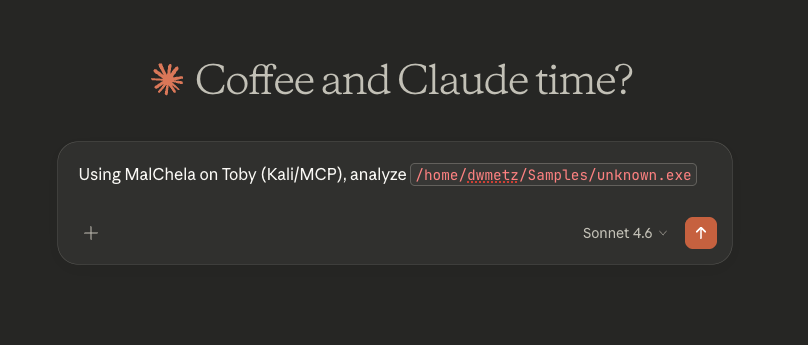
Testing on an unknown malware sample
[below is the exact response received from Claude]
I’ll run MalChela analysis on that file via Toby. Let me load the tools first.Tools loaded. Running fileanalyzer first for static analysis, then mstrings for IOC/ATT&CK mapping. Let me verify the path exists:File confirmed on Toby. The MalChela MCP tools use local paths — let me run it directly via the Kali execute_command since the MCP path routing doesn’t map Toby paths. I’ll invoke MalChela’s binaries directly:MalChela binaries found. Running the full suite now:That’s already very telling. Now running mstrings for IOC and ATT&CK mapping:Now let me pull the VirusTotal intel on the hash:That’s a solid picture. Here’s the full analysis breakdown:
5 PE sections including .ndata (atypical NSIS section, flagged as suspicious)
159 imports, including the dangerous trio:
GetProcAddress / LoadLibraryExA — dynamic API resolution (evasion)
ShellExecuteExA — process execution
🎯 MITRE ATT&CK Mappings (from mstrings)
Technique
ID
Tactic
Obfuscated Files or Information
T1027
Defense Evasion
Process Injection
T1055
Defense Evasion / Privilege Escalation
Application Layer Protocol: Web Protocols
T1071.001
Command and Control
🌐 Network IOC
http://nsis.sf.net/NSIS_Error — NSIS error handler URL (confirms NSIS wrapper), not inherently malicious but characteristic of GuLoader’s packaging
Summary
This is a live GuLoader sample — an NSIS-wrapped shellcode injector/downloader commonly used as a first-stage payload to retrieve second-stage malware (often AgentTesla, Remcos RAT, FormBook, etc.). The high entropy, dynamic API loading, and process injection indicators are all consistent with GuLoader’s known behavior. Treat this as active malware — do not execute outside an isolated sandbox.
Approach 2: Persistent MalChela Instructions in OpenCode on REMnux
The REMnux OpenCode integration I described in the previous post worked, but it had one friction point: each new session required re-pasting the MalChela context. OpenCode has a solution for this — the AGENTS.md file.
Place an AGENTS.md file in your working directory (or MalChela’s root directory) and OpenCode will automatically load it as persistent context for every session started from that location. This is the most lightweight way to make MalChela tool-aware without building any infrastructure.
Create the file at /home/remnux/Tools/MalChela/AGENTS.md:
# MalChela Tool Instructions for AI Assistants
MalChela is installed at: /home/remnux/Tools/MalChela
All tools are Rust binaries. The execution pattern is:
1. fileanalyzer - establish baseline: hashes, entropy, PE headers
2. mstrings - extract strings, look for IOCs and ATT&CK technique indicators
3. malhash - check community threat intelligence
4. nsrlquery - confirm or rule out known-good status
## Environment Notes
- API keys (VT_API_KEY, MB_API_KEY) should be set in the shell environment
- MalChela integrates with REMnux tools; use REMnux CLI tools in conjunction as needed
- Case management is available via the MalChela GUI if a graphical session is active
When you start an OpenCode session from the MalChela directory, this context is automatically loaded. No manual pasting, no re-briefing.
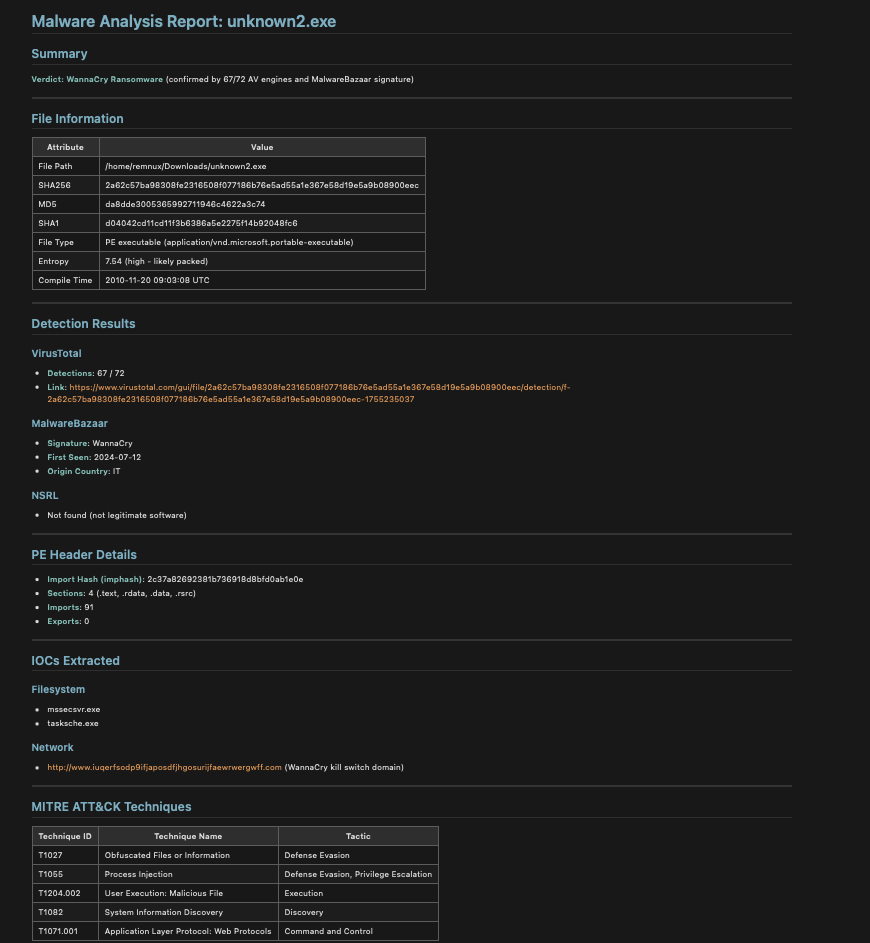
Once complete I asked it to save the results to the Desktop in markdown.
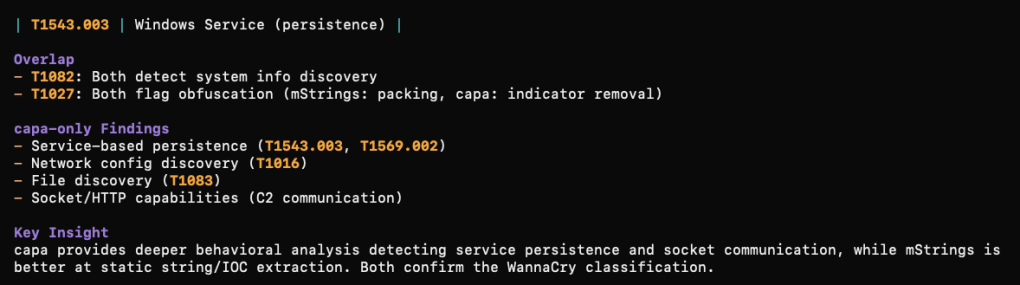
What was cool to me about this approach is that using the installed REMnux tools, you can take the analysis further after MalChela. In my testing I (OpenCode) analyzed a file with mStrings. We then followed up by running capa against the file. From there we could compare what each tool detected and missed in the sample. (screenshot truncated)
Approach 3: MalChela as a Native MCP Server (Mac)
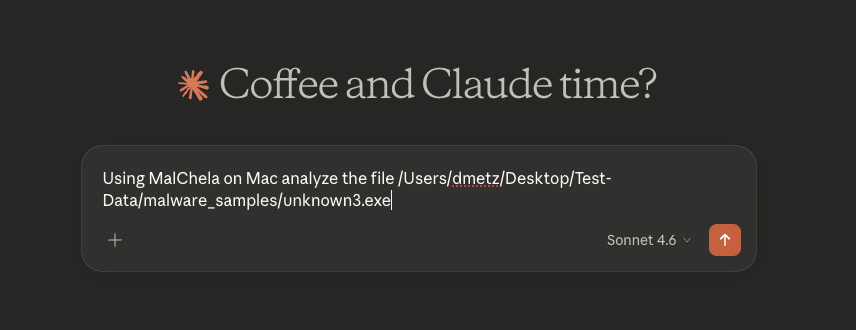
The most powerful integration is running MalChela as its own dedicated MCP server — making its tools directly available to Claude Desktop alongside the Kali server. This is what we built out as mcp-malchela.
The server is a small Node.js project that wraps MalChela’s binaries with proper MCP tool definitions. The key files are index.js (the server logic) and package.json.
package.json:
{
"name": "mcp-malchela",
"version": "1.0.0",
"description": "MCP server exposing MalChela malware analysis tools",
"main": "index.js",
"dependencies": {
"@modelcontextprotocol/sdk": "^1.0.0"
}
}
index.js — the server defines each MalChela tool with its input schema, executes the binary when called, and streams back results. Note that malhash is handled differently from the other tools — it receives a hash string rather than a filepath, so the argument routing accounts for that explicitly:
import { Server } from "@modelcontextprotocol/sdk/server/index.js";
import { StdioServerTransport } from "@modelcontextprotocol/sdk/server/stdio.js";
import { CallToolRequestSchema, ListToolsRequestSchema } from "@modelcontextprotocol/sdk/types.js";
WMI usage — likely for system enumeration pre-exfil
Bottom Line
This is a Go-compiled password/credential stealer targeting browsers (Firefox cookies, Discord tokens, Yandex Browser), using WebSocket for C2, with WMI-based discovery. It was UPX-packed (this is the unpacked copy), has a zeroed compile timestamp to defeat timestamp-based triage, and was submitted to MalwareBazaar just hours ago — very fresh sample. Do not execute in any environment without proper isolation.
All three approaches solve the same core problem from the original post: making the AI reliably aware of your tools without re-briefing it every session. The right choice depends on your primary analysis environment — or, if you’re like me, you end up running all three.
All of the configuration files discussed here — including the MCP server setup and the are available in the MalChela repository on GitHub. Clone or pull the latest and you should be ready to go. As always, if you run into issues or have ideas for where to take the MCP integration next, open an issue or drop me a note.
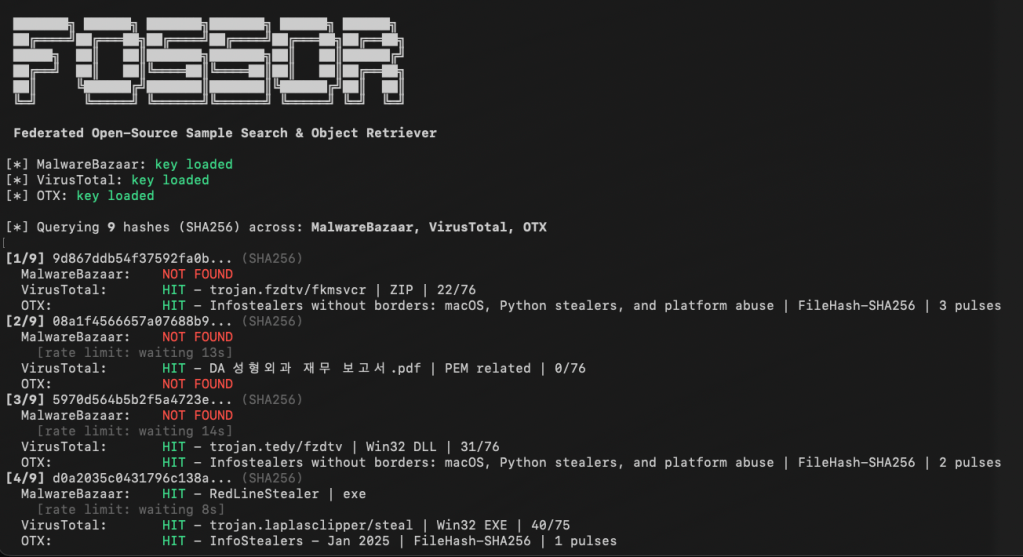
We’ve all encountered this scenario: you’re reading a threat report from CISA or Microsoft and come across hashes related to a malware infection. You start copying these hashes and head to one of your favorite virus repositories to check if there’s a source available for download so you can analyze the malware yourself. Unfortunately, you don’t find a match. So, you move on to another site and repeat the process. This can be time-consuming and prone to errors.
FOSSOR (Federated Open-Source Sample Search & Object Retriever) is a script designed to help you search for malware hashes across multiple threat intelligence sources. Simply run FOSSOR and provide it with a single hash or a text file of hashes (.txt or .csv). It will instantly display which sources have information about the hash, and you can even download samples if needed.
Setup
FOSSOR loads API keys from text files in the same directory as the script. Create one file per source containing only the key:
Sources with missing key files are automatically skipped. You only need the sources you have access to.
fossor/
fossor.py
mb-api.txt # your MalwareBazaar key
vt-api.txt # your VirusTotal key
otx-api.txt # your OTX key
samples/ # created automatically by --download
Usage
Look up hashes from a file
python3 fossor.py hashes.txt
The input file should have one hash per line. Lines starting with # are treated as comments and ignored. Works with .txt, .csv, or any text file — BOM and stray whitespace are handled automatically.
Downloads are saved to ./samples/ as password-protected zips. The password is always infected.
Warning: Downloaded samples are live malware. Handle with appropriate caution — use a VM or isolated analysis environment. Consider excluding the samples/ directory from antivirus real-time scanning and Spotlight indexing.
MalChela’s 2.2 update is packed with practical and platform-friendly improvements. It includes native support for REMnux, better tool settings, and deeper integrations with analysis tools like YARA-X, Tshark, Volatility3, and the newly improved fileanalyzer module.
🦀 REMnux Edition: Built-In Support, Zero Tweaks
When the GUI loads a REMnux-specific tools.yaml profile, it enters REMnux mode.
Screenshot of yaml configuration applying REMnux mode
Native binaries and Python scripts like capa, oledump.py, olevba, and FLOSS are loaded into the MalChela tools menu, allowing you to mix and match operations with the embedded MalChela utilities and the full REMnux tool stack. No manual configuration needed—just launch and go. MalChela currently supports the following REMnux programs right out of the box:
Tool Name
Description
binwalk
Firmware analysis and extraction tool
capa
Identifies capabilities in executable files
radare2
Advanced reverse engineering framework
Volatility 3
Memory forensics framework for RAM analysis
exiftool
Extracts metadata from images, documents, and more
If you only need a subset of tools you can easily save and restore that a custom profile.
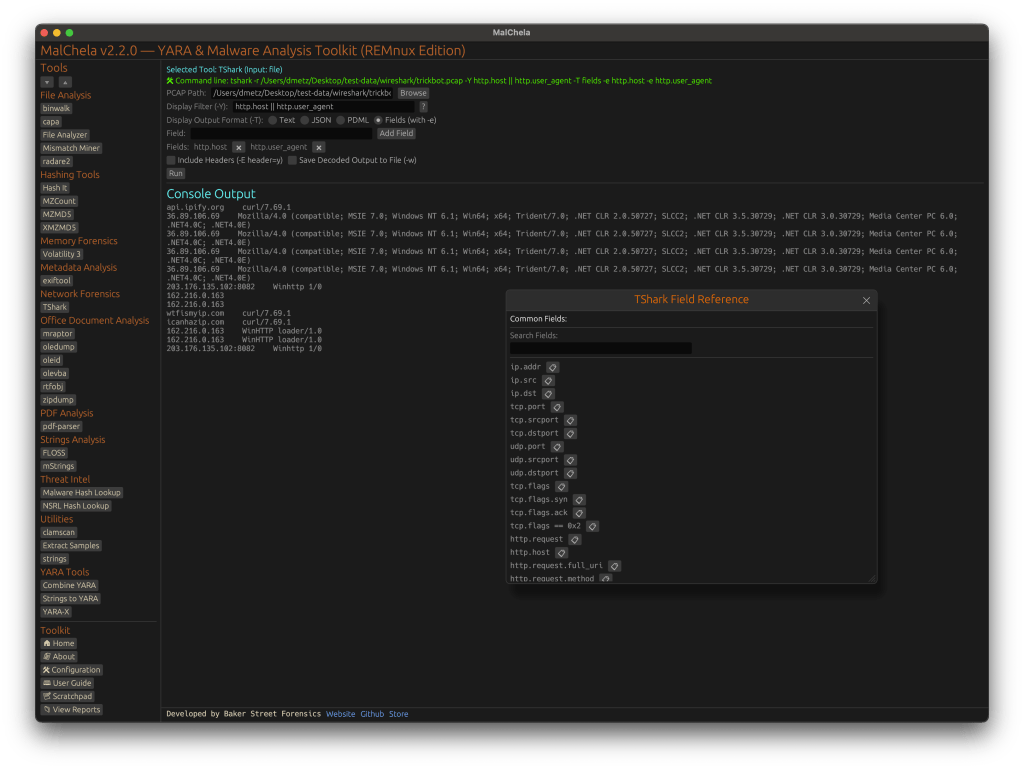
TShark Panel with Built-In Reference
Tshark and the integrated field reference
A new TShark integration exposes features including:
A filter builder panel
Commonly used fields reference
Tooltip hints for each example (e.g., `ip.addr == 192.168.1.1` shows “Any traffic to or from 192.168.1.1”)
One-click copy support
This helps analysts build and understand filters quickly—even if TShark isn’t something they use every day. Using the syntax builder in MalChela you can use the exact commands directly in Tshark or Wireshark.
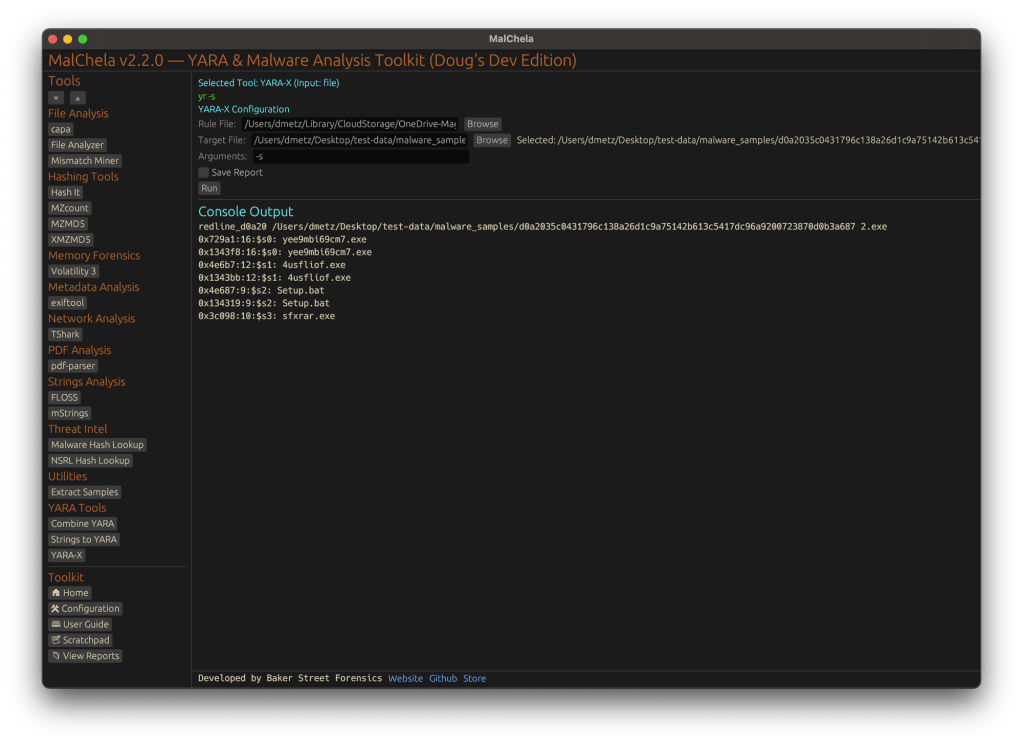
YARA-X Support (Install Guide Included)
YARA-X module in MalChela
Support for YARA-X (via the `yr` binary) is now built in. YARA-X is not bundled with REMnux by default, but install instructions are included in the User Guide for both macOS and Linux users.
Once installed, MalChela allows for rule-based scanning from the GUI,and with YARA-X, it’s faster than ever.
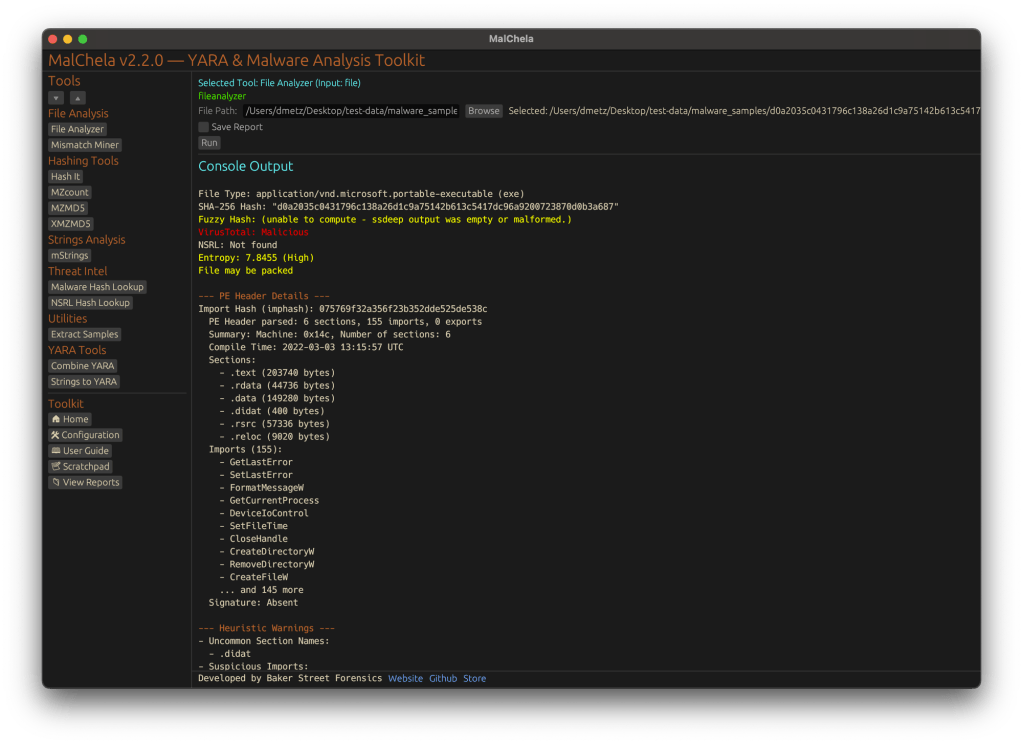
fileanalyzer: Fuzzy Hashing, PE Metadata, and More
Updated FileAnalyzer Module
MalChela’s fileanalyzer tool has also been updated to include:
Fuzzy hashing support via `ssdeep`
BLAKE3 hashing for fast, secure fingerprints
Expanded PE analysis, including:
Import and Export Table parsing (list of imported and exported functions)
Compilation Timestamp (for detection of suspicious or forged build times)
Section Characteristics (flags like IMAGE_SCN_MEM_EXECUTE, IMAGE_SCN_CNT_CODE, etc., for detecting anomalous sections)
These improvements provide deeper insight into executable structure, helping analysts detect anomalies such as packers, suspicious timestamps, or unexpected imports/exports. Useful for everything from sample triage to correlation, fileanalyzer now digs deeper—without slowing down.
Memory Forensics Gets a Boost: Volatility 3 Now Supported
With the 2.2 release, MalChela introduces support for Volatility 3, the modern Python-based memory forensics framework. Whether you’re running MalChela in REMnux or on a customized macOS or Linux setup, you can now access the full power of Volatility directly from the MalChela GUI.
Volatility 3 in MalChela
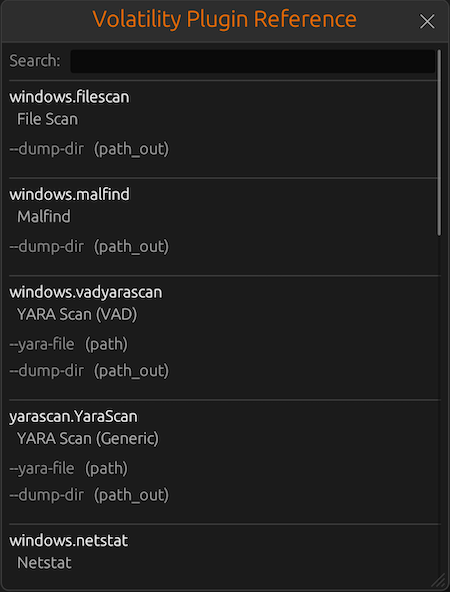
There’s an intuitive plugin selector that dynamically adjusts available arguments based on your chosen plugin,. You can search, sort, and browse available plugins, and even toggle output options like –dump-dir with ease.
Like Tshark, there is an added plugin reference panel with searchable descriptions and argument overviews — a real time-saver when navigating Volatility’s deep and often complex toolset.
Volatility Plugin Reference
Smarter Tool Configuration via YAML
The tool configuration system continues to evolve:
Tools now declare their input type (file, folder, or hash)
The GUI dynamically adjusts the interface to match
Alternate profiles (like REMnux setups) can be managed simply by swapping `tools.yaml` files via the GUI
Easily backup or restore your custom setups
Restore the default toolset to get back to basics
This structure helps keep things clean—whether you’re testing, teaching, or deploying in a lab environment.
Embedded Documentation Access
The GUI now includes a link to the full MalChela User Guide in PDF. You can also access the documentation online.
From tool usage and CLI flags to configuration tips and install steps, it’s all just a click away—especially useful in offline environments or when onboarding new analysts. I’ll be honest, this is likely the most comprehensive user guide I’ve ever written.
Whether you’re reviewing binaries, building hash sets, or exploring network captures—MalChela 2.2 is designed bring together the tools you need, and make it easier to interoperate between them.
The new REMnux mode makes it even easier to get up and running with dozens of third party integrations.
Have an idea for a feature or application you’d like to see supported — reach out to me.